

PaletteLab – Color Picker
Xfinity technologies Productivity
Create and manage beautiful color palettes for designers and developers
- Downloads
- 100+
- on Google Play
- Price
- Free
- No in-app purchases
- Updated
- Jan 3
- 2026 · v1.0
Screenshots
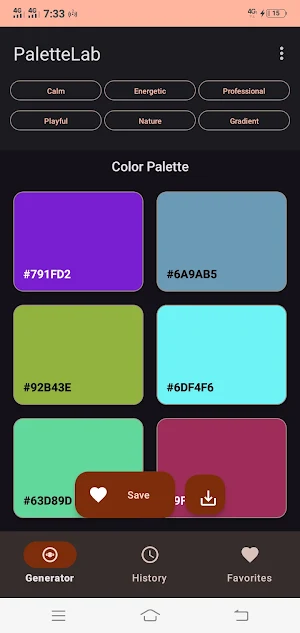
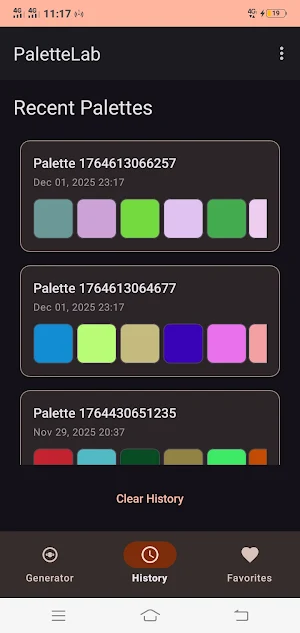
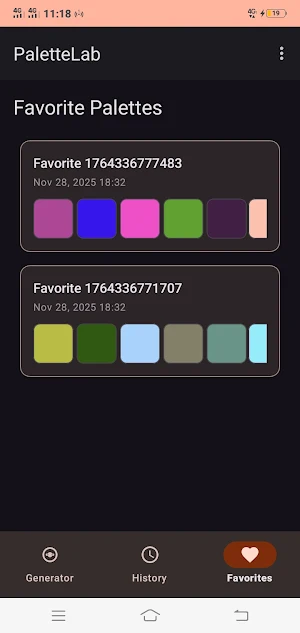
About PaletteLab – Color Picker
PaletteLab - Your Ultimate Color Companion
Create perfect color combinations with PaletteLab. Designed for designers, developers, and creative professionals, PaletteLab provides advanced tools to generate, analyze, and organize color palettes.
Key Features:
Smart Palette Generation:
- Generate random, analogous, complementary, triadic, and monochromatic palettes
- Mood-based palettes: Calm, Energetic, Professional, Playful, Nature themes
- Smooth gradient creation between colors
- Smart color suggestions based on color theory
Advanced Color Analysis:
- Detailed color information: HEX, RGB, HSV
- Color naming and matching
- Temperature analysis: Warm and Cool colors
- Color harmony visualization
- Recent colors history
Accessibility Tools:
- WCAG contrast checker
- Color blindness simulation (Protanopia, Deuteranopia, Tritanopia)
- Accessibility compliance ratings
- Professional contrast analysis
Save and Organize:
- Save favorite palettes for easy access
- Export palettes as text
- Browse generation history
- Data stored locally on your device
Professional Tools:
- Color picker integration
- One-tap copy of color values
- Dark and light theme support
- Material Design 3 interface
- Smooth and intuitive UI
Who is it for:
- UI/UX Designers building brand color systems
- Developers implementing color schemes
- Digital Artists seeking inspiration
- Students learning color theory
- Content Creators designing visuals
- Marketing Professionals building brand identity
Why Choose PaletteLab:
- Works entirely offline, no permissions required
- Professional-grade tools found in premium apps
- Intuitive interface for beginners and pros
- Regular updates with new features
- Completely free with no subscriptions
Technical Highlights:
- Built with Material Design 3
- Optimized for all screen sizes
- Fast and responsive
- Minimal battery usage
- No background processes
Join thousands of designers and developers who trust PaletteLab for their color needs. Download now and transform the way you work with colors.
Contact Support:
For questions or feedback, reach out through the in-app contact option.
Create perfect color combinations with PaletteLab. Designed for designers, developers, and creative professionals, PaletteLab provides advanced tools to generate, analyze, and organize color palettes.
Key Features:
Smart Palette Generation:
- Generate random, analogous, complementary, triadic, and monochromatic palettes
- Mood-based palettes: Calm, Energetic, Professional, Playful, Nature themes
- Smooth gradient creation between colors
- Smart color suggestions based on color theory
Advanced Color Analysis:
- Detailed color information: HEX, RGB, HSV
- Color naming and matching
- Temperature analysis: Warm and Cool colors
- Color harmony visualization
- Recent colors history
Accessibility Tools:
- WCAG contrast checker
- Color blindness simulation (Protanopia, Deuteranopia, Tritanopia)
- Accessibility compliance ratings
- Professional contrast analysis
Save and Organize:
- Save favorite palettes for easy access
- Export palettes as text
- Browse generation history
- Data stored locally on your device
Professional Tools:
- Color picker integration
- One-tap copy of color values
- Dark and light theme support
- Material Design 3 interface
- Smooth and intuitive UI
Who is it for:
- UI/UX Designers building brand color systems
- Developers implementing color schemes
- Digital Artists seeking inspiration
- Students learning color theory
- Content Creators designing visuals
- Marketing Professionals building brand identity
Why Choose PaletteLab:
- Works entirely offline, no permissions required
- Professional-grade tools found in premium apps
- Intuitive interface for beginners and pros
- Regular updates with new features
- Completely free with no subscriptions
Technical Highlights:
- Built with Material Design 3
- Optimized for all screen sizes
- Fast and responsive
- Minimal battery usage
- No background processes
Join thousands of designers and developers who trust PaletteLab for their color needs. Download now and transform the way you work with colors.
Contact Support:
For questions or feedback, reach out through the in-app contact option.
What’s new
Version 1.0 · Updated January 3, 2026
Initial production launch of PaletteLab – the simple, fast tool for capturing and managing color codes on the go.
User reviews

This app is great and very easy to use

A app of transformation it's a 10/10 minus nothing 🙌 I love it

This app have collaboration features and matches the app experience 👌, it's very nice and it gives good exposure on colors to us who don't know much about color combinations 😉😉😉😊😊😊

This app is awesome.it gives a very nice description of colours plus it's very easy to use 👏

This is magnificent, I like the fact that you included the coding of colours on the buttons of these beautiful different kinds of colours, making it easy and also helping me to memorize and master the codes. It's easy to learn and apply

This app is great. It gives a very good description of colors and is simple to use
Alternatives to PaletteLab – Color Picker
Looking for apps like PaletteLab – Color Picker? Here are 4 similar Android apps on Google Play. All of them are free to download.
| App | Rating | Price | Installs | Last updated | Compare |
|---|---|---|---|---|---|
| PaletteLab – Color Picker | – | Free | 100+ | Jan 3, 2026 | |
| Millinexis | – | Free | 1+ | – | Compare |
| Gravynexis | – | Free | 1+ | Feb 24, 2026 | Compare |
| Prism Flow | – | Free | 5+ | Feb 5, 2026 | Compare |
| Logic Vault | – | Free | 5+ | Feb 5, 2026 | Compare |