

Superior Polymer Crew
Xeratec Corporation Business
Field-service app for coatings crews.
- Downloads
- 3+
- on Google Play
- Price
- Free
- No in-app purchases
- Updated
- Sep 30
- 2026 · v2.0.20
Screenshots


About Superior Polymer Crew
Superior Polymer Crew is the official field app for Superior Polymer's coatings
crews. It gives on-site workers everything they need to run a job from their
phone or tablet — even with no signal — and keeps the office up to date
automatically once a connection returns.
WHAT YOU CAN DO
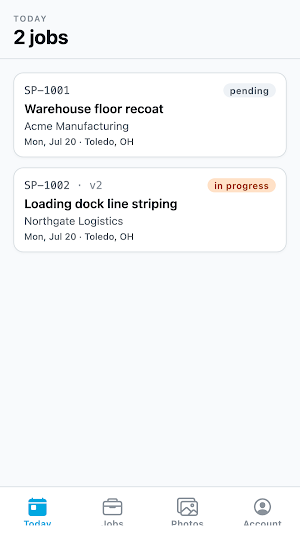
• See your schedule
View the jobs assigned to you for today and tomorrow, with the customer name,
job site address, scheduled date, and the crew working with you.
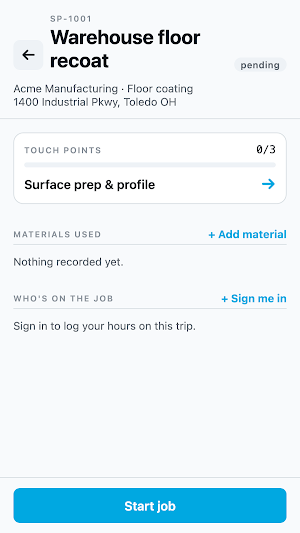
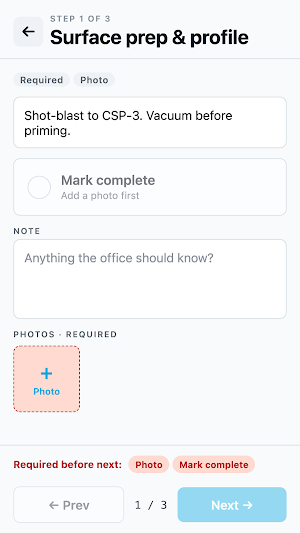
• Work through each job step by step
Every job has a guided checklist of the tasks to complete on site. Mark each
step done as you go, add notes where required, and confirm the work with a
photo when one is needed.
• Log the materials you use
Record which products and quantities were applied on the job. Scan the lot
number barcode printed on each drum, or type it in by hand, so every material
is traceable back to the job.
• Track who's on the job and their hours
Mark which crew members are present and enter the hours each person worked.
• Capture job-site photos
Take photos during the job and attach them to the relevant step as a record of
the work performed.
• Start and complete jobs
Update a job's status from your device so the office can see progress in real
time.
WORKS OFFLINE
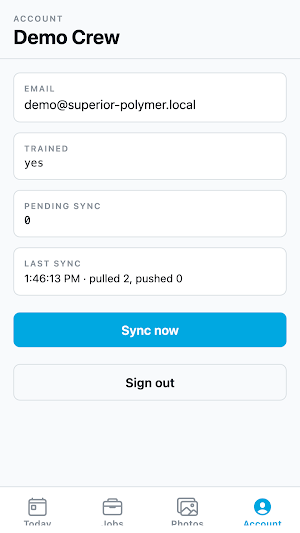
Job sites often have poor or no connectivity. Everything works without a signal:
your schedule, checklists, materials, hours, and photos are all saved on your
device and sync securely to the office automatically once you're back online.
SIGN-IN REQUIRED
You'll need a Superior Polymer account to use the app. If you're a crew member
and don't have login details, contact your supervisor.
crews. It gives on-site workers everything they need to run a job from their
phone or tablet — even with no signal — and keeps the office up to date
automatically once a connection returns.
WHAT YOU CAN DO
• See your schedule
View the jobs assigned to you for today and tomorrow, with the customer name,
job site address, scheduled date, and the crew working with you.
• Work through each job step by step
Every job has a guided checklist of the tasks to complete on site. Mark each
step done as you go, add notes where required, and confirm the work with a
photo when one is needed.
• Log the materials you use
Record which products and quantities were applied on the job. Scan the lot
number barcode printed on each drum, or type it in by hand, so every material
is traceable back to the job.
• Track who's on the job and their hours
Mark which crew members are present and enter the hours each person worked.
• Capture job-site photos
Take photos during the job and attach them to the relevant step as a record of
the work performed.
• Start and complete jobs
Update a job's status from your device so the office can see progress in real
time.
WORKS OFFLINE
Job sites often have poor or no connectivity. Everything works without a signal:
your schedule, checklists, materials, hours, and photos are all saved on your
device and sync securely to the office automatically once you're back online.
SIGN-IN REQUIRED
You'll need a Superior Polymer account to use the app. If you're a crew member
and don't have login details, contact your supervisor.
Alternatives to Superior Polymer Crew
Looking for apps like Superior Polymer Crew? Here are 4 similar Android apps on Google Play. All of them are free to download.




| App | Rating | Price | Installs | Last updated | Compare |
|---|---|---|---|---|---|
| Superior Polymer Crew | – | Free | 1+ | Sep 30, 2026 | |
| World Of Wood | – | Free | 1+ | Sep 25, 2026 | Compare |
| HarQuin App | – | Free | 100+ | Oct 16, 2026 | Compare |
| Bradway Timekeeper | – | Free | 1+ | Oct 5, 2026 | Compare |
| LJJ Timekeeper | – | Free | 5+ | Sep 18, 2026 | Compare |