
StickToGif GIF Sticker Tracker
Chapiware Tools
Pin stickers, text & blur onto moving subjects in GIFs. No uploads. Free.
- Downloads
- 200+
- on Google Play
- Price
- Free
- No in-app purchases
- Updated
- Apr 7
- 2026 · v1.0.1
Screenshots


About StickToGif GIF Sticker Tracker
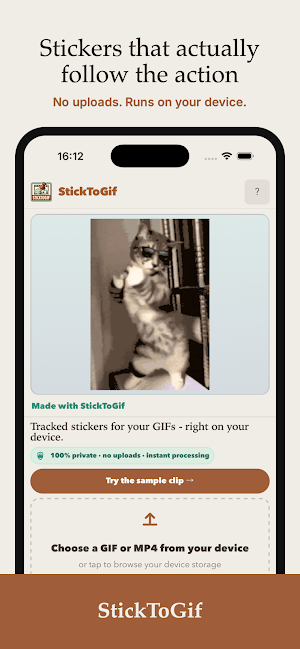
StickToGif pins tracked stickers, text overlays, or blur effects onto
moving subjects in GIFs and short video clips — running entirely on
your device.
No cloud processing. No file uploads. No account required. No watermarks.
── HOW IT WORKS ──
1. Import a GIF or MP4 from your device
2. Tap the thing you want to track
3. Hit Track — the engine follows it frame by frame
4. Choose a sticker, add text, or blur the subject
5. Share instantly through the native Android share sheet
── WHAT YOU CAN DO ──
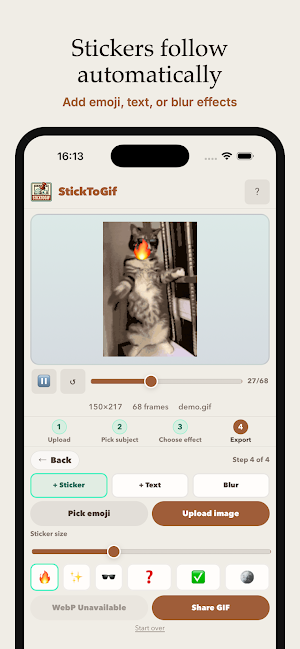
🕶️ STICKER TRACKING
Upload any image or pick from built-in emoji presets. The sticker
follows your subject through every frame automatically.
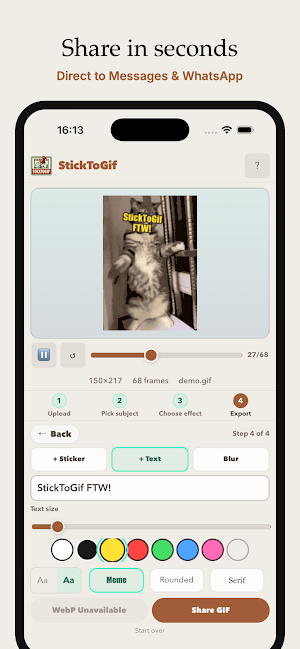
✍️ TEXT TRACKING
Add a caption or label that sticks to a moving person, object, or
animal as it moves across the frame.
🔲 FACE & OBJECT BLUR
Blur a moving face, license plate, or screen before sharing — no
timeline, no keyframes.
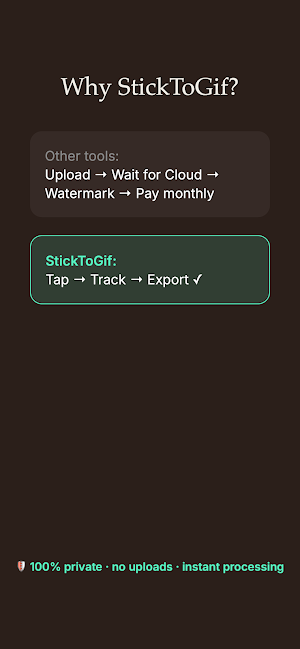
── WHY STICKTOGIF ──
Every alternative either uploads your video to a remote server, charges
a monthly subscription, stamps a watermark on your export, or requires
an account just to make one GIF.
StickToGif does none of these. The tracking engine runs entirely inside
the app. Your files go directly to the Android share sheet. Nothing is
transmitted.
── PERFECT FOR ──
- Making reaction GIFs for Discord, Telegram, or WhatsApp
- Blurring faces or sensitive data before sharing clips
- Adding captions that follow moving subjects in memes
- Processing product demo GIFs without cloud rendering delays
- Privacy-conscious users who don't want to upload personal clips
── SUPPORTED FORMATS ──
Input: Animated GIF, MP4 (up to 15s, 30MB)
Output: Animated GIF, Animated WebP
── TECHNICAL NOTES ──
Tracking uses LK optical flow (OpenCV compiled to WebAssembly) with
template matching assist for low-confidence frames. Processing runs in
a background thread. Exports go directly to the Android share sheet.
Free. Open source. No backend.
moving subjects in GIFs and short video clips — running entirely on
your device.
No cloud processing. No file uploads. No account required. No watermarks.
── HOW IT WORKS ──
1. Import a GIF or MP4 from your device
2. Tap the thing you want to track
3. Hit Track — the engine follows it frame by frame
4. Choose a sticker, add text, or blur the subject
5. Share instantly through the native Android share sheet
── WHAT YOU CAN DO ──
🕶️ STICKER TRACKING
Upload any image or pick from built-in emoji presets. The sticker
follows your subject through every frame automatically.
✍️ TEXT TRACKING
Add a caption or label that sticks to a moving person, object, or
animal as it moves across the frame.
🔲 FACE & OBJECT BLUR
Blur a moving face, license plate, or screen before sharing — no
timeline, no keyframes.
── WHY STICKTOGIF ──
Every alternative either uploads your video to a remote server, charges
a monthly subscription, stamps a watermark on your export, or requires
an account just to make one GIF.
StickToGif does none of these. The tracking engine runs entirely inside
the app. Your files go directly to the Android share sheet. Nothing is
transmitted.
── PERFECT FOR ──
- Making reaction GIFs for Discord, Telegram, or WhatsApp
- Blurring faces or sensitive data before sharing clips
- Adding captions that follow moving subjects in memes
- Processing product demo GIFs without cloud rendering delays
- Privacy-conscious users who don't want to upload personal clips
── SUPPORTED FORMATS ──
Input: Animated GIF, MP4 (up to 15s, 30MB)
Output: Animated GIF, Animated WebP
── TECHNICAL NOTES ──
Tracking uses LK optical flow (OpenCV compiled to WebAssembly) with
template matching assist for low-confidence frames. Processing runs in
a background thread. Exports go directly to the Android share sheet.
Free. Open source. No backend.
What’s new
Version 1.0.1 · Updated April 7, 2026
My creations!
Alternatives to StickToGif GIF Sticker Tracker
Looking for apps like StickToGif GIF Sticker Tracker? Here are 6 similar Android apps on Google Play. The highest rated is Send to X4: E-Ink Companion (5.0/5), and all 6 are free to download.
-
Send to X4: E-Ink Companion 5.0
-
8 Seconds Hug
-
Beatable - Library Playtime
-
Countly Daily
-
Your Year: 365 Photo Grid
-
Ayer
| App | Rating | Price | Installs | Last updated | Compare |
|---|---|---|---|---|---|
| StickToGif GIF Sticker Tracker | – | Free | 100+ | Apr 7, 2026 | |
| Send to X4: E-Ink Companion | 5.0 / 5 | Free | 1,000+ | Mar 24, 2026 | Compare |
| 8 Seconds Hug | – | Free | 50+ | Apr 7, 2026 | Compare |
| Beatable - Library Playtime | – | Free | 50+ | Mar 26, 2026 | Compare |
| Countly Daily | – | Free | 100+ | Apr 4, 2026 | Compare |
| Your Year: 365 Photo Grid | – | Free | 1,000+ | Mar 10, 2026 | Compare |
| Ayer | – | Free | 100+ | Mar 2, 2026 | Compare |