

Auto Swipe
Productivity
Auto Swipe tool that plays shorts & flips novel pages.
- Downloads
- 500+
- on Google Play
- Price
- Free
- No in-app purchases
- Updated
- Feb 11
- 2026 · v1.0.32.202602111427
Screenshots

About Auto Swipe
Auto Swipe APP - An intelligent automated screen scrolling tool that can automatically play short videos and automatically scroll through pages to read novels
Main functions:
[Auto-slide]
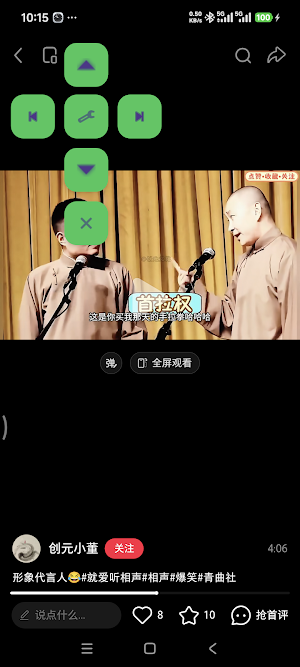
Support automatic screen sliding in four directions (up, down, left, and right), freeing your hands and allowing you to easily browse long pages or automatically perform repetitive sliding operations.
[Custom sliding speed]
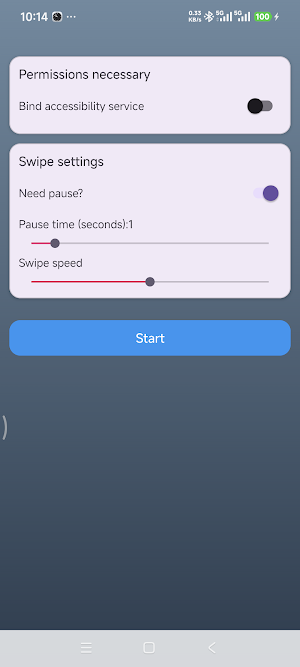
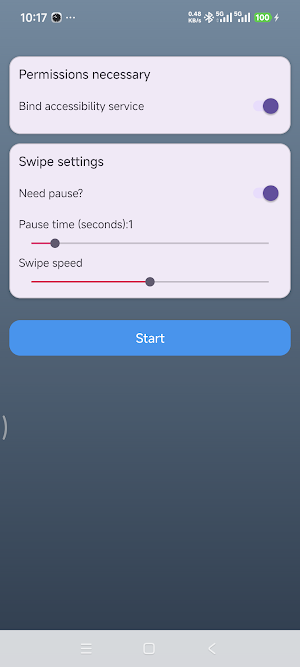
The sliding speed can be intuitively adjusted through the slider, allowing for flexible adjustments according to different scene requirements, ranging from slow browsing to rapid sliding, meeting various usage needs.
[Flexible pause setting]
You can choose whether to add pauses between slides and customize the pause time (in increments of 1 second) to make the slide transition more consistent with your usage habits.
[Convenient floating window control]
After starting, a draggable floating window will appear, supporting one-click switching of sliding directions without the need to return to the main interface, making the operation more convenient and efficient.
[Intelligent Access Management]
Two barrier-free service activation methods are provided: manual activation and permanent authorization, simplifying the permission setting process and ensuring stable service operation.
[Pure offline operation]
It can be used normally without network connection, and is not limited by network environment. You can enjoy automatic screen swiping service anytime and anywhere.
[Privacy and Security Guarantee]
The app runs exclusively on the local device, does not collect any user data, and makes no network requests. All settings are saved locally on the device, fully protecting your privacy and security.
Download Auto Swipe app now, let the screen scroll automatically, free your hands, and enjoy a smart life with ease!
Accessibility Function Description
Auto Slide is an accessibility auxiliary tool designed for users who need automated screen sliding. The app uses Android's Accessibility Service to implement core functions, strictly complying with Google Play Accessibility Function policies.
### Purpose of Accessibility Service
- Perform automated screen sliding operations, supporting four directions: up, down, left, and right
- Implement custom sliding speed and pause time functions
- Provide a convenient sliding control interface through a floating window
### Data Security Commitment
- Only use Accessibility Service to implement the above core functions
- Will not monitor, collect, or share any personal data
- Will not access user privacy information or app content
- Will not interfere with normal device usage
### Usage Tips
When enabling Accessibility Service, the system will display a routine warning reminder, which is a standard Android system process. This app strictly adheres to privacy policies and will not engage in any behavior that harms user interests, so please feel free to use it. You can turn off this service at any time in system settings.
Permission Description
### Accessibility Service Permission
- Purpose: Implement automated screen sliding functionality, which is the core feature of the app
- Necessity: Required permission, otherwise cannot provide auto-slide service
- Data Processing: Does not collect any user data
### Floating Window Permission
- Purpose: Display the app's control interface, allowing users to adjust sliding parameters at any time
- Necessity: Required permission, otherwise cannot provide convenient operation control
- Data Processing: Only used to display the control interface, does not collect any data
### Other Permissions
- This app does not request or use any other sensitive permissions
- Does not access device storage, contacts, location, or other privacy information
- Does not require network permission, can be used offline
Main functions:
[Auto-slide]
Support automatic screen sliding in four directions (up, down, left, and right), freeing your hands and allowing you to easily browse long pages or automatically perform repetitive sliding operations.
[Custom sliding speed]
The sliding speed can be intuitively adjusted through the slider, allowing for flexible adjustments according to different scene requirements, ranging from slow browsing to rapid sliding, meeting various usage needs.
[Flexible pause setting]
You can choose whether to add pauses between slides and customize the pause time (in increments of 1 second) to make the slide transition more consistent with your usage habits.
[Convenient floating window control]
After starting, a draggable floating window will appear, supporting one-click switching of sliding directions without the need to return to the main interface, making the operation more convenient and efficient.
[Intelligent Access Management]
Two barrier-free service activation methods are provided: manual activation and permanent authorization, simplifying the permission setting process and ensuring stable service operation.
[Pure offline operation]
It can be used normally without network connection, and is not limited by network environment. You can enjoy automatic screen swiping service anytime and anywhere.
[Privacy and Security Guarantee]
The app runs exclusively on the local device, does not collect any user data, and makes no network requests. All settings are saved locally on the device, fully protecting your privacy and security.
Download Auto Swipe app now, let the screen scroll automatically, free your hands, and enjoy a smart life with ease!
Accessibility Function Description
Auto Slide is an accessibility auxiliary tool designed for users who need automated screen sliding. The app uses Android's Accessibility Service to implement core functions, strictly complying with Google Play Accessibility Function policies.
### Purpose of Accessibility Service
- Perform automated screen sliding operations, supporting four directions: up, down, left, and right
- Implement custom sliding speed and pause time functions
- Provide a convenient sliding control interface through a floating window
### Data Security Commitment
- Only use Accessibility Service to implement the above core functions
- Will not monitor, collect, or share any personal data
- Will not access user privacy information or app content
- Will not interfere with normal device usage
### Usage Tips
When enabling Accessibility Service, the system will display a routine warning reminder, which is a standard Android system process. This app strictly adheres to privacy policies and will not engage in any behavior that harms user interests, so please feel free to use it. You can turn off this service at any time in system settings.
Permission Description
### Accessibility Service Permission
- Purpose: Implement automated screen sliding functionality, which is the core feature of the app
- Necessity: Required permission, otherwise cannot provide auto-slide service
- Data Processing: Does not collect any user data
### Floating Window Permission
- Purpose: Display the app's control interface, allowing users to adjust sliding parameters at any time
- Necessity: Required permission, otherwise cannot provide convenient operation control
- Data Processing: Only used to display the control interface, does not collect any data
### Other Permissions
- This app does not request or use any other sensitive permissions
- Does not access device storage, contacts, location, or other privacy information
- Does not require network permission, can be used offline
What’s new
Version 1.0.32.202602111427 · Updated February 11, 2026
Auto Swipe APP – auto-scroll tool that plays shorts & flips novel pages. [Auto-slide] 4-direction swipe, hands free. [Custom speed] slider slow-fast. [Pause] optional 1s steps. [Float] drag toggle, one-tap. [Access] manual or permanent. [Offline] no net. [Privacy] zero data, local save. Download, free your hands!
Alternatives to Auto Swipe
Looking for apps like Auto Swipe? Here are 6 similar Android apps on Google Play. All of them are free to download.
-
FreeCell — No luck Pure skill
-
Peg Solitaire — Solo Peg
-
Mind Word — Timed Accurate
-
Chess Solo — Anytime Anywhere
-
Blind Cube — Solving Tool
-
Happy Time — Tic Simon Song
| App | Rating | Price | Installs | Last updated | Compare |
|---|---|---|---|---|---|
| Auto Swipe | – | Free | 500+ | Feb 11, 2026 | |
| FreeCell — No luck Pure skill | – | Free | 1+ | Mar 30, 2026 | Compare |
| Peg Solitaire — Solo Peg | – | Free | 1+ | Mar 30, 2026 | Compare |
| Mind Word — Timed Accurate | – | Free | 0+ | Mar 30, 2026 | Compare |
| Chess Solo — Anytime Anywhere | – | Free | 5+ | Mar 30, 2026 | Compare |
| Blind Cube — Solving Tool | – | Free | 5+ | Mar 23, 2026 | Compare |
| Happy Time — Tic Simon Song | – | Free | 0+ | Apr 14, 2026 | Compare |
Compare Auto Swipe with the top alternatives: ratings, updates, ASO score and keyword gaps →