

Hover - Floating AI & Notes
Productivity In-app purchases
Your study companion, always one tap away. Powered by the web, wordnet and AI
- Downloads
- 500+
- on Google Play
- Price
- Free
- In-app purchases
- Updated
- Sep 23
- 2026 · v2.0.3
Screenshots


About Hover - Floating AI & Notes
Meet Hover — the smarter way to learn.
Hover gives you a personal AI tutor that actually knows your material. Upload your notes, PDFs, lecture slides, videos, and documents into a Space, and let Hover's AI help you truly understand what you're studying — not just read through it.
Ask questions and get answers grounded in your own content. Generate flashcards and quizzes instantly from your materials. Get summaries, concept breakdowns, and weak spot detection that adapts to how well you're retaining information.
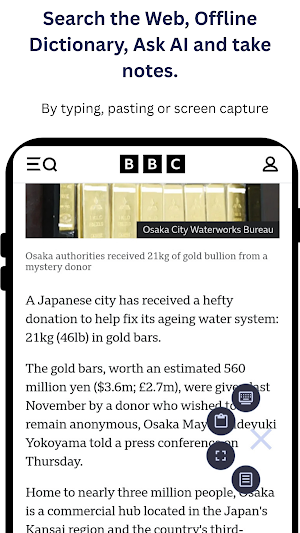
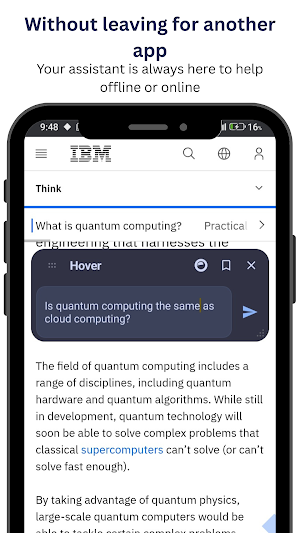
But Hover doesn't stop when you leave the app. A lightweight floating diamon stays with you across every app on your phone — giving you instant access to AI chat, web search, and a built-in dictionary whenever you need it, without breaking your flow.
Looking something up in your browser? Ask Hover. Watching a lecture on YouTube? Ask Hover. Reading a WhatsApp message with an unfamiliar term? Ask Hover.
Everything you discover carries back to your Space, keeping your knowledge organized and growing in one place.
Hover is for students, researchers, avid readers, and anyone who never stops learning.
✦ AI tutoring grounded in your own materials
✦ Flashcards and quizzes generated from your content
✦ Floating overlay works across every app
✦ Built-in web search, AI chat, and dictionary
✦ Organized Spaces for every subject or topic
Your studies. Your material. Your AI — Lightweight, fast, and always on top.
Accessibility Service Disclosure
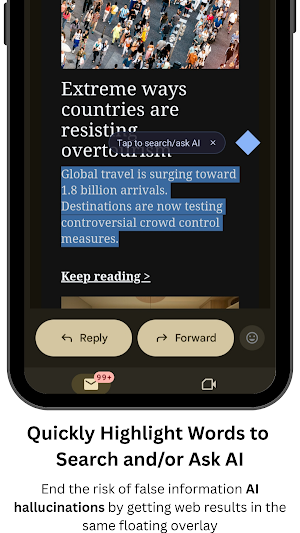
Hover uses the AccessibilityService API to provide an enhanced AI interaction experience. To enable the "Search/Ask AI" functionality, the Accessibility Service allows the app to identify selected text currently displayed on your screen. This enables you to interact with the floating assistant regarding specific on-screen content without the need to manually copy-paste or switch between applications.
We value your privacy. The AccessibilityService API is used strictly for the purpose of text selection to facilitate AI queries. Overlay Pro does not collect, store, or share any personal or sensitive user data through this service.
Hover gives you a personal AI tutor that actually knows your material. Upload your notes, PDFs, lecture slides, videos, and documents into a Space, and let Hover's AI help you truly understand what you're studying — not just read through it.
Ask questions and get answers grounded in your own content. Generate flashcards and quizzes instantly from your materials. Get summaries, concept breakdowns, and weak spot detection that adapts to how well you're retaining information.
But Hover doesn't stop when you leave the app. A lightweight floating diamon stays with you across every app on your phone — giving you instant access to AI chat, web search, and a built-in dictionary whenever you need it, without breaking your flow.
Looking something up in your browser? Ask Hover. Watching a lecture on YouTube? Ask Hover. Reading a WhatsApp message with an unfamiliar term? Ask Hover.
Everything you discover carries back to your Space, keeping your knowledge organized and growing in one place.
Hover is for students, researchers, avid readers, and anyone who never stops learning.
✦ AI tutoring grounded in your own materials
✦ Flashcards and quizzes generated from your content
✦ Floating overlay works across every app
✦ Built-in web search, AI chat, and dictionary
✦ Organized Spaces for every subject or topic
Your studies. Your material. Your AI — Lightweight, fast, and always on top.
Accessibility Service Disclosure
Hover uses the AccessibilityService API to provide an enhanced AI interaction experience. To enable the "Search/Ask AI" functionality, the Accessibility Service allows the app to identify selected text currently displayed on your screen. This enables you to interact with the floating assistant regarding specific on-screen content without the need to manually copy-paste or switch between applications.
We value your privacy. The AccessibilityService API is used strictly for the purpose of text selection to facilitate AI queries. Overlay Pro does not collect, store, or share any personal or sensitive user data through this service.
What’s new
Version 2.0.3 · Updated September 23, 2026
Fixed issues that were causing the app to crash, as well as other bug fixes and performance improvements
User reviews

It’s a powerful study companion, especially if you like learning on your phone and multitasking.

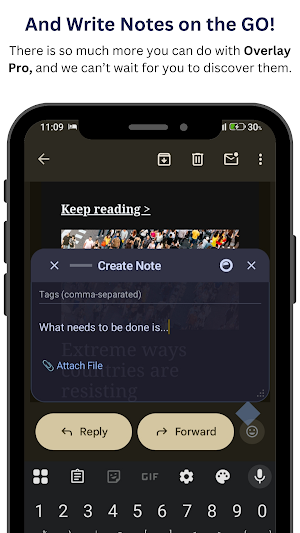
Over time using this app, I have nothing to regret its been the best when it comes to accessibility features. My favorite feature is the ability to take down notes conveniently without having to leave I'd recommend this app to anybody, anywhere
Alternatives to Hover - Floating AI & Notes
Looking for apps like Hover - Floating AI & Notes? Here are 6 similar Android apps on Google Play. All of them are free to download.





| App | Rating | Price | Installs | Last updated | Compare |
|---|---|---|---|---|---|
| Hover - Floating AI & Notes | – | Free | 500+ | Sep 23, 2026 | |
| Prumptcenter | – | Free | 500+ | May 22, 2026 | Compare |
| un:short - Shorts Blocker | – | Free | 1,000+ | Nov 1, 2026 | Compare |
| DPV | – | Free | 50+ | Oct 10, 2025 | Compare |
| AutoHaccp | – | Free | 500+ | Jul 29, 2026 | Compare |
| Leuit Mobile | – | Free | 50+ | Feb 25, 2026 | Compare |
| Rice Clinic - Telugu | – | Free | 500+ | Jul 3, 2025 | Compare |
Similar apps on Google Play
- Prumptcenter
- un:short - Shorts Blocker
- DPV
- AutoHaccp
- Leuit Mobile
- Rice Clinic - Telugu
- Buraale Data
- Germinate AI
- MyWS 2.0
- RenoJira
- HPS Shift Changes
- Ingegni Streaming
- ECOSOL
- Hifadhi
- protol.io
- ALCA PROTECAO VEICULAR
- Cbox
- Coating pro guard
- Novela: Writing app for novels
- PeacePal: Wellness Companion
- AJEERO
- RIB Unify
- Dera
- Fleet.nl
- Orbit