

Chess ClockG
WORMEE TECH Entertainment
Professional chess clock for Blitz, Rapid & Bullet
- Downloads
- 11+
- on Google Play
- Price
- Free
- No in-app purchases
- Updated
- Sep 7
- 2026 · v1.0.2
Screenshots




About Chess ClockG
Features
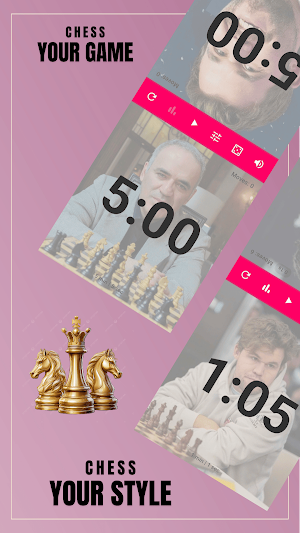
* Dual clocks – Two large, easy-to-read timers (one per player). Tap your side after your move to switch the running clock to your opponent.
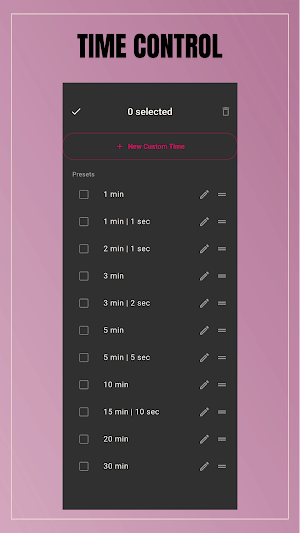
* Presets – 1 min, 1+1, 2+1, 3+0, 3+2, 5+0, 5+5, 10 min, 15+10, 20 min, 30 min. Pick one and start.
* Custom time – Name your control, set base time (min:sec) and increment. Advanced mode supports multiple stages and Fischer / Bronstein / Delay.
* Coin flip – Randomly decide who plays first before each game.
* Game stats – Per-move time, fastest and slowest move, averages, and a short move-time chart; summary when time runs out.
* Low-time warning – Pulsing background and haptics at 30s, 10s, 5s; progress bar turns green → orange → red.
* Dark theme & colors – Several accent colors (green, orange, teal, gold, pink, etc.) and optional subtle background images per clock.
* Adjust time – Change remaining time for each player (hours : minutes : seconds) during a game.
* Sound on/off, full-screen mode, and screen stays on while playing.
Who it’s for
* Blitz, rapid, and classical play at home, club, or small events.
* Anyone who wants a clear chess clock and simple stats after the game.
Download Chess Clock Mind, choose your time control, and start your game.
* Dual clocks – Two large, easy-to-read timers (one per player). Tap your side after your move to switch the running clock to your opponent.
* Presets – 1 min, 1+1, 2+1, 3+0, 3+2, 5+0, 5+5, 10 min, 15+10, 20 min, 30 min. Pick one and start.
* Custom time – Name your control, set base time (min:sec) and increment. Advanced mode supports multiple stages and Fischer / Bronstein / Delay.
* Coin flip – Randomly decide who plays first before each game.
* Game stats – Per-move time, fastest and slowest move, averages, and a short move-time chart; summary when time runs out.
* Low-time warning – Pulsing background and haptics at 30s, 10s, 5s; progress bar turns green → orange → red.
* Dark theme & colors – Several accent colors (green, orange, teal, gold, pink, etc.) and optional subtle background images per clock.
* Adjust time – Change remaining time for each player (hours : minutes : seconds) during a game.
* Sound on/off, full-screen mode, and screen stays on while playing.
Who it’s for
* Blitz, rapid, and classical play at home, club, or small events.
* Anyone who wants a clear chess clock and simple stats after the game.
Download Chess Clock Mind, choose your time control, and start your game.
What’s new
Version 1.0.2 · Updated September 7, 2026
🎉 Welcome to Check ClockG! Initial release includes: • Play classic chess with an intuitive interface. • Chess clock support for competitive games. • Smooth gameplay and responsive controls. • Optimized performance and stability. Thank you for playing! More game modes, features, and improvements are coming soon.
User reviews

Excellent
Alternatives to Chess ClockG
Looking for apps like Chess ClockG? Here are 6 similar Android apps on Google Play. All of them are free to download.


| App | Rating | Price | Installs | Last updated | Compare |
|---|---|---|---|---|---|
| Chess ClockG | – | Free | 10+ | Sep 7, 2026 | |
| Hanzi - Writing Chinese | – | Free | 10+ | – | Compare |
| Paw Talk - Pet Translator | – | Free | 50+ | Oct 1, 2026 | Compare |
| Tile Blazz | – | Free | 10+ | Jul 26, 2026 | Compare |
| Caro Mind | – | Free | 0+ | – | Compare |
| Calculator | – | Free | 10+ | Sep 7, 2026 | Compare |
| Lucky Wheel | – | Free | 100+ | Oct 1, 2026 | Compare |
Compare Chess ClockG with the top alternatives: ratings, updates, ASO score and keyword gaps →