
Nerone PDF Tool
Productivity
Manage your PDF, offline
- Downloads
- 23+
- on Google Play
- Price
- Free
- No in-app purchases
- Updated
- Jul 7
- 2026 · v1.0.0
Screenshots
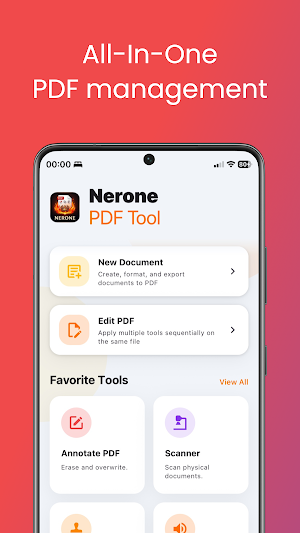
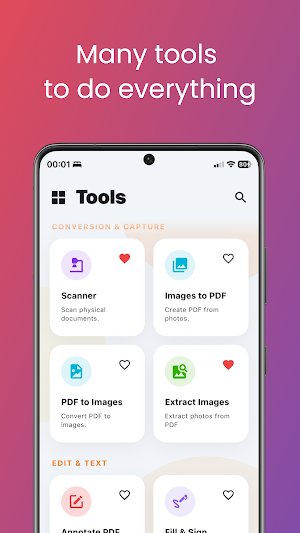
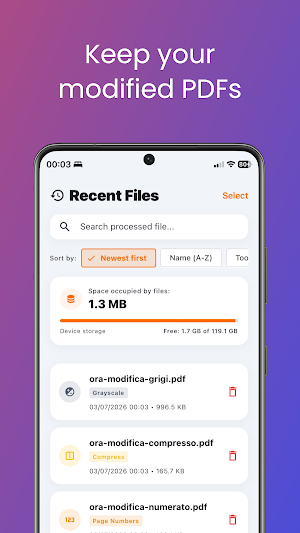


About Nerone PDF Tool
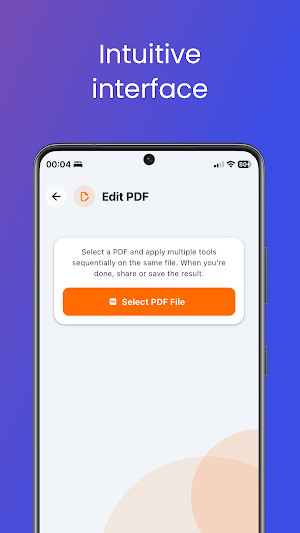
Need a fast, simple, and secure way to manage your PDFs? Discover Nerone PDF Tool, the ultimate offline suite of tools designed to give you full control over your documents directly on your iPhone or iPad.
No cloud uploads, no internet connection required. All files are processed locally on your device to guarantee maximum privacy and confidentiality.
WHY CHOOSE NERONE PDF TOOL?
• 100% Offline Security: Process contracts, bank statements, and private files locally without uploading them to external servers.
• No Subscriptions: Access all professional tools without recurring fees or hidden costs.
• All-in-One Suite: From merging files to filling and signing, you have everything you need in one place.
• Fast & Lightweight: Get results instantly with a highly optimized processing engine.
KEY FEATURES:
1. Organize & Page Tools
• Merge PDF: Combine multiple files into a single, clean document.
• Split PDF: Extract pages or separate a PDF into multiple files.
• Reorder Pages: Drag and drop pages to rearrange their order easily.
• Delete Pages: Quickly remove unwanted pages.
• Rotate Pages: Fix page orientation (portrait/landscape) instantly.
2. Convert & Scan
• Images to PDF: Convert photos and gallery scans into high-quality PDFs.
• PDF to Images: Extract PDF pages as image files (PNG/JPEG).
• Document Scanner: Scan physical pages using your camera with automatic border detection.
3. Edit & Text Tools
• Fill & Sign: Draw your signature and add text overlay directly onto the document.
• Annotate: Sketch, highlight, and write comments on your files.
• Page Numbers: Add custom header/footer numbering to your pages.
• Watermark: Protect files by adding custom logos or text stamps.
4. Security & Optimization
• Compress PDF: Reduce file sizes to easily share via email.
• Protect PDF: Encrypt files with secure password protection.
• Unlock PDF: Remove passwords to access locked files (rights required).
• Metadata Editor: Adjust internal fields (Author, Title, Subject).
• Grayscale: Convert color PDFs to black & white to save printer ink.
Privacy & Local Processing:
We respect your privacy. No personal data is collected. Files remain in your secure app inbox, making Nerone PDF Tool fully private and safe
No cloud uploads, no internet connection required. All files are processed locally on your device to guarantee maximum privacy and confidentiality.
WHY CHOOSE NERONE PDF TOOL?
• 100% Offline Security: Process contracts, bank statements, and private files locally without uploading them to external servers.
• No Subscriptions: Access all professional tools without recurring fees or hidden costs.
• All-in-One Suite: From merging files to filling and signing, you have everything you need in one place.
• Fast & Lightweight: Get results instantly with a highly optimized processing engine.
KEY FEATURES:
1. Organize & Page Tools
• Merge PDF: Combine multiple files into a single, clean document.
• Split PDF: Extract pages or separate a PDF into multiple files.
• Reorder Pages: Drag and drop pages to rearrange their order easily.
• Delete Pages: Quickly remove unwanted pages.
• Rotate Pages: Fix page orientation (portrait/landscape) instantly.
2. Convert & Scan
• Images to PDF: Convert photos and gallery scans into high-quality PDFs.
• PDF to Images: Extract PDF pages as image files (PNG/JPEG).
• Document Scanner: Scan physical pages using your camera with automatic border detection.
3. Edit & Text Tools
• Fill & Sign: Draw your signature and add text overlay directly onto the document.
• Annotate: Sketch, highlight, and write comments on your files.
• Page Numbers: Add custom header/footer numbering to your pages.
• Watermark: Protect files by adding custom logos or text stamps.
4. Security & Optimization
• Compress PDF: Reduce file sizes to easily share via email.
• Protect PDF: Encrypt files with secure password protection.
• Unlock PDF: Remove passwords to access locked files (rights required).
• Metadata Editor: Adjust internal fields (Author, Title, Subject).
• Grayscale: Convert color PDFs to black & white to save printer ink.
Privacy & Local Processing:
We respect your privacy. No personal data is collected. Files remain in your secure app inbox, making Nerone PDF Tool fully private and safe
Alternatives to Nerone PDF Tool
Looking for apps like Nerone PDF Tool? Here are 6 similar Android apps on Google Play. The highest rated is UpNote - notes, diary, journal (4.9/5), and all 6 are free to download.
-
Jolly Classroom 4.6
-
Inkpad Notepad & To do list 4.5
-
Notes 4.2
-
UpNote - notes, diary, journal 4.9
-
Color Notes, Notebook, Notepad 4.4
-
Quotation Maker 4.8
| App | Rating | Price | Installs | Last updated | Compare |
|---|---|---|---|---|---|
| Nerone PDF Tool | – | Free | 10+ | Jul 7, 2026 | |
| Jolly Classroom | 4.6 / 5 | Free | 100,000+ | Oct 30, 2026 | Compare |
| Inkpad Notepad & To do list | 4.5 / 5 | Free | 10,000,000+ | – | Compare |
| Notes | 4.2 / 5 | Free | 5,000,000+ | Jul 1, 2026 | Compare |
| UpNote - notes, diary, journal | 4.9 / 5 | Free | 500,000+ | Oct 23, 2026 | Compare |
| Color Notes, Notebook, Notepad | 4.4 / 5 | Free | 1,000,000+ | Oct 23, 2025 | Compare |
| Quotation Maker | 4.8 / 5 | Free | 500,000+ | Oct 27, 2026 | Compare |
Compare Nerone PDF Tool with the top alternatives: ratings, updates, ASO score and keyword gaps →