

My Bank Statements Converter
hamzii Tools In-app purchases
AI-powered bank statement PDF to Excel converter
- Downloads
- 1.7K+
- on Google Play
- Price
- Free
- In-app purchases
- Updated
- Sep 14
- 2026 · v1.0.7
Screenshots

About My Bank Statements Converter
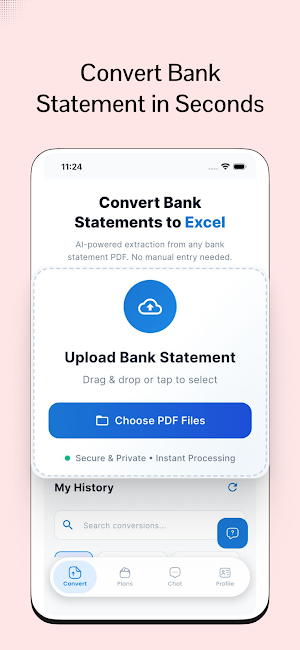
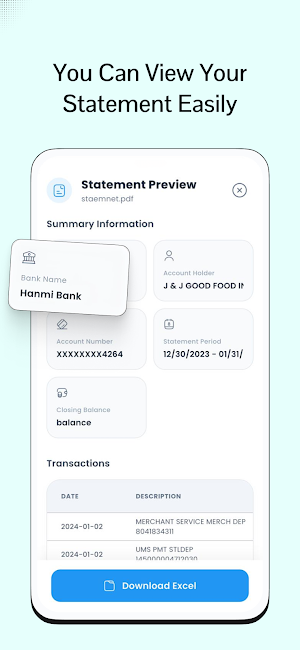
Bank Statement PDF to Excel is a professional-grade tool designed to streamline financial data management. By leveraging advanced Gemini AI technology, the application provides a precise and efficient way to extract transaction details from secure or standard PDF bank statements into structured Excel (.xlsx) files.
Professional Features
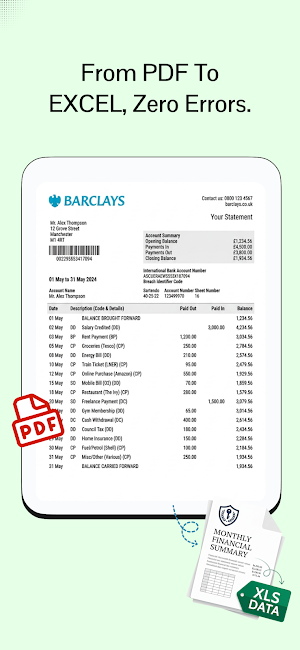
1. Automated PDF to Excel Conversion: Transform complex bank statements into organized spreadsheets in seconds.
2. Advanced AI Integration: Powered by industry-leading Gemini AI to ensure maximum accuracy in data extraction and formatting.
3. Password-Protected Document Support: Securely process encrypted PDFs with built-in password handling.
4. Intelligent Data Alignment: Automatic column detection and data cleaning for error-free results.
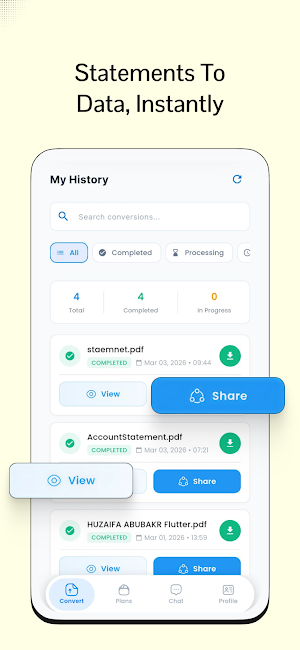
5. Secure Data Management: Comprehensive dashboard to manage conversion history and re-download files.
6. Multi-Method Authentication: Convenient and secure access via professional email and password login options.
7. Flexible Subscription Plans: Choose a tier that fits your volume, including free credits for new users and premium options for bulk processing.
8. Referral Rewards: Earn bonus conversion credits by inviting colleagues and professional contacts.
Why Choose This Application
1. Unmatched Efficiency: Eliminate hours of manual data entry and transcription errors.
2. Precision for Professionals: Ideal for accountants, financial analysts, small business owners, and freelancers who require perfect data integrity.
3. Global Compatibility: Engineered to work seamlessly with a wide range of international bank statement formats.
4. Commitment to Privacy: Industry-standard encryption ensures your financial
data is processed securely and deleted automatically after conversion.
Simple Operation Flow
1. Upload your bank statement PDF directly within the application.
2. Provide a password if the document is secured.
3. Initiate the conversion process with a single tap.
4. Download your perfectly formatted Excel file instantly.
Privacy and Security Standards
We prioritize the confidentiality of your financial information. All documents are handled through encrypted channels and are purged from our systems following the conversion process. We do not store your financial documents or utilize your data for AI training models.
Support and Feedback
For technical assistance, feature requests, or professional inquiries, please contact our dedicated support team.
Email Support: [email protected]
Privacy Policy: https://docs.google.com/document/d/e/2PACX-1vRBN1Oo2seYPqLaYrF5ZA5kWPLziAjHh5rd2-WDrx7uujw7SHs4l6Y6rgr-7sQi7qmlJ2nEtW3yngxx/pub
Experience the future of financial data processing with Bank Statement PDF to Excel.
Professional Features
1. Automated PDF to Excel Conversion: Transform complex bank statements into organized spreadsheets in seconds.
2. Advanced AI Integration: Powered by industry-leading Gemini AI to ensure maximum accuracy in data extraction and formatting.
3. Password-Protected Document Support: Securely process encrypted PDFs with built-in password handling.
4. Intelligent Data Alignment: Automatic column detection and data cleaning for error-free results.
5. Secure Data Management: Comprehensive dashboard to manage conversion history and re-download files.
6. Multi-Method Authentication: Convenient and secure access via professional email and password login options.
7. Flexible Subscription Plans: Choose a tier that fits your volume, including free credits for new users and premium options for bulk processing.
8. Referral Rewards: Earn bonus conversion credits by inviting colleagues and professional contacts.
Why Choose This Application
1. Unmatched Efficiency: Eliminate hours of manual data entry and transcription errors.
2. Precision for Professionals: Ideal for accountants, financial analysts, small business owners, and freelancers who require perfect data integrity.
3. Global Compatibility: Engineered to work seamlessly with a wide range of international bank statement formats.
4. Commitment to Privacy: Industry-standard encryption ensures your financial
data is processed securely and deleted automatically after conversion.
Simple Operation Flow
1. Upload your bank statement PDF directly within the application.
2. Provide a password if the document is secured.
3. Initiate the conversion process with a single tap.
4. Download your perfectly formatted Excel file instantly.
Privacy and Security Standards
We prioritize the confidentiality of your financial information. All documents are handled through encrypted channels and are purged from our systems following the conversion process. We do not store your financial documents or utilize your data for AI training models.
Support and Feedback
For technical assistance, feature requests, or professional inquiries, please contact our dedicated support team.
Email Support: [email protected]
Privacy Policy: https://docs.google.com/document/d/e/2PACX-1vRBN1Oo2seYPqLaYrF5ZA5kWPLziAjHh5rd2-WDrx7uujw7SHs4l6Y6rgr-7sQi7qmlJ2nEtW3yngxx/pub
Experience the future of financial data processing with Bank Statement PDF to Excel.
User reviews

excellent

good

easy to convert bank pdf

This app is a game changer! Converting bank statement PDFs into Excel takes just a few seconds, and the results are clean and accurate. It saved me a lot of manual work. Super fast and easy to use!

I just converted my bank statement It works great.

best ever app I found in my life, I really want to appreciate and thankful to the developer you are fabulous 😍
Alternatives to My Bank Statements Converter
Looking for apps like My Bank Statements Converter? Here are 4 similar Android apps on Google Play. All of them are free to download.




| App | Rating | Price | Installs | Last updated | Compare |
|---|---|---|---|---|---|
| My Bank Statements Converter | – | Free | 1,000+ | Sep 14, 2026 | |
| AI Tattoo Parlor | – | Free | 1+ | – | Compare |
| GlowLens | – | Free | 10+ | Aug 17, 2026 | Compare |
| Soulflock | – | Free | 10+ | Jul 26, 2026 | Compare |
| Budget AI: Expense Tracker | – | Free | 100+ | – | Compare |