

測量野帳 SIMA|座標計算・野帳
witty apps Tools In-app purchases
SIMA-compatible coordinate calculation. Includes reverse calculation, coordinate area calculation, traverse, and instrument height-based field notebook. One-time purchase, no ads, offline use.
- Downloads
- 50+
- on Google Play
- Price
- Free
- In-app purchases
- Updated
- Aug 2
- 2026 · v1.1.1
Screenshots


About 測量野帳 SIMA|座標計算・野帳
This app was created to eliminate the anxiety of SIMA files crashing the moment they're opened.
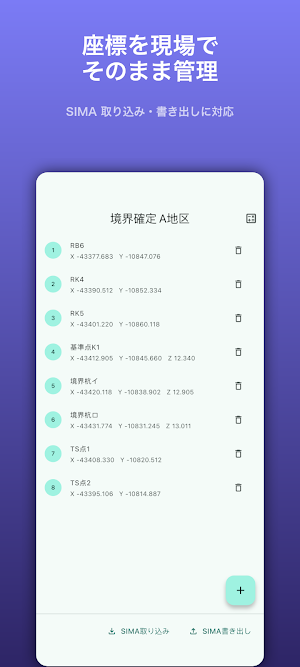
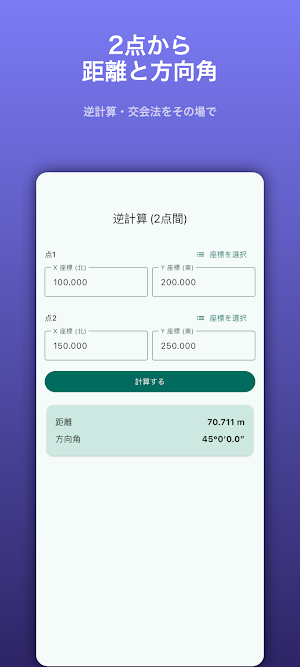
SIMA Survey Notebook is a coordinate calculation app for Japanese surveying professionals that reliably reads and writes the SIMA common format (.sim), and handles everything from reverse calculations, coordinate area calculations, traverses, forward intersections, and instrument-level field notebooks all on a single smartphone. It works completely offline.
【SIMA Never Crashes】
- Even if there are corrupted records during import, the app will never crash. It skips unreadable lines and reports the number of skipped records on the spot.
- Automatically detects Shift-JIS / UTF-8 character encoding. It can open files exported by Japanese surveying software directly.
- Ignores records other than coordinates, such as plot sizes (D00/B01), and imports only the coordinates.
[Comprehensive Calculations for Field Use]
• Inverse Calculation (Between Two Points) — Distance and direction angle in degrees, minutes, and seconds
• Coordinate Area (Double Area Method) — Calculates area from selected coordinates
• Radiation Calculation (Traverse) — New point coordinates from known point + direction angle + distance
• Forward Intersection (Intersection Method) — Unknown point coordinates from the direction angles of two known points
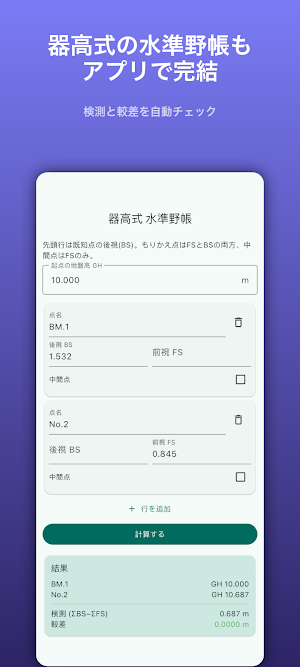
• Instrument Height Leveling Field Book — From BS/FS/instrument height to ground height GH, measurement (ΣBS−ΣFS), and difference
[Correctly Supports the Japanese Coordinate System]
• Adheres to the conventions of the plane rectangular coordinate system with X = North and Y = East.
• Angle input and output in degrees, minutes, and seconds (DMS).
[Designed for Field Use]
• Sleep prevention prevents the screen from turning off during use.
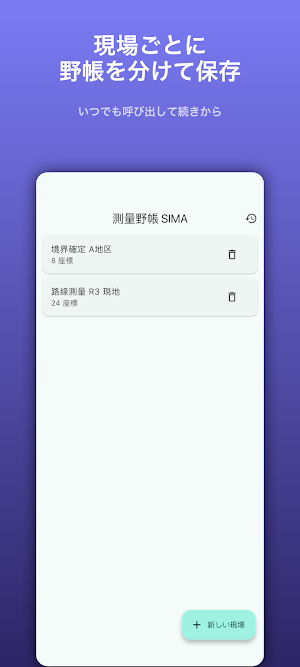
• All entered coordinates are saved only within the device. Atomic writing ensures that the coordinate list is not lost even if the device crashes.
• No account required. No ads. Entered coordinates and calculation data are never sent externally via communication. [One-time purchase]
The free version allows you to manually input coordinates (unlimited), perform inverse calculations, calculate coordinate area, and preview SIMA data (up to 50 points). Features have not been removed to make it inconvenient.
The Pro version (one-time purchase) is a one-time payment that unlocks unlimited SIMA data import and export, as well as traverse, forward intersection, and instrument-level field notebook functions. It is not a subscription service. There are no ads or additional charges for features.
*This app is an auxiliary tool for surveying calculations. Please always verify the results using the proper procedures.
SIMA Survey Notebook is a coordinate calculation app for Japanese surveying professionals that reliably reads and writes the SIMA common format (.sim), and handles everything from reverse calculations, coordinate area calculations, traverses, forward intersections, and instrument-level field notebooks all on a single smartphone. It works completely offline.
【SIMA Never Crashes】
- Even if there are corrupted records during import, the app will never crash. It skips unreadable lines and reports the number of skipped records on the spot.
- Automatically detects Shift-JIS / UTF-8 character encoding. It can open files exported by Japanese surveying software directly.
- Ignores records other than coordinates, such as plot sizes (D00/B01), and imports only the coordinates.
[Comprehensive Calculations for Field Use]
• Inverse Calculation (Between Two Points) — Distance and direction angle in degrees, minutes, and seconds
• Coordinate Area (Double Area Method) — Calculates area from selected coordinates
• Radiation Calculation (Traverse) — New point coordinates from known point + direction angle + distance
• Forward Intersection (Intersection Method) — Unknown point coordinates from the direction angles of two known points
• Instrument Height Leveling Field Book — From BS/FS/instrument height to ground height GH, measurement (ΣBS−ΣFS), and difference
[Correctly Supports the Japanese Coordinate System]
• Adheres to the conventions of the plane rectangular coordinate system with X = North and Y = East.
• Angle input and output in degrees, minutes, and seconds (DMS).
[Designed for Field Use]
• Sleep prevention prevents the screen from turning off during use.
• All entered coordinates are saved only within the device. Atomic writing ensures that the coordinate list is not lost even if the device crashes.
• No account required. No ads. Entered coordinates and calculation data are never sent externally via communication. [One-time purchase]
The free version allows you to manually input coordinates (unlimited), perform inverse calculations, calculate coordinate area, and preview SIMA data (up to 50 points). Features have not been removed to make it inconvenient.
The Pro version (one-time purchase) is a one-time payment that unlocks unlimited SIMA data import and export, as well as traverse, forward intersection, and instrument-level field notebook functions. It is not a subscription service. There are no ads or additional charges for features.
*This app is an auxiliary tool for surveying calculations. Please always verify the results using the proper procedures.
What’s new
Version 1.1.1 · Updated August 2, 2026
Stability and reliability improvements.
Alternatives to 測量野帳 SIMA|座標計算・野帳
Looking for apps like 測量野帳 SIMA|座標計算・野帳? Here are 6 similar Android apps on Google Play. All of them are free to download.
-
Scoreboard: Score Keeper
-
Golf Tracer: Ball Flight
-
Pain Diary: Body Tracker
-
Conduit Bender: Bend Calc
-
Punch List - Site Report
-
Desktop Micro-Factory
| App | Rating | Price | Installs | Last updated | Compare |
|---|---|---|---|---|---|
| 測量野帳 SIMA|座標計算・野帳 | – | Free | 50+ | Aug 2, 2026 | |
| Scoreboard: Score Keeper | – | Free | 100+ | – | Compare |
| Golf Tracer: Ball Flight | – | Free | 100+ | – | Compare |
| Pain Diary: Body Tracker | – | Free | 50+ | – | Compare |
| Conduit Bender: Bend Calc | – | Free | 100+ | Aug 5, 2026 | Compare |
| Punch List - Site Report | – | Free | 50+ | – | Compare |
| Desktop Micro-Factory | – | Free | 0+ | – | Compare |
Compare 測量野帳 SIMA|座標計算・野帳 with the top alternatives: ratings, updates, ASO score and keyword gaps →
Similar apps on Google Play
- Scoreboard: Score Keeper
- Golf Tracer: Ball Flight
- Pain Diary: Body Tracker
- Conduit Bender: Bend Calc
- Punch List - Site Report
- Desktop Micro-Factory
- UK Trade Certificates
- Arcweft
- AA Claim Prep
- Add & Check Todo
- OBD Scope
- Kinetic Puzzles
- Filament Shelf
- Weekly Flock Pulse
- Soap Batch Board
- Smoker Timeline
- Hatch Batch Clock
- Tailor Job Cards
- BeeYard Log
- Claim Ledger
- Calm Tents
- Calm Cryptogram
- PetPlant: Plant Watering Log
- Bingo Caller: 75 & 90 Ball
- GLP-1 Muscle Coach
- Machinist Calc: CNC Tools
- E6B Flight Computer + W&B
- Work Diary Checker: AU Trucks
- CP12 Gas Certificates
- Solunar: Hunt & Fish Times
- GPS Camera: Site Stamp
- Flip Clock: Bedside Clock
- Multi Timer: Kitchen Timers
- Poker Timer: Blinds & Chips
- QR Code Generator: Logo Maker
- Duct Calc: HVAC Duct Sizer
- Drivers' Hours: HGV & Van
- Row Counter: Knit & Crochet
- Dive Log: Scuba Logbook
- PDF Document Translator - AI
- EICR Certify: BS 7671 Forms
- ドローン飛行日誌・点検記録
- DBT Diary Card & Skills Log
- 塗料配合計算:硬化剤・希釈・逆算
- ダクト計算 Pro
- Sheet Metal Layout: Patterns
- Electric Ref: Wire Size, Fill
- 소방설비기사 실기 수리계산
- Trotty: Focus & App Blocker
- Pool Chemical Calculator
- LinePrompter: Actor Self-Tape
- Pipe Calc: Pipefitter Offsets
- Framing Calc: Rafter & Stairs
- Tape Calc: Feet Inch Fraction
- mubo - dance formation editor
- LinkPocket: Save Links
- pawtales