

CalMate
T. Zsolt Business In-app purchases
Keep track of your working hours! Track your schedule or share it with your team!
- Downloads
- 50+
- on Google Play
- Price
- Free
- In-app purchases
- Updated
- Sep 6
- 2026 · v1.0.23
Screenshots


About CalMate
CalMate – always know when you’re working and how your earnings are going
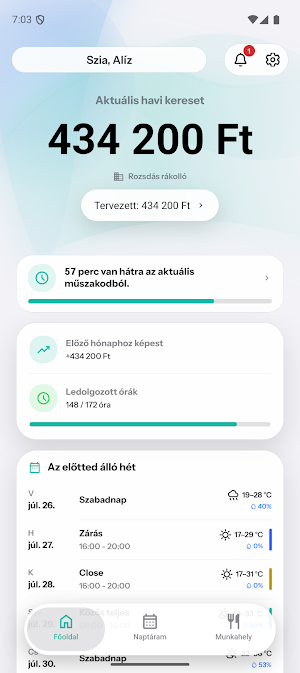
When does your next shift start? How many hours are you working this month? How much have you earned so far?
CalMate organizes your shifts, working hours and earnings in one place. This way, you don’t have to do mental math, look for notes or constantly ask for the schedule – just open the app and you’re in the clear.
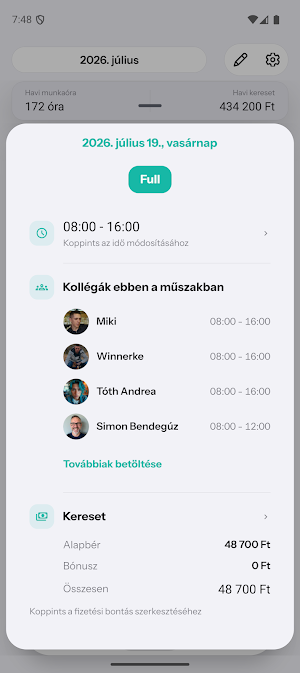
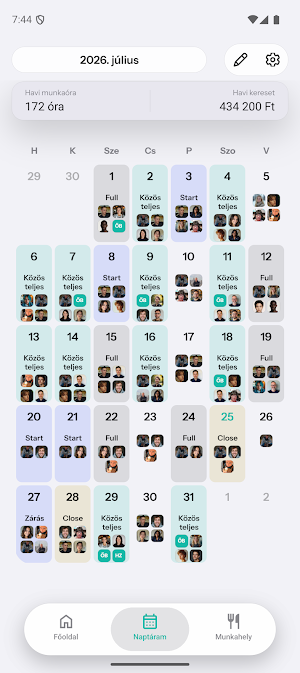
Create your frequent shifts as templates, populate your calendar with them and see your entire month. Based on your own salary settings, CalMate helps you track your hours worked, planned and earned amounts, as well as tips, commissions and deductions.
CalMate helps you with:
• Transparent shift calendar and reusable shift templates
• Quick overview of current and next shift
• Tracking hours worked and earnings
• Manage hourly wages, fixed amounts, tips, commissions and deductions
• Detailed reports on working hours and earnings
• Synchronize shifts with other calendar applications
• Notifications about important changes
CalMate Workplace – when a whole team needs to move together
CalMate also makes coordination between managers and employees easier. The manager can conveniently create the team's schedule in the web shift planner, and employees can immediately see their own shifts in the mobile app after publishing.
The web shift planner helps you see the weekly and monthly schedule, the required number of staff, job titles, time frames and absences. Automatic optimization supports the creation of a balanced schedule, notifies you of conflicts and unfilled shifts. The finished plan can be saved as a draft, checked, and then published to the team in one step.
With the workplace features:
• everyone sees their own schedule up to date
• the team receives notifications about important changes
• shift handover becomes easier
• absence requests can be sent and reviewed
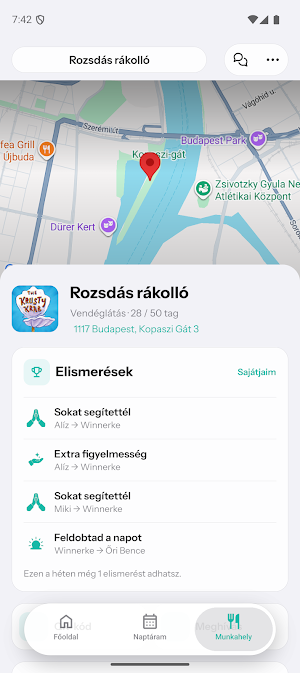
• workplace news and conversations are in one place
• employees can join with a code or QR code
This means less time is spent on spreadsheets, messaging, and continuous coordination. The manager has an overview of the operation, and employees always know when and where they are expected.
Whether you want to see your own shifts or coordinate the work of an entire team, CalMate takes the burden of organization and calculation off your shoulders. This way you always know what's coming up and have more time for what really matters.
Some features of the app require a CalMate Pro or CalMate Workplace subscription.
Privacy Policy:
https://calmate.hu/privacy
When does your next shift start? How many hours are you working this month? How much have you earned so far?
CalMate organizes your shifts, working hours and earnings in one place. This way, you don’t have to do mental math, look for notes or constantly ask for the schedule – just open the app and you’re in the clear.
Create your frequent shifts as templates, populate your calendar with them and see your entire month. Based on your own salary settings, CalMate helps you track your hours worked, planned and earned amounts, as well as tips, commissions and deductions.
CalMate helps you with:
• Transparent shift calendar and reusable shift templates
• Quick overview of current and next shift
• Tracking hours worked and earnings
• Manage hourly wages, fixed amounts, tips, commissions and deductions
• Detailed reports on working hours and earnings
• Synchronize shifts with other calendar applications
• Notifications about important changes
CalMate Workplace – when a whole team needs to move together
CalMate also makes coordination between managers and employees easier. The manager can conveniently create the team's schedule in the web shift planner, and employees can immediately see their own shifts in the mobile app after publishing.
The web shift planner helps you see the weekly and monthly schedule, the required number of staff, job titles, time frames and absences. Automatic optimization supports the creation of a balanced schedule, notifies you of conflicts and unfilled shifts. The finished plan can be saved as a draft, checked, and then published to the team in one step.
With the workplace features:
• everyone sees their own schedule up to date
• the team receives notifications about important changes
• shift handover becomes easier
• absence requests can be sent and reviewed
• workplace news and conversations are in one place
• employees can join with a code or QR code
This means less time is spent on spreadsheets, messaging, and continuous coordination. The manager has an overview of the operation, and employees always know when and where they are expected.
Whether you want to see your own shifts or coordinate the work of an entire team, CalMate takes the burden of organization and calculation off your shoulders. This way you always know what's coming up and have more time for what really matters.
Some features of the app require a CalMate Pro or CalMate Workplace subscription.
Privacy Policy:
https://calmate.hu/privacy
Alternatives to CalMate
Looking for apps like CalMate? Here are 6 similar Android apps on Google Play. The highest rated is Catalog Maker: PDF Price List (4.9/5), and all 6 are free to download.
-
Biochemical & Molecular Eng.
-
Catalog Maker: PDF Price List 4.9
-
CafePro - IA na Cafeicultura
-
DTS RFID Retail
-
Artisan CI
-
Eds-ks.com Klient
| App | Rating | Price | Installs | Last updated | Compare |
|---|---|---|---|---|---|
| CalMate | – | Free | 50+ | Sep 6, 2026 | |
| Biochemical & Molecular Eng. | – | Free | 10+ | Jun 17, 2026 | Compare |
| Catalog Maker: PDF Price List | 4.9 / 5 | Free | 5,000+ | Oct 9, 2026 | Compare |
| CafePro - IA na Cafeicultura | – | Free | 1,000+ | Aug 22, 2026 | Compare |
| DTS RFID Retail | – | Free | 10+ | Mar 7, 2024 | Compare |
| Artisan CI | – | Free | 1,000+ | – | Compare |
| Eds-ks.com Klient | – | Free | 100+ | Sep 14, 2026 | Compare |
Compare CalMate with the top alternatives: ratings, updates, ASO score and keyword gaps →
Similar apps on Google Play
- Biochemical & Molecular Eng.
- Catalog Maker: PDF Price List
- CafePro - IA na Cafeicultura
- DTS RFID Retail
- Artisan CI
- Eds-ks.com Klient
- Troove
- Manakchand Jain Jewellery
- MAASUMAH DATA
- Avto Park
- SnapCoin: QR & Barcode Scanner
- ItzoFood HRMS
- Zinnov Confluence
- Idea Network
- RF9
- Yellow Taxi Jordan Driver
- Agari MiOS
- UGC Roster - Creator Jobs
- Aqarless Link
- ROT app
- Utify
- TechTuk
- Grupo Campestre
- Hassa Plus
- Vertex Ledger