

Win Handball
Nokviter Sports
Win Handball - tactical planning, shot analysis, and team performance workspace
- Price
- Free
- No in-app purchases
- Updated
- Jul 17
- 2026 · v1.0
Screenshots


About Win Handball
Win Handball is a structured handball planning and analysis app for players, coaches, and training groups. It combines tactical preparation, passing patterns, transition timing, shot recording, physical-load notes, recovery checks, and session review in one clear mobile workspace. The app is focused on practical team use. Each main section supports a specific part of handball preparation, from arranging positions on the court to recording where a shot was taken and how it finished.
📊 PERFORMANCE DASHBOARD
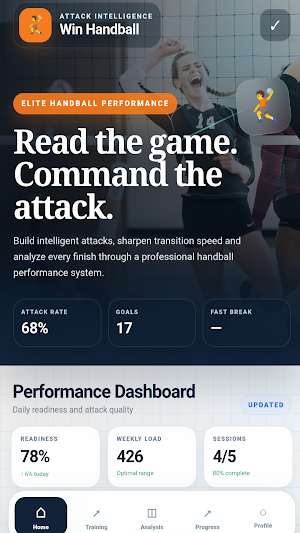
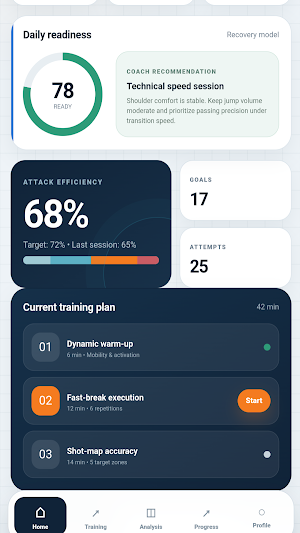
Win Handball opens with a performance dashboard designed to present the main session information without filling the screen with unnecessary data. The dashboard displays attack efficiency, goals, attempts, readiness information, weekly activity, training load, completed-session indicators, and the current training plan. Large values, compact cards, progress graphics, and clear labels make the opening screen easy to scan before training or analysis. The dashboard also provides direct access to tactical work, transition timing, shot analysis, and session review.
🧠 INTERACTIVE TACTICAL BOARD
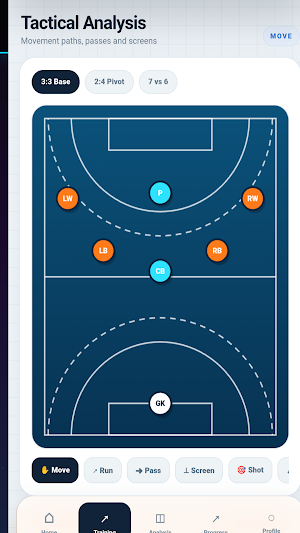
The tactical board is a central feature of Win Handball. Users can arrange the left wing, left back, center back, right back, right wing, pivot, and goalkeeper on an interactive handball court. Each player marker can be moved directly with touch controls. Users can draw player runs, passing directions, pivot screens, and final-shot directions. The board includes prepared formation layouts for different attacking structures. Drawn actions can be removed one by one, cleared, or saved as an attacking pattern. This makes the board useful for explaining back-line movement, pivot interaction, wing involvement, crossings, spacing, and finishing routes.
👥 LINEUP AND ROLE NOTES
Win Handball includes a lineup section for the starting seven. Each listed position includes a short tactical responsibility, such as creating width, directing tempo, supporting the pivot, or initiating a transition. A dedicated note field allows users to record formation details, movement timing, player responsibilities, screening ideas, and other instructions connected to the selected lineup.
⚡ TRANSITION TEST
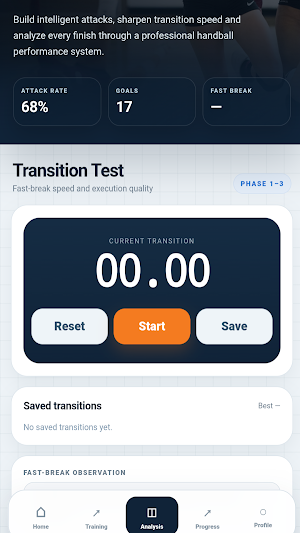
The fast-break section contains a focused transition timer. Users can start, pause, reset, and save recorded runs. Saved values remain visible in a list, and the fastest recorded result is displayed for comparison. A separate observation field can be used to document the first pass, running lanes, spacing, decision speed, phase progression, or the quality of the final action. Win Handball keeps these timing results together with the other session information.
🔁 PASSING ANALYSIS
The passing section allows users to create ordered passing sequences. Positions can be added one after another using left wing, left back, center back, right back, right wing, and pivot controls. The current sequence is shown visually and can be edited before saving. Saved combinations remain available for later review. This section is suitable for documenting circulation patterns, repeated combinations, and the order of passes used before a planned finish.
🎯 SHOT MAP AND GOAL ZONES
Win Handball includes a Shot Map for recording shooting activity from five origins: wing, nine-meter, six-meter, fast break, and penalty. The goal is divided into nine selectable target zones. For each origin, users can record a goal, goalkeeper save, or miss. The app tracks total attempts, goals, saves, and misses, while successful finishes are added to the selected goal zone. The most recent shot entry can be reversed when it was recorded incorrectly. This provides a clear way to review finishing choices without claiming automated video analysis or sensor-based detection.
📊 PERFORMANCE DASHBOARD
Win Handball opens with a performance dashboard designed to present the main session information without filling the screen with unnecessary data. The dashboard displays attack efficiency, goals, attempts, readiness information, weekly activity, training load, completed-session indicators, and the current training plan. Large values, compact cards, progress graphics, and clear labels make the opening screen easy to scan before training or analysis. The dashboard also provides direct access to tactical work, transition timing, shot analysis, and session review.
🧠 INTERACTIVE TACTICAL BOARD
The tactical board is a central feature of Win Handball. Users can arrange the left wing, left back, center back, right back, right wing, pivot, and goalkeeper on an interactive handball court. Each player marker can be moved directly with touch controls. Users can draw player runs, passing directions, pivot screens, and final-shot directions. The board includes prepared formation layouts for different attacking structures. Drawn actions can be removed one by one, cleared, or saved as an attacking pattern. This makes the board useful for explaining back-line movement, pivot interaction, wing involvement, crossings, spacing, and finishing routes.
👥 LINEUP AND ROLE NOTES
Win Handball includes a lineup section for the starting seven. Each listed position includes a short tactical responsibility, such as creating width, directing tempo, supporting the pivot, or initiating a transition. A dedicated note field allows users to record formation details, movement timing, player responsibilities, screening ideas, and other instructions connected to the selected lineup.
⚡ TRANSITION TEST
The fast-break section contains a focused transition timer. Users can start, pause, reset, and save recorded runs. Saved values remain visible in a list, and the fastest recorded result is displayed for comparison. A separate observation field can be used to document the first pass, running lanes, spacing, decision speed, phase progression, or the quality of the final action. Win Handball keeps these timing results together with the other session information.
🔁 PASSING ANALYSIS
The passing section allows users to create ordered passing sequences. Positions can be added one after another using left wing, left back, center back, right back, right wing, and pivot controls. The current sequence is shown visually and can be edited before saving. Saved combinations remain available for later review. This section is suitable for documenting circulation patterns, repeated combinations, and the order of passes used before a planned finish.
🎯 SHOT MAP AND GOAL ZONES
Win Handball includes a Shot Map for recording shooting activity from five origins: wing, nine-meter, six-meter, fast break, and penalty. The goal is divided into nine selectable target zones. For each origin, users can record a goal, goalkeeper save, or miss. The app tracks total attempts, goals, saves, and misses, while successful finishes are added to the selected goal zone. The most recent shot entry can be reversed when it was recorded incorrectly. This provides a clear way to review finishing choices without claiming automated video analysis or sensor-based detection.
Alternatives to Win Handball
Looking for apps like Win Handball? Here are 6 similar Android apps on Google Play. All of them are free to download.






| App | Rating | Price | Installs | Last updated | Compare |
|---|---|---|---|---|---|
| Win Handball | – | Free | 0+ | Jul 17, 2026 | |
| Play Student | – | Free | 0+ | Jul 21, 2026 | Compare |
| Fortune Orbit | – | Free | 0+ | Jul 21, 2026 | Compare |
| Grosvenor Victoria Casino | – | Free | 0+ | Jul 21, 2026 | Compare |
| Meritking | – | Free | 0+ | Jul 21, 2026 | Compare |
| Gamdom | – | Free | 0+ | Jul 19, 2026 | Compare |
| Galabet | – | Free | 0+ | Jul 19, 2026 | Compare |
Compare Win Handball with the top alternatives: ratings, updates, ASO score and keyword gaps →