
eZy Edit: Batch Photo Editor
Whizpool Photography In-app purchases Contains ads
Edit multiple images at once & create templates only once to use at any time.
- Rating
- 3.3
- 15 ratings
- Downloads
- 1.3K+
- on Google Play
- Price
- Free
- In-app purchases
- Updated
- Sep 12
- 2025 · v1.33
Screenshots
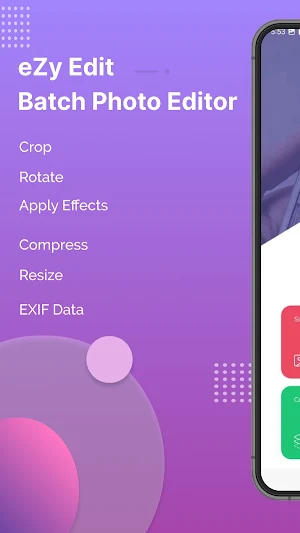
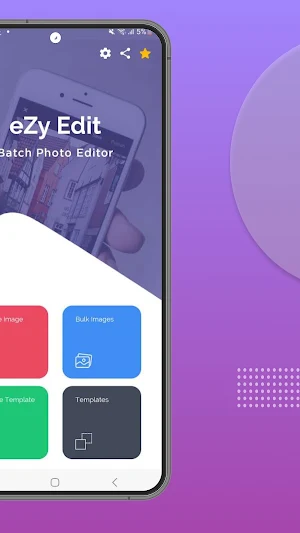
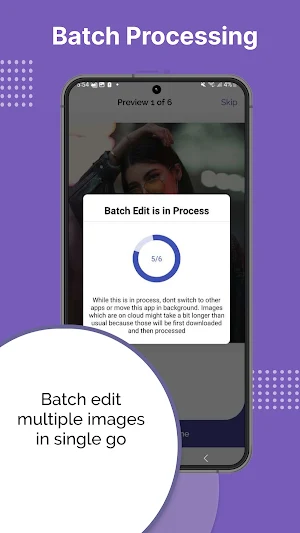


About eZy Edit: Batch Photo Editor
eZy Edit provides a great way to edit single and multiple images in one go! All you have to do is select photos from your gallery and start editing them right away.
Here are some of the most prominent features of our app:
- Image Editing Options:
With eZy Edit, you can efficiently edit multiple images at once. The app offers a variety of tools and functions, including:
Crop: Trim your photos to remove unwanted edges or focus on specific areas.
Rotate: Adjust the orientation of your images with ease.
Flip: Mirror your photos horizontally or vertically.
Apply Effects: Enhance your images with various effects to improve their appearance or achieve a specific look.
Compress: Reduce the file size of your images without compromising quality, making them easier to share or store.
Convert: Change the format of your images between popular file types like JPG and PNG.
Resize: Adjust the dimensions of multiple images simultaneously with just one click, ensuring they fit your desired specifications.
- Create Template:
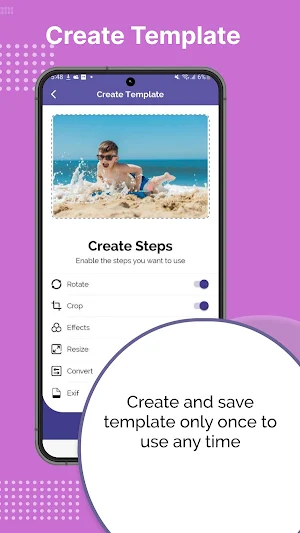
eZy Edit allows you to simplify your editing process by creating and saving templates. These templates can include any combination of edits you frequently use, such as cropping dimensions, rotation angles, and specific effects. Once saved, you can apply these templates to multiple images with a single click, ensuring consistent results across your entire photo collection. This feature not only saves time but also ensures that all your photos adhere to the same editing standards, making it ideal for professional photographers and social media enthusiasts alike.
- Image Conversion:
eZy Edit simplifies the process of converting images between different formats. With support for popular formats like PNG and JPG, the app allows you to convert multiple images in one go. This is particularly useful for standardizing your photo library or preparing images for specific uses, such as web uploads or printing.
- Exif Metadata:
Exif metadata contains important information about your images, such as the camera settings, date and time, and GPS location. With eZy Edit, you have the option to either preserve or remove this metadata during the editing process. Preserving metadata can be useful for maintaining the history and authenticity of your photos while removing it can help protect your privacy, especially when sharing images online.
- Photo Effects:
Enhance your images with a variety of photo effects available in eZy Edit. From subtle adjustments to dramatic transformations, the app offers a range of effects to suit any style or preference. You can apply filters, adjust brightness and contrast, add vignette effects, and more. These effects can be applied to single images or in batches, allowing you to achieve a uniform look across multiple photos.
- Resize:
Resizing images has never been easier with eZy Edit's batch resize feature. You can select multiple photos and specify the desired dimensions, whether you need to reduce the size for faster web uploads or enlarge them for printing purposes. The app offers various resizing options, including maintaining the original aspect ratio or custom dimensions.
- Rotate Photos:
Rotating photos in eZy Edit is both simple and efficient. Whether you need to adjust the orientation of a single image or a batch of photos, the app provides an easy-to-use interface for rotating images clockwise or counterclockwise. With the batch rotate feature, you can select multiple images and apply the same rotation to all of them at once, making the process quick and hassle-free.
Any suggestions for the next version of eZy Edit? Have any problems using eZy Edit: Batch Photo Editor?
Feel free to write to us at: [email protected]
Here are some of the most prominent features of our app:
- Image Editing Options:
With eZy Edit, you can efficiently edit multiple images at once. The app offers a variety of tools and functions, including:
Crop: Trim your photos to remove unwanted edges or focus on specific areas.
Rotate: Adjust the orientation of your images with ease.
Flip: Mirror your photos horizontally or vertically.
Apply Effects: Enhance your images with various effects to improve their appearance or achieve a specific look.
Compress: Reduce the file size of your images without compromising quality, making them easier to share or store.
Convert: Change the format of your images between popular file types like JPG and PNG.
Resize: Adjust the dimensions of multiple images simultaneously with just one click, ensuring they fit your desired specifications.
- Create Template:
eZy Edit allows you to simplify your editing process by creating and saving templates. These templates can include any combination of edits you frequently use, such as cropping dimensions, rotation angles, and specific effects. Once saved, you can apply these templates to multiple images with a single click, ensuring consistent results across your entire photo collection. This feature not only saves time but also ensures that all your photos adhere to the same editing standards, making it ideal for professional photographers and social media enthusiasts alike.
- Image Conversion:
eZy Edit simplifies the process of converting images between different formats. With support for popular formats like PNG and JPG, the app allows you to convert multiple images in one go. This is particularly useful for standardizing your photo library or preparing images for specific uses, such as web uploads or printing.
- Exif Metadata:
Exif metadata contains important information about your images, such as the camera settings, date and time, and GPS location. With eZy Edit, you have the option to either preserve or remove this metadata during the editing process. Preserving metadata can be useful for maintaining the history and authenticity of your photos while removing it can help protect your privacy, especially when sharing images online.
- Photo Effects:
Enhance your images with a variety of photo effects available in eZy Edit. From subtle adjustments to dramatic transformations, the app offers a range of effects to suit any style or preference. You can apply filters, adjust brightness and contrast, add vignette effects, and more. These effects can be applied to single images or in batches, allowing you to achieve a uniform look across multiple photos.
- Resize:
Resizing images has never been easier with eZy Edit's batch resize feature. You can select multiple photos and specify the desired dimensions, whether you need to reduce the size for faster web uploads or enlarge them for printing purposes. The app offers various resizing options, including maintaining the original aspect ratio or custom dimensions.
- Rotate Photos:
Rotating photos in eZy Edit is both simple and efficient. Whether you need to adjust the orientation of a single image or a batch of photos, the app provides an easy-to-use interface for rotating images clockwise or counterclockwise. With the batch rotate feature, you can select multiple images and apply the same rotation to all of them at once, making the process quick and hassle-free.
Any suggestions for the next version of eZy Edit? Have any problems using eZy Edit: Batch Photo Editor?
Feel free to write to us at: [email protected]
User reviews

Good stuff
Alternatives to eZy Edit: Batch Photo Editor
Looking for apps like eZy Edit: Batch Photo Editor? Here are 6 similar Android apps on Google Play. The highest rated is Quran App Read, Listen, Search (4.8/5), and all 6 are free to download.
-
Nonstop Video Cam : Pause & Sw 3.6
-
Quran App Read, Listen, Search 4.8
-
eZy Watermark Photos Lite 4.5
-
eZy Sign & Fill Documents
-
LinkFileShare: Send via link 3.3
-
Photo Vault - Hide Photos, Vid 4.0
| App | Rating | Price | Installs | Last updated | Compare |
|---|---|---|---|---|---|
| eZy Edit: Batch Photo Editor | 3.3 / 5 | Free | 1,000+ | Sep 12, 2025 | |
| Nonstop Video Cam : Pause & Sw | 3.6 / 5 | Free | 100,000+ | Sep 23, 2026 | Compare |
| Quran App Read, Listen, Search | 4.8 / 5 | Free | 100,000+ | Aug 21, 2026 | Compare |
| eZy Watermark Photos Lite | 4.5 / 5 | Free | 500,000+ | Sep 28, 2026 | Compare |
| eZy Sign & Fill Documents | – | Free | 10,000+ | Sep 17, 2026 | Compare |
| LinkFileShare: Send via link | 3.3 / 5 | Free | 100,000+ | Aug 24, 2026 | Compare |
| Photo Vault - Hide Photos, Vid | 4.0 / 5 | Free | 50,000+ | Apr 7, 2026 | Compare |
Similar apps on Google Play
- Nonstop Video Cam : Pause & Sw
- Quran App Read, Listen, Search
- eZy Watermark Photos Lite
- eZy Sign & Fill Documents
- LinkFileShare: Send via link
- Photo Vault - Hide Photos, Vid
- Autograph+: Signature Maker
- eZy Distance Calculator
- eZy Watermark Videos Lite
- HopPogs: Overcome Obstacles
- Symbols: Match & Conquer
- eZy No Crop for Social Media
- Islamic Prayer Times & Tracker
- eZy Teleprompter
- WhatsText Send Direct Message
- Doubles: Merge Number Blocks
- eZy Watermark Videos Pro
- eZy Watermark Photos Pro
- Autograph+ : Signature Maker
- Hajj Midani