
Aurora Alarma: Wake Up Clock
Tools In-app purchases Contains ads
Alarm clock with real dismiss challenges. Your data encrypted on your phone.
- Downloads
- 13+
- on Google Play
- Price
- Free
- In-app purchases
- Updated
- Oct 15
- 2026 · v1.5.12
Screenshots


About Aurora Alarma: Wake Up Clock
Aurora Alarma is an alarm clock for people who hit snooze without waking up and
go straight back to sleep.
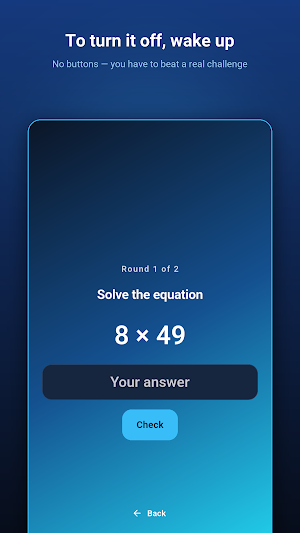
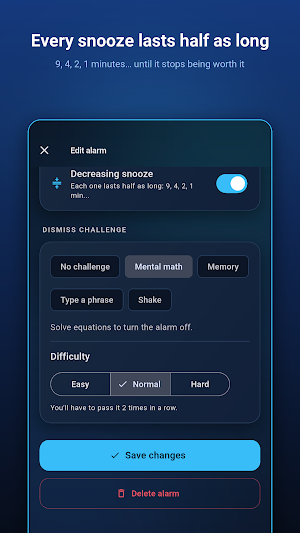
Turning the alarm off takes more than tapping a button: you pick a challenge
you actually have to complete. Mental arithmetic, memorising a light sequence,
typing a phrase, or shaking the phone. Three difficulty levels, and you can
require several rounds in a row.
ACTUALLY WAKE UP
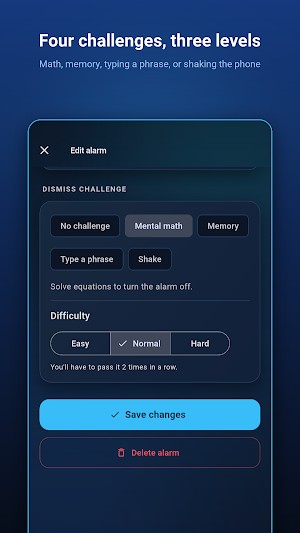
• Four dismiss challenges: math, memory, typing and shake.
• Three difficulty levels, up to three consecutive rounds.
• Decreasing snooze: every snooze lasts half as long as the last. 9, 4, 2, 1
minutes... until it stops being worth it.
• Snooze limit: you decide how many times you get to give in.
• Gradual volume: starts quiet and rises until you're awake, no jolt.
• Enforced volume: turn it down half asleep and the alarm turns it back up.
• Rings even on silent or Do Not Disturb.
• Survives reboots: if the phone restarts overnight, your alarm is still set.
ALSO INCLUDED
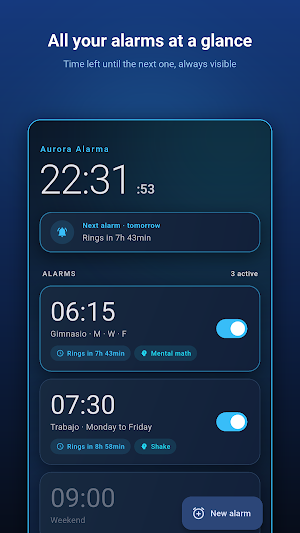
• Day repetition with shortcuts: once, weekdays, weekend, every day.
• Skip the next occurrence without disabling the alarm — handy for a holiday.
• Three original tones: Dawn, Tide and Beacon.
• Countdown timer.
• Stopwatch with laps.
• Light and dark themes, 12 or 24 hour format.
PRIVACY YOU CAN VERIFY
Your alarms never leave your phone. There is no server of ours, no account
and nothing to sync: whatever you set stays encrypted on the device itself.
• No accounts, no sign-up, no email address.
• Aurora Alarma is free because ads keep it running. Google serves them, and
they are the only thing that uses the connection; your alarms never travel.
• Your alarms are stored encrypted with AES-256-GCM on the device itself, with
the key held in the operating system's secure keystore.
• Excluded from automatic cloud backups.
• Optional app lock with PIN or biometrics.
• Optional screenshot blocking.
• Secure wipe: delete your data and destroy the key in one action.
WHY SO MANY ALARM PERMISSIONS?
Because an alarm clock that doesn't ring is useless. Exact alarm, full-screen
notification and boot-completed permissions are precisely what the operating
system needs in order to guarantee your alarm goes off at the time you set.
Every permission is justified in the source code, and no others are requested.
Aurora Alarma works exactly the same in airplane mode. That's the point.
go straight back to sleep.
Turning the alarm off takes more than tapping a button: you pick a challenge
you actually have to complete. Mental arithmetic, memorising a light sequence,
typing a phrase, or shaking the phone. Three difficulty levels, and you can
require several rounds in a row.
ACTUALLY WAKE UP
• Four dismiss challenges: math, memory, typing and shake.
• Three difficulty levels, up to three consecutive rounds.
• Decreasing snooze: every snooze lasts half as long as the last. 9, 4, 2, 1
minutes... until it stops being worth it.
• Snooze limit: you decide how many times you get to give in.
• Gradual volume: starts quiet and rises until you're awake, no jolt.
• Enforced volume: turn it down half asleep and the alarm turns it back up.
• Rings even on silent or Do Not Disturb.
• Survives reboots: if the phone restarts overnight, your alarm is still set.
ALSO INCLUDED
• Day repetition with shortcuts: once, weekdays, weekend, every day.
• Skip the next occurrence without disabling the alarm — handy for a holiday.
• Three original tones: Dawn, Tide and Beacon.
• Countdown timer.
• Stopwatch with laps.
• Light and dark themes, 12 or 24 hour format.
PRIVACY YOU CAN VERIFY
Your alarms never leave your phone. There is no server of ours, no account
and nothing to sync: whatever you set stays encrypted on the device itself.
• No accounts, no sign-up, no email address.
• Aurora Alarma is free because ads keep it running. Google serves them, and
they are the only thing that uses the connection; your alarms never travel.
• Your alarms are stored encrypted with AES-256-GCM on the device itself, with
the key held in the operating system's secure keystore.
• Excluded from automatic cloud backups.
• Optional app lock with PIN or biometrics.
• Optional screenshot blocking.
• Secure wipe: delete your data and destroy the key in one action.
WHY SO MANY ALARM PERMISSIONS?
Because an alarm clock that doesn't ring is useless. Exact alarm, full-screen
notification and boot-completed permissions are precisely what the operating
system needs in order to guarantee your alarm goes off at the time you set.
Every permission is justified in the source code, and no others are requested.
Aurora Alarma works exactly the same in airplane mode. That's the point.
What’s new
Version 1.5.12 · Updated October 15, 2026
Version 1.5.12: • The time picker now fully respects your 12-hour or 24-hour preference. • In 12-hour mode, 1 PM is no longer confused with 13:00. • Current and tomorrow's weather appear without waiting for the calendar, with clear recovery when connection or location is unavailable.
Alternatives to Aurora Alarma: Wake Up Clock
Looking for apps like Aurora Alarma: Wake Up Clock? Here are 6 similar Android apps on Google Play. The highest rated is Timelog - Goal & Time Tracker (4.7/5), and all 6 are free to download.
-
The Clock: Alarm Clock & Timer 4.1
-
MOTIVE : Daily Quotes & Alarm 4.7
-
Timelog - Goal & Time Tracker 4.7
-
Alarm Clock Xtreme & Timer 4.5
-
Mr. Screamy - Loud Alarm Clock 4.5
-
Avocation Goal & Habit Tracker 4.2
| App | Rating | Price | Installs | Last updated | Compare |
|---|---|---|---|---|---|
| Aurora Alarma: Wake Up Clock | – | Free | 10+ | Oct 15, 2026 | |
| The Clock: Alarm Clock & Timer | 4.1 / 5 | Free | 1,000,000+ | Aug 24, 2026 | Compare |
| MOTIVE : Daily Quotes & Alarm | 4.7 / 5 | Free | 500,000+ | Sep 18, 2025 | Compare |
| Timelog - Goal & Time Tracker | 4.7 / 5 | Free | 100,000+ | Oct 20, 2026 | Compare |
| Alarm Clock Xtreme & Timer | 4.5 / 5 | Free | 50,000,000+ | Apr 9, 2026 | Compare |
| Mr. Screamy - Loud Alarm Clock | 4.5 / 5 | Free | 100,000+ | Aug 26, 2026 | Compare |
| Avocation Goal & Habit Tracker | 4.2 / 5 | Free | 1,000,000+ | Apr 15, 2023 | Compare |
Similar apps on Google Play
- The Clock: Alarm Clock & Timer
- MOTIVE : Daily Quotes & Alarm
- Timelog - Goal & Time Tracker
- Alarm Clock Xtreme & Timer
- Mr. Screamy - Loud Alarm Clock
- Avocation Goal & Habit Tracker
- BeeDone: Gamified ADHD Planner
- Rabit: Habit Tracker & Planner
- Challenges Alarm Clock
- SleepTracker: Record & Improve
- Sleep Tracker & Alarm - Moonap
- My Feelings Wheel
- Striving: Pomodoro focus timer
- Time Timer Visual Productivity
- Clarify: Focus & Task Manager