
3D & CAD Viewer
Tapline Studio Tools
View STL, STEP, DXF, GLB, G-code, glTF, OBJ, FBX & more on your device
- Downloads
- 2.7K+
- on Google Play
- Price
- Free
- No in-app purchases
- Updated
- Sep 8
- 2026 · v1.1.0
Screenshots


About 3D & CAD Viewer
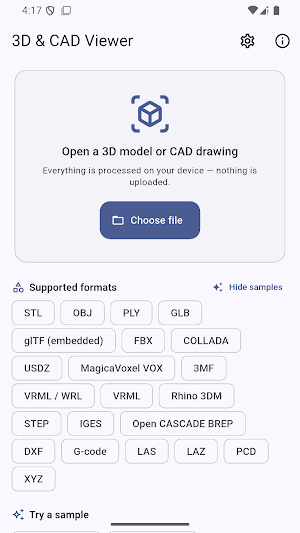
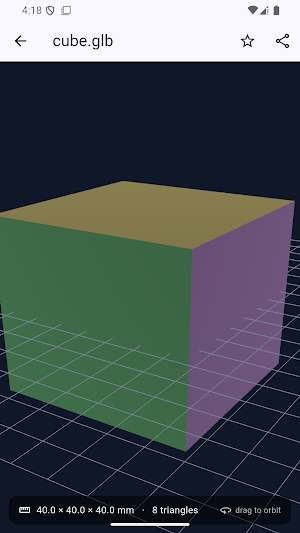
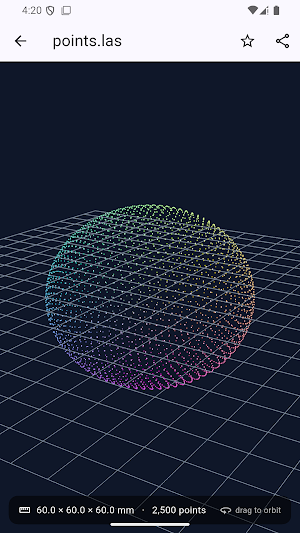
3D & CAD Viewer lets you inspect 3D models, CAD drawings, 3D printing files and point clouds on your Android phone or tablet.
SUPPORTED FORMATS
Open these core formats locally without downloading an additional viewer engine:
• STL, OBJ and PLY
• GLB and self-contained glTF
• FBX, DAE / COLLADA, USDZ and VOX
• DXF 2D drawings
• G-code and GCO toolpaths
• LAS, PCD and XYZ point clouds
STEP / STP, IGES / IGS, BREP / BRP, Rhino 3DM, 3MF, WRL / VRML and LAZ require a one-time download of an optional viewer engine. The app asks before downloading. After that engine is stored on your device, its supported files work offline. Only the engine is downloaded; your model or CAD file is never uploaded to our servers.
VIEWER FEATURES
• Orbit, pan and pinch to zoom
• Automatically fit and center supported models
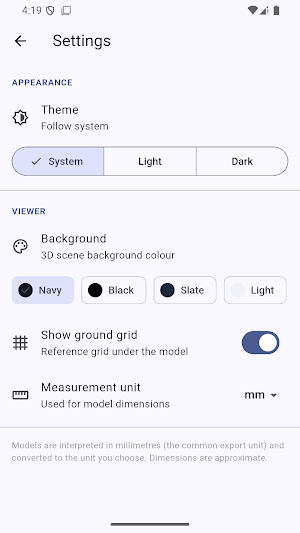
• Approximate bounding-box dimensions in mm, cm, m or inches
• Recent files and Favorites stored on your device
• Dark mode, background colors and an optional reference grid
• Share opened files with other apps
• Built-in sample files
• No account required
13 LANGUAGES
English, German, French, Spanish, Portuguese, Italian, Dutch, Japanese, Korean, Traditional Chinese (Taiwan), Thai, Vietnamese and Malay. The app uses your phone language when supported, otherwise English. Choose another language in Settings.
FORMAT LIMITATIONS
• glTF files must be self-contained. Separate .bin files, images or textures may not load completely. Use GLB for a single packaged file.
• DXF supports text-based 2D drawings with common LINE, LWPOLYLINE, CIRCLE and ARC entities. Not all DXF entities or 3D DXF objects are supported.
• The optional CAD engine converts STEP, IGES and BREP to viewable mesh geometry. This app does not edit CAD files or validate them for manufacturing.
• Support depends on the exporter, file version, encoding, compression, external dependencies, complexity and available device memory.
• DWG, DWT, IFC, BLEND, 3DS, SKP and X3D are not supported.
For visualization and preview only. Geometry, toolpaths and dimensions are approximate. Do not rely on them for manufacturing, construction or engineering decisions. Verify important information using the original file and the software that created it.
More tools: viewer.webtech360.com
Feedback: [email protected]
SUPPORTED FORMATS
Open these core formats locally without downloading an additional viewer engine:
• STL, OBJ and PLY
• GLB and self-contained glTF
• FBX, DAE / COLLADA, USDZ and VOX
• DXF 2D drawings
• G-code and GCO toolpaths
• LAS, PCD and XYZ point clouds
STEP / STP, IGES / IGS, BREP / BRP, Rhino 3DM, 3MF, WRL / VRML and LAZ require a one-time download of an optional viewer engine. The app asks before downloading. After that engine is stored on your device, its supported files work offline. Only the engine is downloaded; your model or CAD file is never uploaded to our servers.
VIEWER FEATURES
• Orbit, pan and pinch to zoom
• Automatically fit and center supported models
• Approximate bounding-box dimensions in mm, cm, m or inches
• Recent files and Favorites stored on your device
• Dark mode, background colors and an optional reference grid
• Share opened files with other apps
• Built-in sample files
• No account required
13 LANGUAGES
English, German, French, Spanish, Portuguese, Italian, Dutch, Japanese, Korean, Traditional Chinese (Taiwan), Thai, Vietnamese and Malay. The app uses your phone language when supported, otherwise English. Choose another language in Settings.
FORMAT LIMITATIONS
• glTF files must be self-contained. Separate .bin files, images or textures may not load completely. Use GLB for a single packaged file.
• DXF supports text-based 2D drawings with common LINE, LWPOLYLINE, CIRCLE and ARC entities. Not all DXF entities or 3D DXF objects are supported.
• The optional CAD engine converts STEP, IGES and BREP to viewable mesh geometry. This app does not edit CAD files or validate them for manufacturing.
• Support depends on the exporter, file version, encoding, compression, external dependencies, complexity and available device memory.
• DWG, DWT, IFC, BLEND, 3DS, SKP and X3D are not supported.
For visualization and preview only. Geometry, toolpaths and dimensions are approximate. Do not rely on them for manufacturing, construction or engineering decisions. Verify important information using the original file and the software that created it.
More tools: viewer.webtech360.com
Feedback: [email protected]
What’s new
Version 1.1.0 · Updated September 8, 2026
Added 12 languages, localized app names and viewer messages. The app follows your phone language when supported, with English as the fallback. Change language anytime in Settings using the language icon.
Alternatives to 3D & CAD Viewer
Looking for apps like 3D & CAD Viewer? Here are 6 similar Android apps on Google Play. The highest rated is Skiplagged - Exclusive Flights (4.8/5), and 5 of the 6 are free to download.
-
Travelfika: Hotels & Flights
-
ZWCAD Mobile - DWG Viewer 3.6
-
Thingiverse MakerWorld | 3Drop 4.8
-
Skiplagged - Exclusive Flights 4.8
-
Video Converter Pro 4.6
-
ConstructionOnline 3.9
| App | Rating | Price | Installs | Last updated | Compare |
|---|---|---|---|---|---|
| 3D & CAD Viewer | – | Free | 1,000+ | Sep 8, 2026 | |
| Travelfika: Hotels & Flights | – | Free | 1,000+ | Sep 3, 2026 | Compare |
| ZWCAD Mobile - DWG Viewer | 3.6 / 5 | Free | 1,000,000+ | Aug 12, 2026 | Compare |
| Thingiverse MakerWorld | 3Drop | 4.8 / 5 | Free | 100,000+ | – | Compare |
| Skiplagged - Exclusive Flights | 4.8 / 5 | Free | 1,000,000+ | Oct 23, 2026 | Compare |
| Video Converter Pro | 4.6 / 5 | 5.99 USD | 10,000+ | Nov 1, 2025 | Compare |
| ConstructionOnline | 3.9 / 5 | Free | 10,000+ | Oct 23, 2026 | Compare |
Compare 3D & CAD Viewer with the top alternatives: ratings, updates, ASO score and keyword gaps →