
FloatShot: Pin Your Screenshot
WebsCare Tools
Easily pin your screenshots on screen. View anywhere without opening gallery.
- Downloads
- 177+
- on Google Play
- Price
- Free
- No in-app purchases
- Updated
- May 31
- 2026 · v1.0.3
Screenshots


About FloatShot: Pin Your Screenshot
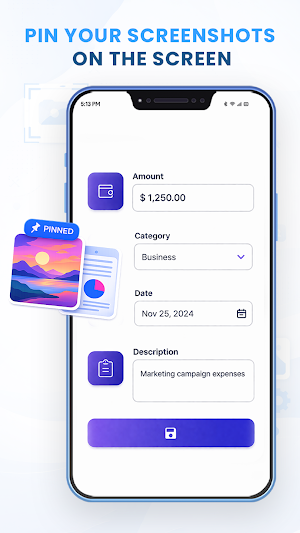
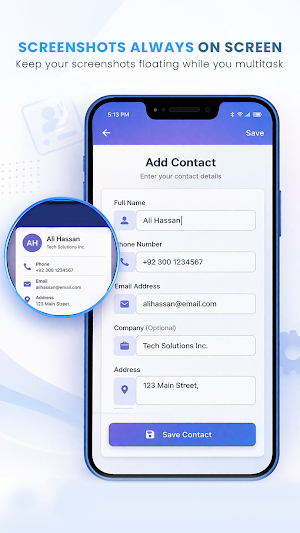
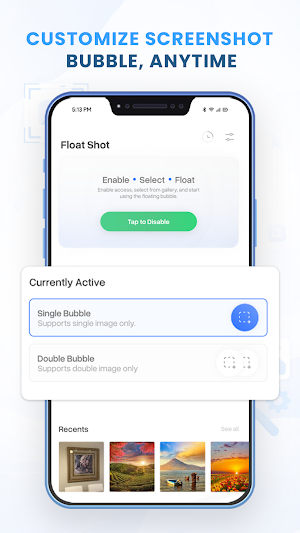
Float Shot is a screenshot manager that will help you to manage your screenshots in a more functional and more convenient manner with floating bubbles. You do not need to open your gallery again and again, you can keep screenshots on your screen and communicate with them instantly. Bubble screenshot view, single and dual image, zoom, cropping, pin to screen, and replace a picture, making it easy to control and utilize your screenshots without having to break your thought. Your recent screenshots have also been tracked by the app, and whenever you wish to visit them again, the app makes it easier to come back and reuse that screen. The Float Shot can be used by users who work with a lot of tasks, compare pictures, or need fast access to saved materials during the working, studying, or browsing process. It makes screenshot handling easy as it puts the required features on your screen in a tidy and organized manner.
SCREENSHOT BUBBLE MANAGEMENT
Drag and drop screenshots to floating bubbles and also control them on your screen without having to leave your applications. Have important images at hand when you are working or browsing.
MULTIPLE IMAGE SUPPORT
Summize up to 2 images simultaneously with single or double bubble mode. Compare a screenshot with another one or have several references at once.
IMAGE REPLACEMENT
Whenever you want to update your content or change the screenshot, simply change any screenshot enclosed in the bubble with a new image, and you are all ready to remain updated and relevant.
GALLERY ACCESS AND RECENTS
View your device screenshots on the app and easily see the last used bubbled images in the recents section on your home screen.
BUBBLE CONTROLS
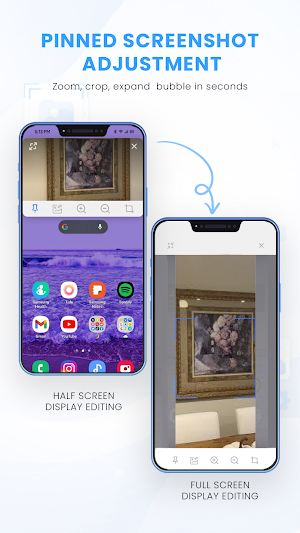
A bubble will be shown upon which the user could tap to use such tools as crop, zoom in, zoom out, expand view, pin to position, save changes, or close the bubble using the cross bubble.
HISTORY MANAGEMENT
You can manage all your screenshots with the option of adding them to a bubble, downloading, pinning, or unpinning and deleting any time. Create order in your workflow.
CUSTOMIZATION OPTIONS
Control the size of the bubbles to small, medium, or large. Adjust the time between bubbles and remain on the screen, or be able to move freely.
AUTO DETECTION and PERMISSIONS.
The application is able to automatically identify screenshots whenever you take them. To access and handle your screenshots, you need Gallery permission to do so.
WHY CHOOSE US?
✔No need to open your gallery to access screenshots every time.
✔Multitasking without any problems and maintaining screenshots on the screen.
✔Single and double mode flexible bubble system.
✔Fast editing features such as crop, zoom, and expand.
✔Sophisticated organization and track history and recent.
✔Individual control of bubble size, location, and visibility.
✔Automatic screenshot capture for fast access.
SCREENSHOT BUBBLE MANAGEMENT
Drag and drop screenshots to floating bubbles and also control them on your screen without having to leave your applications. Have important images at hand when you are working or browsing.
MULTIPLE IMAGE SUPPORT
Summize up to 2 images simultaneously with single or double bubble mode. Compare a screenshot with another one or have several references at once.
IMAGE REPLACEMENT
Whenever you want to update your content or change the screenshot, simply change any screenshot enclosed in the bubble with a new image, and you are all ready to remain updated and relevant.
GALLERY ACCESS AND RECENTS
View your device screenshots on the app and easily see the last used bubbled images in the recents section on your home screen.
BUBBLE CONTROLS
A bubble will be shown upon which the user could tap to use such tools as crop, zoom in, zoom out, expand view, pin to position, save changes, or close the bubble using the cross bubble.
HISTORY MANAGEMENT
You can manage all your screenshots with the option of adding them to a bubble, downloading, pinning, or unpinning and deleting any time. Create order in your workflow.
CUSTOMIZATION OPTIONS
Control the size of the bubbles to small, medium, or large. Adjust the time between bubbles and remain on the screen, or be able to move freely.
AUTO DETECTION and PERMISSIONS.
The application is able to automatically identify screenshots whenever you take them. To access and handle your screenshots, you need Gallery permission to do so.
WHY CHOOSE US?
✔No need to open your gallery to access screenshots every time.
✔Multitasking without any problems and maintaining screenshots on the screen.
✔Single and double mode flexible bubble system.
✔Fast editing features such as crop, zoom, and expand.
✔Sophisticated organization and track history and recent.
✔Individual control of bubble size, location, and visibility.
✔Automatic screenshot capture for fast access.
What’s new
Version 1.0.3 · Updated May 31, 2026
Revamp UI for better experience Bug fixes Stability enhancements
User reviews

This app has saved my life and made designing ocs so much easier because I can still see my reference picture without exiting any other app.
Alternatives to FloatShot: Pin Your Screenshot
Looking for apps like FloatShot: Pin Your Screenshot? Here are 6 similar Android apps on Google Play. The highest rated is MakerFlo (4.9/5), and all 6 are free to download.
-
Letterly: Write by Voice & AI 4.7
-
Partify: All Things Birthday 4.4
-
HiNotes by HiDock 3.8
-
SCRIBZEE® 2.8
-
Soaak 4.1
-
MakerFlo 4.9
| App | Rating | Price | Installs | Last updated | Compare |
|---|---|---|---|---|---|
| FloatShot: Pin Your Screenshot | – | Free | 100+ | May 31, 2026 | |
| Letterly: Write by Voice & AI | 4.7 / 5 | Free | 100,000+ | Sep 16, 2026 | Compare |
| Partify: All Things Birthday | 4.4 / 5 | Free | 500+ | May 20, 2025 | Compare |
| HiNotes by HiDock | 3.8 / 5 | Free | 10,000+ | Sep 24, 2026 | Compare |
| SCRIBZEE® | 2.8 / 5 | Free | 1,000,000+ | – | Compare |
| Soaak | 4.1 / 5 | Free | 50,000+ | – | Compare |
| MakerFlo | 4.9 / 5 | Free | 10,000+ | Jun 22, 2026 | Compare |