
WattWatch: Watch Battery
Cricke Tools
What your watch battery is draining at right now, and whether that is normal.
- Downloads
- 1+
- on Google Play
- Price
- $2.59
- No in-app purchases
- Updated
- Aug 10
- 2026 · v1.0.0
Screenshots


About WattWatch: Watch Battery
Every smartwatch shows you a battery percentage. None of them answer the
question you actually have about your watch battery life, which is why the
number is falling faster today than it did last week.
WattWatch answers three questions your watch does not.
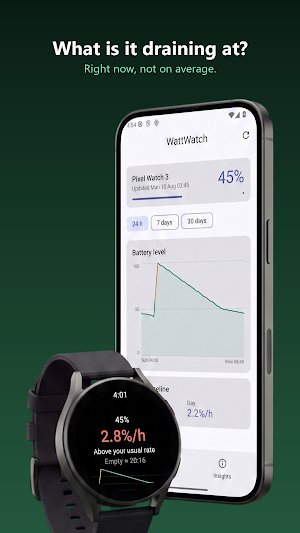
WHAT AM I DRAINING AT, RIGHT NOW
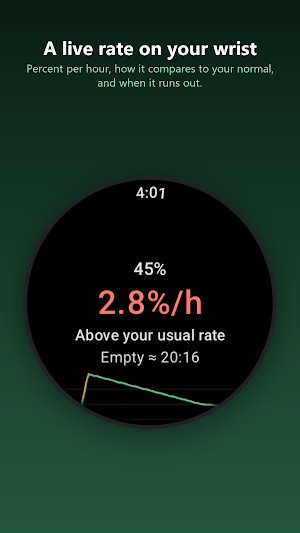
A live Wear OS battery drain rate in percent per hour, on the watch, as a
tile, as a watch face complication and in the app. Plus the projection that follows from it: the
time your watch is on course to reach empty, given how you are using it in
this moment rather than an average of the last month.
IS THIS NORMAL FOR ME
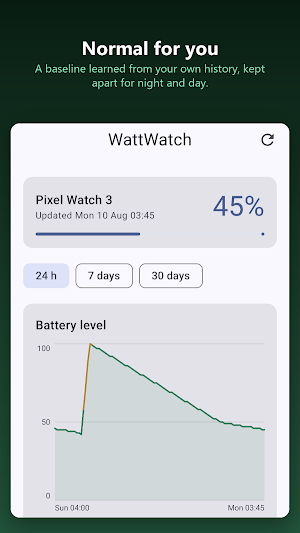
WattWatch learns a baseline from your own history, kept separately for night
and day, because a watch on your wrist at 3am behaves nothing like a watch on
your wrist at 3pm. The baseline uses the median drain per phase over fourteen
days, so one runaway night cannot quietly absorb the very anomaly it caused.
When a stretch sits well outside your normal, it gets flagged.
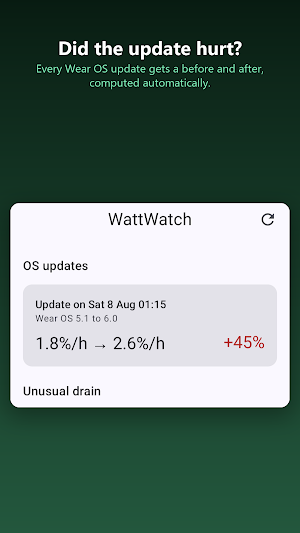
DID THE UPDATE MAKE IT WORSE
When the watch takes a Wear OS update, WattWatch notices and compares the days
before with the days after, automatically. You get a real number instead of a
feeling, and instead of a forum thread full of people guessing.
ON THE PHONE
The phone app keeps the full battery history, well past what the watch stores. A level
chart with proper axes, the individual discharge and charge sessions, the
night and day baseline side by side, the anomalies, the before and after of
every detected update, and a home-screen widget showing the watch's battery
level.
IT DOES NOT DRAIN YOUR BATTERY TO MEASURE YOUR BATTERY
An analyzer that costs what it measures is worthless. WattWatch samples every
fifteen minutes through WorkManager, which is the floor Android allows for
periodic work, and takes everything else from signals that are free: the
sticky battery broadcast, and a worker constrained to run when a charger is
connected. There is no continuous service, no wake locks of its own, and it
never asks to be exempted from battery optimisation. Target self-cost is under
one percent per day.
Gaps in the data are treated as gaps. Doze thins out periodic work, so the
segmenter treats holes longer than two hours, charger changes and unobserved
charges as boundaries, rather than drawing a smooth line through hours it
never actually saw.
WHAT IT DELIBERATELY DOES NOT DO
There is no per-app breakdown in milliamp hours. Android reserves that data
for the system, and third-party apps cannot get it. Any app that claims to
show you per-app watch consumption is estimating and not telling you so.
WattWatch sells comparison and correlation instead: your baseline, your
anomalies, your update impact.
WHY YOU CAN TRUST IT
Your battery history never leaves your devices. The phone app requests no
permissions at all. The watch app requests one, to restart sampling after a
reboot. Sync between watch and phone goes over the Wear Data Layer, which is
your own paired pair of devices.
No account. No analytics. No ads. No subscription. One purchase.
Requires Wear OS 4 or newer on the watch and Android 8.0 or newer on the
phone. The interface is English only.
question you actually have about your watch battery life, which is why the
number is falling faster today than it did last week.
WattWatch answers three questions your watch does not.
WHAT AM I DRAINING AT, RIGHT NOW
A live Wear OS battery drain rate in percent per hour, on the watch, as a
tile, as a watch face complication and in the app. Plus the projection that follows from it: the
time your watch is on course to reach empty, given how you are using it in
this moment rather than an average of the last month.
IS THIS NORMAL FOR ME
WattWatch learns a baseline from your own history, kept separately for night
and day, because a watch on your wrist at 3am behaves nothing like a watch on
your wrist at 3pm. The baseline uses the median drain per phase over fourteen
days, so one runaway night cannot quietly absorb the very anomaly it caused.
When a stretch sits well outside your normal, it gets flagged.
DID THE UPDATE MAKE IT WORSE
When the watch takes a Wear OS update, WattWatch notices and compares the days
before with the days after, automatically. You get a real number instead of a
feeling, and instead of a forum thread full of people guessing.
ON THE PHONE
The phone app keeps the full battery history, well past what the watch stores. A level
chart with proper axes, the individual discharge and charge sessions, the
night and day baseline side by side, the anomalies, the before and after of
every detected update, and a home-screen widget showing the watch's battery
level.
IT DOES NOT DRAIN YOUR BATTERY TO MEASURE YOUR BATTERY
An analyzer that costs what it measures is worthless. WattWatch samples every
fifteen minutes through WorkManager, which is the floor Android allows for
periodic work, and takes everything else from signals that are free: the
sticky battery broadcast, and a worker constrained to run when a charger is
connected. There is no continuous service, no wake locks of its own, and it
never asks to be exempted from battery optimisation. Target self-cost is under
one percent per day.
Gaps in the data are treated as gaps. Doze thins out periodic work, so the
segmenter treats holes longer than two hours, charger changes and unobserved
charges as boundaries, rather than drawing a smooth line through hours it
never actually saw.
WHAT IT DELIBERATELY DOES NOT DO
There is no per-app breakdown in milliamp hours. Android reserves that data
for the system, and third-party apps cannot get it. Any app that claims to
show you per-app watch consumption is estimating and not telling you so.
WattWatch sells comparison and correlation instead: your baseline, your
anomalies, your update impact.
WHY YOU CAN TRUST IT
Your battery history never leaves your devices. The phone app requests no
permissions at all. The watch app requests one, to restart sampling after a
reboot. Sync between watch and phone goes over the Wear Data Layer, which is
your own paired pair of devices.
No account. No analytics. No ads. No subscription. One purchase.
Requires Wear OS 4 or newer on the watch and Android 8.0 or newer on the
phone. The interface is English only.
What’s new
Version 1.0.0 · Updated August 10, 2026
First release. Live drain rate on the watch as a tile and a complication, a night and day baseline learned from your own history, anomaly flagging, automatic before and after comparison around Wear OS updates, and a phone dashboard with the full history.
Alternatives to WattWatch: Watch Battery
Looking for apps like WattWatch: Watch Battery? Here are 3 similar Android apps on Google Play. The highest rated is Vantix Law (4.7/5), and all 3 are free to download.



| App | Rating | Price | Installs | Last updated | Compare |
|---|---|---|---|---|---|
| WattWatch: Watch Battery | – | $2.59 | 1+ | Aug 10, 2026 | |
| Vantix Law | 4.7 / 5 | Free | 5,000+ | Oct 1, 2026 | Compare |
| FITEQ | – | Free | 5,000+ | Sep 10, 2026 | Compare |
| Fit2Flaunt | 4.2 / 5 | Free | 50,000+ | Oct 2, 2026 | Compare |