
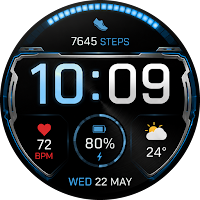
Neon Shield Watch Face
Personalization
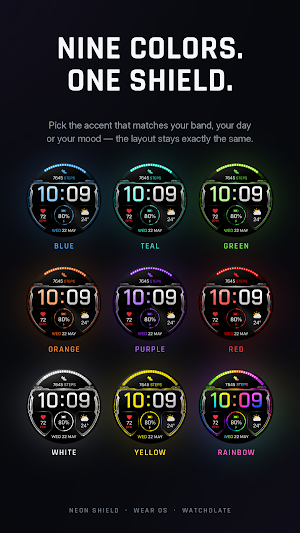
Nine LED colours, two free. Steps, heart rate, battery and weather at a glance.
- Downloads
- 18+
- on Google Play
- Price
- Free
- No in-app purchases
- Updated
- Oct 8
- 2026 · v1.0.7
Screenshots

About Neon Shield Watch Face
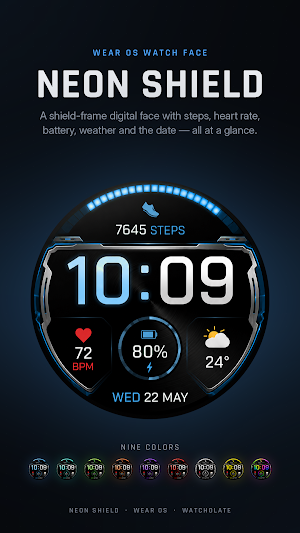
Neon Shield is a digital watch face for Wear OS, built in Watch Face Format. Everything a glance should answer is on one screen: the time, how far you have walked, your heart rate, how much battery is left, and what the weather is doing.
FEATURES AND DISPLAY
- Hour and minute in a wide LED-style numeral, hours in the accent colour
- Step count with a lit progress arc that follows your own daily step goal
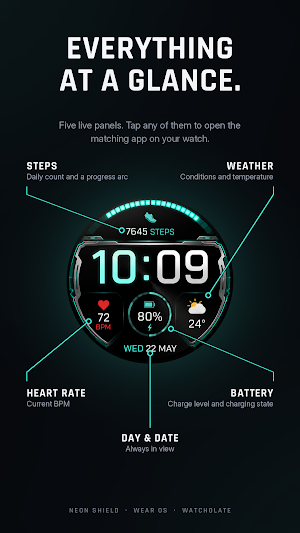
- Heart rate in beats per minute, battery percentage with a charging indicator, current temperature and conditions, and the day and date
- Five tappable panels: touch one and the matching app opens - steps, heart rate, battery, weather, or your calendar
- Always-on display: the face keeps the time and the day and date, drops the arc, and dims to a small fraction of the screen, so it costs your battery very little
NINE COLOURS, TWO OF THEM YOURS
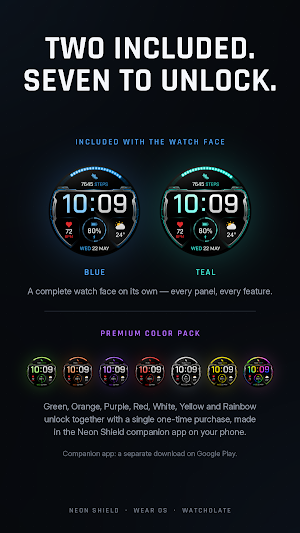
Blue and Teal are included with this watch face. They are complete, permanent colours - not a trial, and they do not expire.
Green, Orange, Purple, Red, White, Yellow and Rainbow are the premium set. One single payment of US$1.49 unlocks all seven at once. There is no subscription and nothing recurring.
A premium colour you have not unlocked shows a padlock when you wear it, so you always see exactly what you would be buying before you decide.
HOW TO UNLOCK THE PREMIUM COLOURS
1. Install the free Watcholate Watch Faces app on your phone from Google Play.
2. Install the Watcholate Watch Faces app on your watch as well - the phone app will offer to open the right page on your watch for you.
3. Make the one-time purchase in the phone app. Payment is handled by Google Play.
4. The premium colours unlock on your watch, usually within a second or two. You do not need to reload the face.
The purchase is tied to your Google account, so it applies to every watch you sign in to, and it comes back if you reset your watch or buy a new one.
REQUIREMENTS
- A Wear OS watch running Wear OS 5 or later (Android 14 or later)
- The Watcholate Watch Faces app, on both your phone and your watch, for the premium colours. Blue and Teal need nothing but this watch face.
PRIVACY
This watch face contains no code and collects nothing. Step count, heart rate, battery and weather are read and drawn by Wear OS itself and never leave your watch. The Watcholate Watch Faces app collects nothing either. There is no tracking code in either one. Full policy: https://watcholate.com/privacy
From Watcholate.
FEATURES AND DISPLAY
- Hour and minute in a wide LED-style numeral, hours in the accent colour
- Step count with a lit progress arc that follows your own daily step goal
- Heart rate in beats per minute, battery percentage with a charging indicator, current temperature and conditions, and the day and date
- Five tappable panels: touch one and the matching app opens - steps, heart rate, battery, weather, or your calendar
- Always-on display: the face keeps the time and the day and date, drops the arc, and dims to a small fraction of the screen, so it costs your battery very little
NINE COLOURS, TWO OF THEM YOURS
Blue and Teal are included with this watch face. They are complete, permanent colours - not a trial, and they do not expire.
Green, Orange, Purple, Red, White, Yellow and Rainbow are the premium set. One single payment of US$1.49 unlocks all seven at once. There is no subscription and nothing recurring.
A premium colour you have not unlocked shows a padlock when you wear it, so you always see exactly what you would be buying before you decide.
HOW TO UNLOCK THE PREMIUM COLOURS
1. Install the free Watcholate Watch Faces app on your phone from Google Play.
2. Install the Watcholate Watch Faces app on your watch as well - the phone app will offer to open the right page on your watch for you.
3. Make the one-time purchase in the phone app. Payment is handled by Google Play.
4. The premium colours unlock on your watch, usually within a second or two. You do not need to reload the face.
The purchase is tied to your Google account, so it applies to every watch you sign in to, and it comes back if you reset your watch or buy a new one.
REQUIREMENTS
- A Wear OS watch running Wear OS 5 or later (Android 14 or later)
- The Watcholate Watch Faces app, on both your phone and your watch, for the premium colours. Blue and Teal need nothing but this watch face.
PRIVACY
This watch face contains no code and collects nothing. Step count, heart rate, battery and weather are read and drawn by Wear OS itself and never leave your watch. The Watcholate Watch Faces app collects nothing either. There is no tracking code in either one. Full policy: https://watcholate.com/privacy
From Watcholate.
What’s new
Version 1.0.7 · Updated October 8, 2026
Fixed: a four- or five-digit step count no longer loses its last digit.
Alternatives to Neon Shield Watch Face
Looking for apps like Neon Shield Watch Face? Here are 6 similar Android apps on Google Play. The highest rated is TVV Workout 3 Watch Face (4.8/5), and 1 of the 6 are free to download.
-
OBSERVER WS01 Watch face
-
Numeric Format Watch Face
-
RE15 - Km & Mile - Sport 4.3
-
MD323 Modern Digital WatchFace 4.7
-
TVV Workout 3 Watch Face 4.8
-
Immortal Modern Digital ECO59
| App | Rating | Price | Installs | Last updated | Compare |
|---|---|---|---|---|---|
| Neon Shield Watch Face | – | Free | 10+ | Oct 8, 2026 | |
| OBSERVER WS01 Watch face | – | Free | 10+ | Jun 27, 2026 | Compare |
| Numeric Format Watch Face | – | 1.99 USD | 100+ | – | Compare |
| RE15 - Km & Mile - Sport | 4.3 / 5 | 0.49 USD | 5,000+ | Oct 15, 2026 | Compare |
| MD323 Modern Digital WatchFace | 4.7 / 5 | 1.99 USD | 1,000+ | – | Compare |
| TVV Workout 3 Watch Face | 4.8 / 5 | 1.49 USD | 1,000+ | Aug 27, 2026 | Compare |
| Immortal Modern Digital ECO59 | – | 1.99 USD | 1,000+ | Sep 30, 2026 | Compare |
Similar apps on Google Play
- OBSERVER WS01 Watch face
- Numeric Format Watch Face
- RE15 - Km & Mile - Sport
- MD323 Modern Digital WatchFace
- TVV Workout 3 Watch Face
- Immortal Modern Digital ECO59
- PER7 Storm Animated Weather
- MD217 Digital watch face
- BRN125 Digital Watch Face
- TKS 17 Surge Watch Face
- KF138 Watch face
- Oled - Digital v6 | watch face
- NOVA
- SH009 Watch Face, WearOS watch
- MD258 Digital watch face
- SG-106
- MD318 3D Digital Watch Face
- MD201 Digital watch face
- KF159 Watch face
- SamWatch Digital II
- PRADO X81 Digital Watch Face
- DX102 Digital Watch Face
- PRADO 86 Digital Watch Face
- PRADO 78 Digital Watch Face
- A385 Futuristic Face wear OS
- ML2U 378 Digital Tactical HUD