
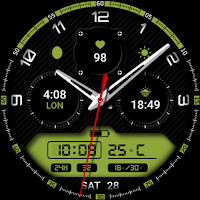
Watch face 10h08.com #128
Personalization
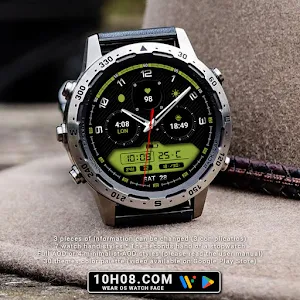
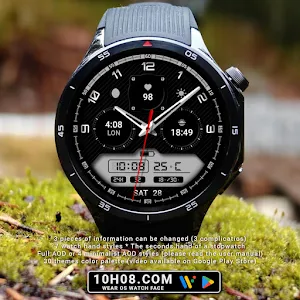
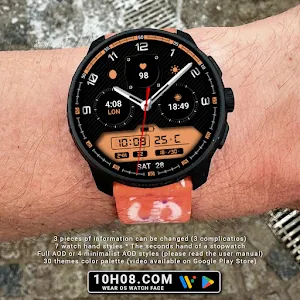
3 complications. Full AOD or 4 minimalist AOD styles. 30 themes color palette.
- Downloads
- 103+
- on Google Play
- Price
- $0.99
- No in-app purchases
- Updated
- Feb 2
- 2026 · v1.0.0
Screenshots
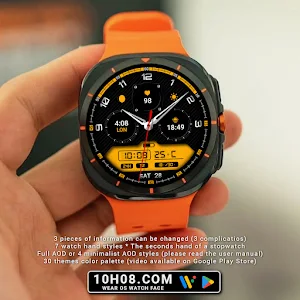


About Watch face 10h08.com #128
⌚️ Watch face 10h08.com #128
User manual:
1. The watch face only works for devices running Wear OS 5 or later
Check in Watch settings - Watch info - Software info - Wear OS version
2. Your weather shows "?". Open Galaxy Wearable app - Watch settings - Apps - Find Weather app and open it - Settings - Enable location, local, adjust units,...
* With Wear OS 6 and One UI 8 or later, please open the Weather app on your watch, then tap settings to configure.
3. How to turn on Simple AOD mode? Customize watch face and select menu:
- AOD simple background: select option 2 to enable black background
- AOD simple hands style: select option 2 or 3 to choose the hand style
- AOD simple index style: select option 2 or 3 to choose the index ring
🟥 Information:
- High resolution, sharp images
- Classic and elegant design
- Analog time
- Day, date
- Weather information
- Heart rate
- World clock
- Sunrise & sunset
- Battery level
- 7 watch hand styles
- 3 complications: heart rate, world clock, sunrise & sunset
- The seconds hand of a stopwatch
- Full AOD or 4 minimalist AOD styles (please read the user manual)
- 30 themes color palette (video available on Google Play Store)
🟨 How to custom this watch face?
1. Press and hold watch face screen
2. Tap “Customize” button
3. Swipe left or right, up or down to customize watch face
🟦 How to install watch face on your watch?
1. Install watch face from Google Play store
2. Press and hold watch face screen
3. Swipe right to left and tap “Add watch face”
4. Scroll to the bottom of the page and selectwatch face in the “downloaded” section
🟧 Compatible with smart watches running Wear OS 5+ SDK 34+
For example: Galaxy Watch 6, Galaxy Watch 7 Ultra, Ticwatch Pro 5, Pixcel Watch 2, Watch 2 Pro,...
🟩 See all my watch faces: https://play.google.com/store/apps/dev?id=5487081600241990978
🟪 Follow my social media pages for the latest watch face updates:
https://10h08.com
https://facebook.com/10h08
User manual:
1. The watch face only works for devices running Wear OS 5 or later
Check in Watch settings - Watch info - Software info - Wear OS version
2. Your weather shows "?". Open Galaxy Wearable app - Watch settings - Apps - Find Weather app and open it - Settings - Enable location, local, adjust units,...
* With Wear OS 6 and One UI 8 or later, please open the Weather app on your watch, then tap settings to configure.
3. How to turn on Simple AOD mode? Customize watch face and select menu:
- AOD simple background: select option 2 to enable black background
- AOD simple hands style: select option 2 or 3 to choose the hand style
- AOD simple index style: select option 2 or 3 to choose the index ring
🟥 Information:
- High resolution, sharp images
- Classic and elegant design
- Analog time
- Day, date
- Weather information
- Heart rate
- World clock
- Sunrise & sunset
- Battery level
- 7 watch hand styles
- 3 complications: heart rate, world clock, sunrise & sunset
- The seconds hand of a stopwatch
- Full AOD or 4 minimalist AOD styles (please read the user manual)
- 30 themes color palette (video available on Google Play Store)
🟨 How to custom this watch face?
1. Press and hold watch face screen
2. Tap “Customize” button
3. Swipe left or right, up or down to customize watch face
🟦 How to install watch face on your watch?
1. Install watch face from Google Play store
2. Press and hold watch face screen
3. Swipe right to left and tap “Add watch face”
4. Scroll to the bottom of the page and selectwatch face in the “downloaded” section
🟧 Compatible with smart watches running Wear OS 5+ SDK 34+
For example: Galaxy Watch 6, Galaxy Watch 7 Ultra, Ticwatch Pro 5, Pixcel Watch 2, Watch 2 Pro,...
🟩 See all my watch faces: https://play.google.com/store/apps/dev?id=5487081600241990978
🟪 Follow my social media pages for the latest watch face updates:
https://10h08.com
https://facebook.com/10h08
What’s new
Version 1.0.0 · Updated February 2, 2026
Release
Alternatives to Watch face 10h08.com #128
Looking for apps like Watch face 10h08.com #128? Here are 6 similar Android apps on Google Play.
-
Rythenight - watch face
-
Watch face 10h08.com #117
-
Binary Classic
-
SW2621 Hybrid Watch
-
CNRwatch048
-
Watch face 10h08.com #141
| App | Rating | Price | Installs | Last updated | Compare |
|---|---|---|---|---|---|
| Watch face 10h08.com #128 | – | $0.99 | 100+ | Feb 2, 2026 | |
| Rythenight - watch face | – | 1.49 USD | 1,000+ | Oct 12, 2023 | Compare |
| Watch face 10h08.com #117 | – | 0.99 USD | 10+ | Jan 14, 2026 | Compare |
| Binary Classic | – | 1.49 USD | 500+ | Aug 31, 2026 | Compare |
| SW2621 Hybrid Watch | – | 0.99 USD | 100+ | May 22, 2026 | Compare |
| CNRwatch048 | – | 0.99 USD | 10+ | – | Compare |
| Watch face 10h08.com #141 | – | 0.99 USD | 50+ | Mar 4, 2026 | Compare |
Similar apps on Google Play
- Rythenight - watch face
- Watch face 10h08.com #117
- Binary Classic
- SW2621 Hybrid Watch
- CNRwatch048
- Watch face 10h08.com #141
- IA133 Classic Watchface
- CNRwatch054
- Watch face 10h08.com #116
- SW2615 Analog Watch
- KF169 watch face
- Classic MOD5 Modern watch face
- Watch face 10h08.com #110
- Hybrid KARADAN Watch face
- Watch face 10h08.com #118
- MJ177 Hybrid Elegant Sport
- Watch face 10h08.com #129
- Watch face 10h08.com #114
- SY02 Watch Face For Wear OS
- Hybrid ACTIVE URX76 Watch face
- SamWatch Simple Analog 45
- KF160 Watch face
- Business Watch Face Wear OS
- SY27 Watch Face for Wear OS
- MJ153 Classic Elegant Hybrid
- PT12 Hybrid Watch Face
- CFS123 Tech Hybrid
- N-SPORT655 Analog Digital Face