
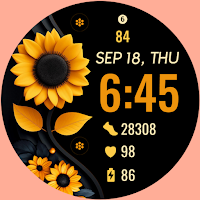
Sunflower Bloom
Personalization
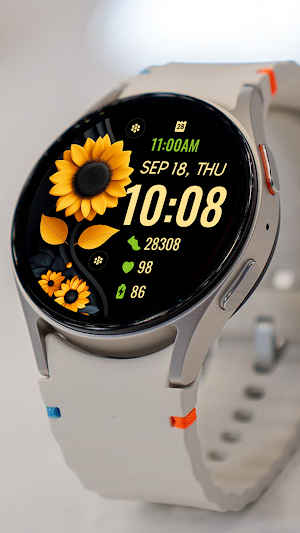
Sunflower Summer Bloom-Themed Watchface
- Downloads
- 100+
- on Google Play
- Price
- $0.89
- No in-app purchases
- Updated
- Oct 28
- 2025
Screenshots
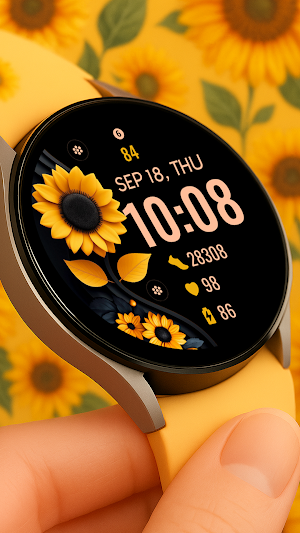
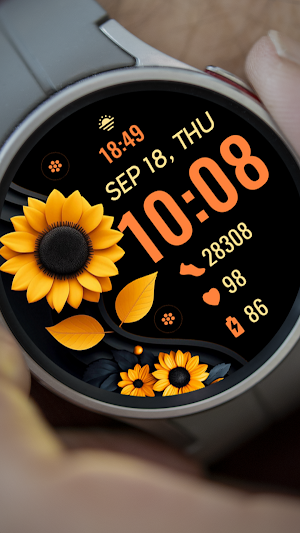


About Sunflower Bloom
📍INSTALLATION NOTES
⭐️Note for Galaxy Watch Users: The watch face editor in the Samsung Wearable app often fails to sync and load complex watch faces.
This is not an issue with the watch face. It is recommended to customize the watch face directly on the watch until Samsung resolves this issue.
📍This watch face supports all Wear OS devices with API Level 34+ | Wear OS 4 and later versions
(Some features may not be available on some watches)
⭐️KEY FEATURES:
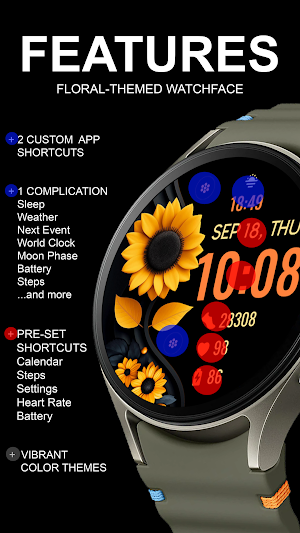
- Floral-Themed Digital Clock
- Pre-Set App Shortcut - FIXED (Alarm, Calendar, Battery, Heart Rate and Steps)
- 2 Custom App Shortcuts
- 1 Custom Complication (you can customize the complication with the any data you want)
For example, you can select Date, weather, steps, world clock, sunset/sunrise, next appointment, distance walked and more.
***You may need to install additional third-party complications.
- Custom Color Palette
TAKE NOTE❗️❗️❗️
1️⃣ Watch faces automatically install on WEAR OS watch.
2️⃣ MAKE SURE THE WATCH IS SYNCED TO YOUR PHONE USING THE SAME EMAIL ADDRESS FOR SEAMLESS INSTALLATION.
3️⃣ After download, WAIT for a few minutes for the watch face to be transferred on watch. (There will be a notification on your watch if the watch face was successfully transferred.)
4️⃣ If incase there is no notification, Go to PLAYSTORE ON YOUR WATCH and type on the SEARCH BOX "Animals Owl Neon"
⭐️ Watch faces don't automatically display/change after successful installation. Go back to home display. Tap and hold display, swipe until the end and tap + to add the watch face. Rotate Bezel or scroll to find the watch face.
📍ALLOW / ENABLE all permissions from settings -> applications -> permissions.
⚠️⚠️⚠️ Refund is ONLY allowed within 24 hours.
Contact us at: [email protected]
Installation Tutorial: https://www.youtube.com/watch?v=vMM4Q2-rqoM
⭐️Note for Galaxy Watch Users: The watch face editor in the Samsung Wearable app often fails to sync and load complex watch faces.
This is not an issue with the watch face. It is recommended to customize the watch face directly on the watch until Samsung resolves this issue.
📍This watch face supports all Wear OS devices with API Level 34+ | Wear OS 4 and later versions
(Some features may not be available on some watches)
⭐️KEY FEATURES:
- Floral-Themed Digital Clock
- Pre-Set App Shortcut - FIXED (Alarm, Calendar, Battery, Heart Rate and Steps)
- 2 Custom App Shortcuts
- 1 Custom Complication (you can customize the complication with the any data you want)
For example, you can select Date, weather, steps, world clock, sunset/sunrise, next appointment, distance walked and more.
***You may need to install additional third-party complications.
- Custom Color Palette
TAKE NOTE❗️❗️❗️
1️⃣ Watch faces automatically install on WEAR OS watch.
2️⃣ MAKE SURE THE WATCH IS SYNCED TO YOUR PHONE USING THE SAME EMAIL ADDRESS FOR SEAMLESS INSTALLATION.
3️⃣ After download, WAIT for a few minutes for the watch face to be transferred on watch. (There will be a notification on your watch if the watch face was successfully transferred.)
4️⃣ If incase there is no notification, Go to PLAYSTORE ON YOUR WATCH and type on the SEARCH BOX "Animals Owl Neon"
⭐️ Watch faces don't automatically display/change after successful installation. Go back to home display. Tap and hold display, swipe until the end and tap + to add the watch face. Rotate Bezel or scroll to find the watch face.
📍ALLOW / ENABLE all permissions from settings -> applications -> permissions.
⚠️⚠️⚠️ Refund is ONLY allowed within 24 hours.
Contact us at: [email protected]
Installation Tutorial: https://www.youtube.com/watch?v=vMM4Q2-rqoM
Alternatives to Sunflower Bloom
Looking for apps like Sunflower Bloom? Here are 6 similar Android apps on Google Play.
-
BFF38- Animation Sunflower
-
Solar Bloom Watch Face
-
One Sunflower WatchFace SMA 07
-
BFF148- Blackboard Art Flower
-
Sun Flower Watch Face SMA - 02
-
BFF24- Neon Art Sunflower
| App | Rating | Price | Installs | Last updated | Compare |
|---|---|---|---|---|---|
| Sunflower Bloom | – | $0.89 | 100+ | Oct 28, 2025 | |
| BFF38- Animation Sunflower | – | 1.39 USD | 5+ | Sep 19, 2024 | Compare |
| Solar Bloom Watch Face | – | 0.99 USD | 50+ | Jun 15, 2026 | Compare |
| One Sunflower WatchFace SMA 07 | – | 0.49 USD | 10+ | Sep 10, 2024 | Compare |
| BFF148- Blackboard Art Flower | – | 1.69 USD | 1+ | Oct 15, 2026 | Compare |
| Sun Flower Watch Face SMA - 02 | – | 0.49 USD | 50+ | Sep 10, 2024 | Compare |
| BFF24- Neon Art Sunflower | – | 1.99 USD | 100+ | Oct 28, 2024 | Compare |
Compare Sunflower Bloom with the top alternatives: ratings, updates, ASO score and keyword gaps →
Similar apps on Google Play
- BFF38- Animation Sunflower
- Solar Bloom Watch Face
- One Sunflower WatchFace SMA 07
- BFF148- Blackboard Art Flower
- Sun Flower Watch Face SMA - 02
- BFF24- Neon Art Sunflower
- Sunflowers analog watch face
- Amoled Flowers Watch face
- Ladies Flower Bloom WatchFace
- BFF67- Neon Art Sunflower fall
- Floral Watch Faces ULTRA SGW7
- BFF24-Blackboard Art Sunflower
- Floral Sunflower Botanical
- BFF142- Blackboard Art Flower
- BFF38-Blackboard Art Sunflower
- BFF51-Blackboard Art Sunflower
- SamWatch Flower 2024 Sunflower
- Floral Elegance Watch Face
- Sunflowers Watch Face Animated
- BFF1- Blackboard Art Sunflower
- RW109 Chic Flora Bloom
- Sunflowers Watch Face
- Simple Sunflowers watch face
- Sunflower Shine WatchFace
- BFF35-Blackboard Art Sunflower
- Elegant Sunflower Bloom Watch
- DM123 Tricolor Weather Face