
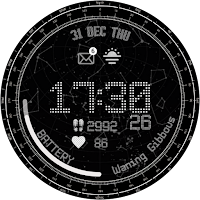
StarGlider Watch Face
VOKKI Personalization
Elegant Wear OS Watch Face
- Downloads
- 122+
- on Google Play
- Price
- $0.99
- No in-app purchases
- Updated
- Oct 31
- 2025
Screenshots
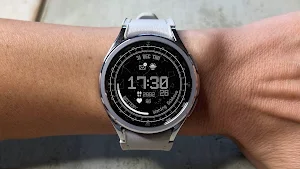
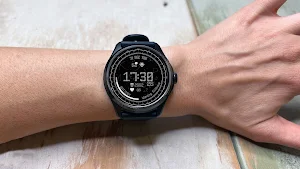
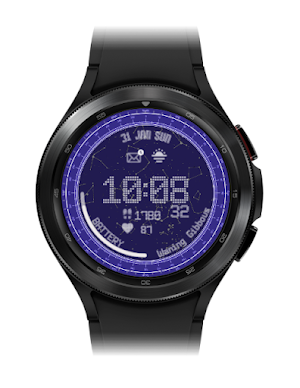
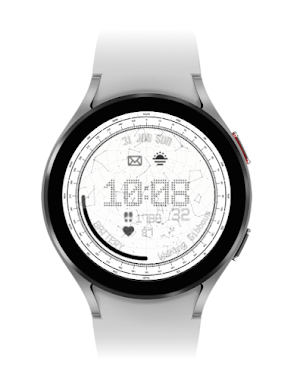


About StarGlider Watch Face
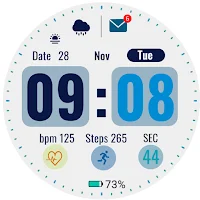
Watch face features;
-5x color option
-Step counter
-Heart rate
-Watch battery
-Date
-AOD screen
-1x complication slot
🌌 Futuristic Design: StarGlider boasts a cutting-edge design inspired by the beauty of the cosmos. Marvel at the dynamic visuals that make your watch face truly stand out.
🔄 Customization Options: Tailor StarGlider to match your unique style. Choose from a variety of complications, ensuring your watch face reflects your personality.
🌐 Informative Complications: Stay informed at a glance with complications displaying essential information such as steps taken, heart rate, and battery level. StarGlider is more than just a pretty face—it's your personal assistant on the wrist.
🕒 Always-On Display: Enjoy the convenience of an always-on display that keeps the time and your chosen complications visible at all times without compromising battery life.
⚙️ Easy Setup: Setting up StarGlider is a breeze. Simply install the watch face, customize it to your liking, and elevate your Wear OS experience.
Installation instructions:
1. Make sure your watch is connected to your cell phone via Bluetooth.
2. Install the watch face and make sure to select your watch.
3. You can also install the watch face by opening the Play Store via your web browser.
4. You can install the watch face directly on your watch by opening the Play Store and search and install your watch face.
How to install a watch face in detail:
https://developer.samsung.com/sdp/blog/en-us/2022/04/05/how-to-install-wear-os-powered-by-samsung-watch-faces
Please note that the developer of the watch face has no control over the installation process in the Play Store.
If you need further assistance, please contact [email protected].
Gizlilik politikası için https://justpaste.it/b8svf
-5x color option
-Step counter
-Heart rate
-Watch battery
-Date
-AOD screen
-1x complication slot
🌌 Futuristic Design: StarGlider boasts a cutting-edge design inspired by the beauty of the cosmos. Marvel at the dynamic visuals that make your watch face truly stand out.
🔄 Customization Options: Tailor StarGlider to match your unique style. Choose from a variety of complications, ensuring your watch face reflects your personality.
🌐 Informative Complications: Stay informed at a glance with complications displaying essential information such as steps taken, heart rate, and battery level. StarGlider is more than just a pretty face—it's your personal assistant on the wrist.
🕒 Always-On Display: Enjoy the convenience of an always-on display that keeps the time and your chosen complications visible at all times without compromising battery life.
⚙️ Easy Setup: Setting up StarGlider is a breeze. Simply install the watch face, customize it to your liking, and elevate your Wear OS experience.
Installation instructions:
1. Make sure your watch is connected to your cell phone via Bluetooth.
2. Install the watch face and make sure to select your watch.
3. You can also install the watch face by opening the Play Store via your web browser.
4. You can install the watch face directly on your watch by opening the Play Store and search and install your watch face.
How to install a watch face in detail:
https://developer.samsung.com/sdp/blog/en-us/2022/04/05/how-to-install-wear-os-powered-by-samsung-watch-faces
Please note that the developer of the watch face has no control over the installation process in the Play Store.
If you need further assistance, please contact [email protected].
Gizlilik politikası için https://justpaste.it/b8svf
What’s new
Updated October 31, 2025
• 16KB page size support added • Updated to Android API 36
User reviews

Thanks Nice work

Beautiful design

Perfect watch for any starfield fan

Beautiful watchface. Looks great on my watch.

The watch face was absolutely fantastic, unquestionably worth its price and the design gives you vibes of nothing phone clock, I adore it!
Alternatives to StarGlider Watch Face
Looking for apps like StarGlider Watch Face? Here are 4 similar Android apps on Google Play. 1 of the 4 are free to download.
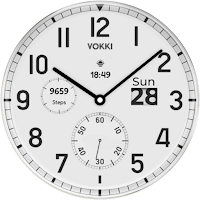
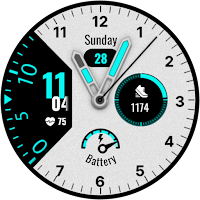
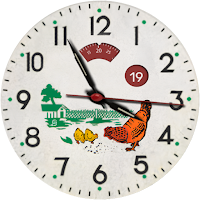
| App | Rating | Price | Installs | Last updated | Compare |
|---|---|---|---|---|---|
| StarGlider Watch Face | – | $0.99 | 100+ | Oct 31, 2025 | |
| Velvora Watch Face | – | Free | 50,000+ | Oct 25, 2025 | Compare |
| Zephyr Watch Face | – | 0.99 USD | 50+ | Nov 1, 2025 | Compare |
| Chicky Watch Face | – | 0.99 USD | 50+ | Oct 31, 2025 | Compare |
| Maurice Watch Face | – | 0.99 USD | 100+ | Oct 31, 2025 | Compare |