
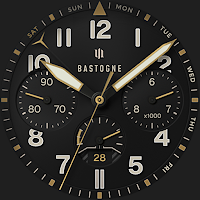
S4U Bastogne Field watch face
Personalization
Eye-catching analog field watch face with numerous customization options
- Rating
- 4.6
- 46 ratings
- Downloads
- 1.1K+
- on Google Play
- Price
- $1.99
- No in-app purchases
- Updated
- Sep 17
- 2026
Screenshots
Save to Pinterest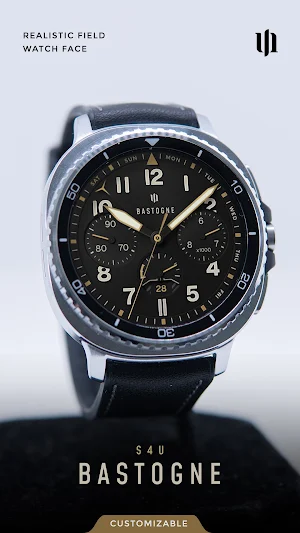



About S4U Bastogne Field watch face
Discover the perfect blend of readability and functionality with this eye-catching analog field watch-style dial, offering a range of customizable options to suit your style. The watch face features 2 editable complications and 5 shortcuts.
━━━━━━━━━━━━━━━━━━
⚠️ IMPORTANT: Compatibility & Installation
This app is optimized for the new Watch Face Format regarding Wear OS 5 (API 34+). Compatible devices include:
- Samsung Galaxy Watch 8, Ultra, 7, 6 , 5, 4 (Wear OS 5 update required)
- Google Pixel Watch Series
- Other Wear OS 5+ smartwatches
(Note: Only devices running Wear OS 5 or higher are supported!)
If you experience any issues with installation or downloading:
1. Ensure your watch is updated to the latest Wear OS version.
2. Open the companion app provided with your purchase.
3. Follow the steps in the Install/Issues section.
Still need help? Email me at [email protected].
━━━━━━━━━━━━━━━━━━
✨ Key Features:
- Realistic Design: Analog field watch face design.
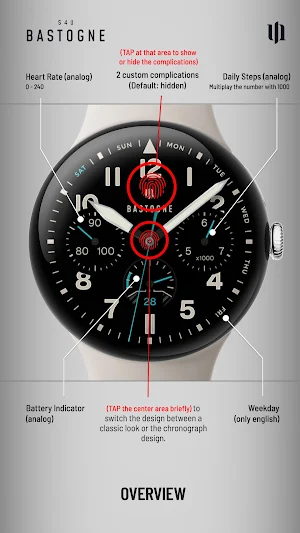
- Switch between classic and chronograph designs with a tap.
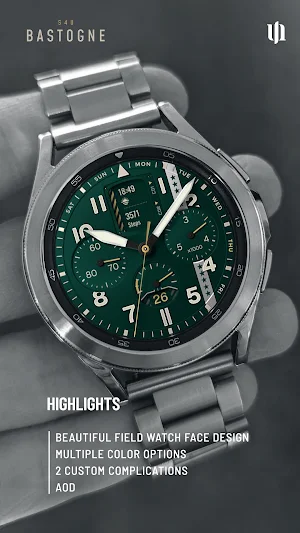
- Color Customization: Personalize your watch with multiple dial color choices.
- 2 Editable Values: Display user-defined data (e.g., weather, battery, heart rate).
- 5 Shortcuts: Quickly access your favorite widgets/apps.
- Always-On Display: Choose from 4 different brighness settings for optimal AOD functionality.
━━━━━━━━━━━━━━━━━━
🎨 CUSTOMIZATION
Personalize your S4U Bastogne in just a few steps:
1. Press and hold the center of the watch display.
2. Tap the customize button.
3. Swipe left or right to navigate through the customizable elements.
4. Swipe up or down to change colors or options for each item.
Available Options:
- Background Color: 10
- Background Stripe: off + 2 options
- Weekend hand: off + 2 options
- Background shadow: off, 5 options
- AOD brightness: 4 (dark, low, mid, bright)
- AOD Layout: 2 (classic, chronograph)
Complications:
- 2 Editable Complications
- 5 App Shortcuts
****
━━━━━━━━━━━━━━━━━━
🌙 Always-On Display (AOD)
The watch face features an Always-On Display for continuous timekeeping. Colors automatically adapt to your chosen design with a pure black background.
4 AOD Brightness options:
- dark, low, mid, bright
4 AOD Layout options:
- classic, chronograph
Note:
- Using AOD will reduce battery life, depending on your smartwatch's settings.
- Some smartwatches may automatically dim the AOD display based on ambient light conditions.
- The AOD background uses a deep black background to keep the On Pixel Ratio (OPR) as low as possible.
━━━━━━━━━━━━━━━━━━
⚙️ SHORTCUTS & COMPLICATIONS
- App Shortcuts: Link to your favorite apps for quick access.
- Editable Complications/Values: Display exactly the data you need.
How to Set Up:
1. Press and hold the watch display.
2. Tap the customize button.
3. Swipe right to left until you reach the "complications" section.
4. Tap on any of the 5 editable shortcuts or 2 editable complications to configure your preferred settings.
With these options, you can tailor your watch face to perfectly suit your daily needs!
━━━━━━━━━━━━━━━━━━
📬 Stay Connected
Enjoying the design? Check out my other creations! I’m constantly crafting new watch faces for Wear OS.
🌐 https://www.s4u-watches.com
Feedback & Support
I’d love to hear your thoughts! Suggestions and feedback help me improve.
📧 Email: [email protected]
💬 Please leave a review on the Play Store!
Follow Me
📸 Instagram: https://www.instagram.com/matze_styles4you/
👍 Facebook: https://www.facebook.com/styles4you
▶️ YouTube: https://www.youtube.com/c/styles4you-watches
🐦 X: https://x.com/MStyles4you
What’s new
Updated September 17, 2026
Version (1.0.7) - Companion App Minor fixes.
User reviews

Nice looking Field Watch with low battery usage. Overall a smart looking watch face. Two feature requests for an update if possible. A slightly larger font for screen apps to better read temperature & events along with an icon for the number of phone calls instead of just showing a digit.

Beautiful and elegant watch face that can be customized for any type of occasion. S4U watch faces are a part of my regular rotation and this one is no different. Always efficient with battery and performs flawlessly on my 8C.

Nice looking watch. But the three complications on the face, do not appear as three dials or circular plates, as it does in the thumbnail. When I purchased this face, I thought those would be there and editable as data complications. Now they just don't show up at all.

gorgeous nice

What a wonderful surprise and a great addition to the collection! This looks awesome on my 8 Ultra! Thank you so much!
Alternatives to S4U Bastogne Field watch face
Looking for apps like S4U Bastogne Field watch face? Here are 6 similar Android apps on Google Play. The highest rated is CELEST1740 Analog Watch (4.8/5).
-
Pilot
-
Sporty Luxury: Watch Face
-
JW040 jwstudio
-
CELEST1740 Analog Watch 4.8
-
JW339 jwstudio
-
Casual Black Watch Face
| App | Rating | Price | Installs | Last updated | Compare |
|---|---|---|---|---|---|
| S4U Bastogne Field watch face | 4.6 / 5 | $1.99 | 1,000+ | Sep 17, 2026 | |
| Pilot | – | 1.49 USD | 100+ | Aug 31, 2026 | Compare |
| Sporty Luxury: Watch Face | – | 1.99 USD | 500+ | Jul 3, 2026 | Compare |
| JW040 jwstudio | – | 1.49 USD | 100+ | Jul 24, 2025 | Compare |
| CELEST1740 Analog Watch | 4.8 / 5 | 1.99 USD | 1,000+ | Aug 5, 2026 | Compare |
| JW339 jwstudio | – | 1.49 USD | 10+ | Apr 8, 2026 | Compare |
| Casual Black Watch Face | – | 1.99 USD | 50+ | Aug 11, 2026 | Compare |
Similar apps on Google Play
- Pilot
- Sporty Luxury: Watch Face
- JW040 jwstudio
- CELEST1740 Analog Watch
- JW339 jwstudio
- Casual Black Watch Face
- Aeronaute Classic Watch Face
- AE LEUCHTEN
- Watch face CNW0014
- WES3 - Aviator Watch Face
- JW101 jwstudio
- UMIL
- AE ATLANTIS [SUPER AVI]
- perslot8
- Lumeon Realistic Watch Face
- MIMIX F772ft Flight Watchface
- Military Watch Face 06
- Breitling ClassicAVI WatchFace
- Chester SkyPilot watch face
- Submarine: Analog Tool Watch