
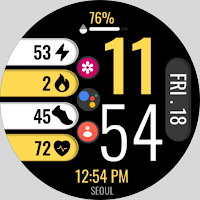
Chroma Fit 1
Personalization
Vibrant and Functional Watch Face
- Downloads
- 715+
- on Google Play
- Price
- $0.49
- No in-app purchases
- Updated
- Jul 8
- 2025
Screenshots
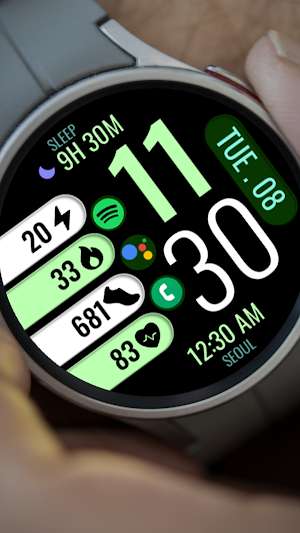
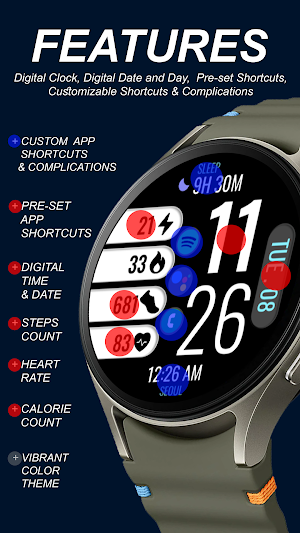
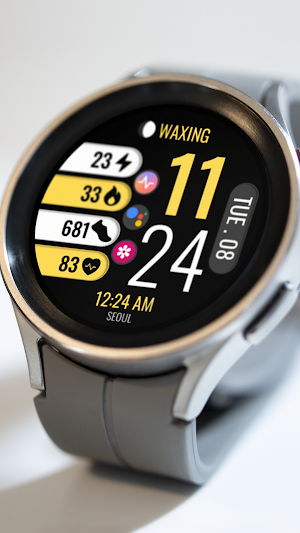
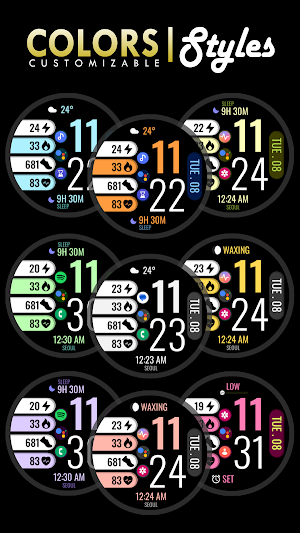


About Chroma Fit 1
📍INSTALLATION GUIDE
⭐️Our watch face apps are thoroughly tested in a real device and are "reviewed and approved" by the Google Play Store Team before publishing them.
TAKE NOTE❗️❗️❗️
1️⃣ Watch faces automatically install on WEAR OS watch.
2️⃣ MAKE SURE THE WATCH IS SYNCED TO YOUR PHONE USING THE SAME GOOGLE ACCOUNT FOR SEAMLESS INSTALLATION.
3️⃣ After download, WAIT for a few minutes for the watch face to be transferred on watch. (There will be a notification on your watch if the watch face was successfully transferred.)
4️⃣ If incase there is no notification, Go to PLAYSTORE ON YOUR WATCH and type on the SEARCH BOX "Chroma Fit 1"
⭐️ Watch faces don't automatically display/change after successful installation. Go back to home display. Tap and hold display, swipe until the end and tap + to add the watch face. Rotate Bezel or scroll to find the watch face.
📍ALLOW / ENABLE all permissions from settings -> applications -> permissions.
⚠️⚠️⚠️ Refund is ONLY allowed within 24 hours.
⭐️FEATURES:
- Digital Clock
- Day & Date
- Preset App Shortcuts
- Customizable App Shortcuts & Complications
- Vibrant Color Backgrounds
📍Supports Wear OS watches, but some features may not be available on some watches.
⭐️Our watch face apps are thoroughly tested in a real device and are "reviewed and approved" by the Google Play Store Team before publishing them.
TAKE NOTE❗️❗️❗️
1️⃣ Watch faces automatically install on WEAR OS watch.
2️⃣ MAKE SURE THE WATCH IS SYNCED TO YOUR PHONE USING THE SAME GOOGLE ACCOUNT FOR SEAMLESS INSTALLATION.
3️⃣ After download, WAIT for a few minutes for the watch face to be transferred on watch. (There will be a notification on your watch if the watch face was successfully transferred.)
4️⃣ If incase there is no notification, Go to PLAYSTORE ON YOUR WATCH and type on the SEARCH BOX "Chroma Fit 1"
⭐️ Watch faces don't automatically display/change after successful installation. Go back to home display. Tap and hold display, swipe until the end and tap + to add the watch face. Rotate Bezel or scroll to find the watch face.
📍ALLOW / ENABLE all permissions from settings -> applications -> permissions.
⚠️⚠️⚠️ Refund is ONLY allowed within 24 hours.
⭐️FEATURES:
- Digital Clock
- Day & Date
- Preset App Shortcuts
- Customizable App Shortcuts & Complications
- Vibrant Color Backgrounds
📍Supports Wear OS watches, but some features may not be available on some watches.
User reviews

Easy to read the time, easy to customize
Alternatives to Chroma Fit 1
Looking for apps like Chroma Fit 1? Here are 6 similar Android apps on Google Play. The highest rated is Perpetual Watch Face (4.6/5), and 1 of the 6 are free to download.
-
Perpetual Watch Face 4.6
-
Night ver 16 - watch face
-
KZY027
-
WaterUP Ratio Watchface
-
Active Wear Watchface 3
-
KITE - Digital Watch Face 4.4
| App | Rating | Price | Installs | Last updated | Compare |
|---|---|---|---|---|---|
| Chroma Fit 1 | – | $0.49 | 500+ | Jul 8, 2025 | |
| Perpetual Watch Face | 4.6 / 5 | 1.49 USD | 10,000+ | Aug 4, 2026 | Compare |
| Night ver 16 - watch face | – | 1.49 USD | 100+ | Jul 11, 2024 | Compare |
| KZY027 | – | 0.49 USD | 50+ | Sep 8, 2025 | Compare |
| WaterUP Ratio Watchface | – | Free | 10+ | Jul 17, 2025 | Compare |
| Active Wear Watchface 3 | – | 0.99 USD | 100+ | – | Compare |
| KITE - Digital Watch Face | 4.4 / 5 | 1.49 USD | 100+ | – | Compare |
Compare Chroma Fit 1 with the top alternatives: ratings, updates, ASO score and keyword gaps →
Similar apps on Google Play
- Perpetual Watch Face
- Night ver 16 - watch face
- KZY027
- WaterUP Ratio Watchface
- Active Wear Watchface 3
- KITE - Digital Watch Face
- Flat Desktop ZKin Watch
- PER38 Digital Watch Face
- Activity Dash Watch Face
- FSW285 digital watch face
- FSW270 Digital Watchface
- CC Digital 27 watch face
- Digital Watchface D16
- Digital Weather Sports Face
- MDS358 Digital Watch Face
- rens watchface90
- Chroma Fit 2
- Digital Watch Face: OMG 53
- ZKinWatch Fantasy Purple Clock
- ZKin Watch Black Color Data
- FSW260 WATCHFACE
- AWD Weather G02 watchface
- YamWatch Digital 15
- Minimal Watch Face: OMG 262
- SamWatch SIGN Z 2023
- Key023 Digital Watch Face