
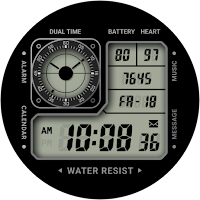
CELEST5616 Retro Digital Watch
Personalization Contains ads
Iconic tactical design with modern LCD gradients and camo options
- Rating
- 5.0
- 14 ratings
- Downloads
- 500+
- on Google Play
- Price
- $1.99
- No in-app purchases
- Updated
- Aug 5
- 2026
Screenshots


About CELEST5616 Retro Digital Watch
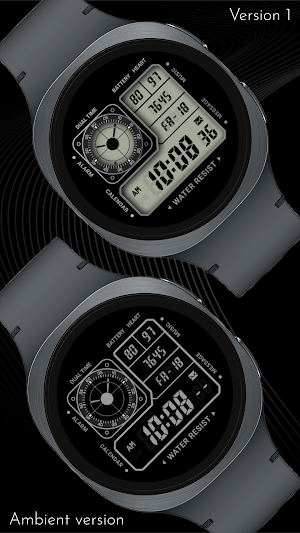
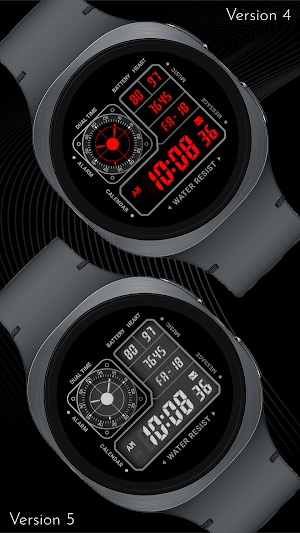
This watch face captures the essence of a legendary digital tool watch, delivering a rugged "command center" aesthetic to your wrist. The high-density layout features a prominent digital clock alongside dedicated readouts for heart rate, battery life, and step counts. With its professional, mission-ready design and iconic segmented compartments, it brings a timeless, technical look to your modern smartwatch.
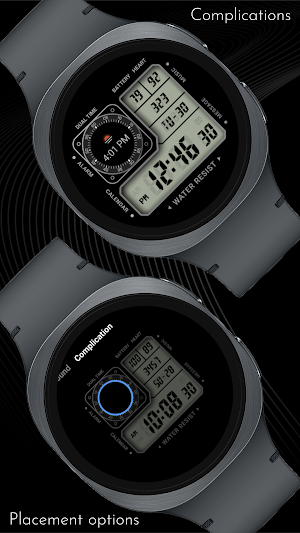
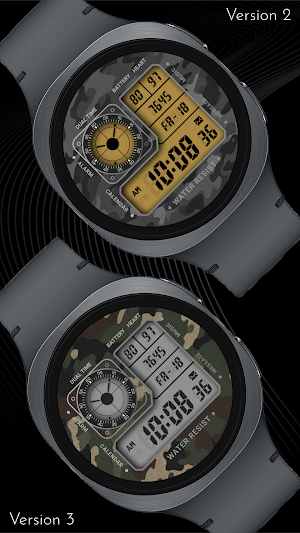
Personalization is at the heart of the experience, offering 8 camo background options, 10 LCD color options, and 9 LCD gradient options. This vast array of choices allows you to create a unique look that matches your tactical gear or daily style. To further refine your setup, you can hide the analog dual-time display to insert a circular complication in its place, giving you the freedom to prioritize the specific data you need most.
With integrated shortcuts for Alarm, Calendar, Music, and Messages, this face is as functional as it is stylish. It transforms your wearable into a comprehensive utility instrument, ensuring every critical metric and tool is available at a glance.
🎨 PERSONALIZATION OPTIONS
· 9 Camo background options
· 10 LCD color options
· 9 LCD gradient options
· 2 LCD divider colors
· 22 text colors
· Option to hide the analog clock to add a circular complication
📱 COMPATIBILITY
✅ Works with Galaxy Watch, Pixel Watch, and all Wear OS 5+ devices
🔧 INSTALLATION HELP
Having trouble? We've got you covered:
- Use the dropdown menu next to "Install" on your phone to select your watch model or install directly from your watch's Play Store app
- Updating weather data may take time after installation but switching to another watch face and switching back or restarting both the watch and phone usually helps
- Check out our installation and troubleshooting guide: https://celest-watches.com/installation-troubleshooting/
- Contact us at [email protected] for quick support
🏪 DISCOVER MORE
Browse our full collection of premium Wear OS watch faces:
🔗 https://celest-watches.com
💰 Exclusive discounts available
📞 SUPPORT & COMMUNITY
📧 Support: [email protected]
📱 Follow @celestwatches on Instagram or sign up to our newsletter!
Personalization is at the heart of the experience, offering 8 camo background options, 10 LCD color options, and 9 LCD gradient options. This vast array of choices allows you to create a unique look that matches your tactical gear or daily style. To further refine your setup, you can hide the analog dual-time display to insert a circular complication in its place, giving you the freedom to prioritize the specific data you need most.
With integrated shortcuts for Alarm, Calendar, Music, and Messages, this face is as functional as it is stylish. It transforms your wearable into a comprehensive utility instrument, ensuring every critical metric and tool is available at a glance.
🎨 PERSONALIZATION OPTIONS
· 9 Camo background options
· 10 LCD color options
· 9 LCD gradient options
· 2 LCD divider colors
· 22 text colors
· Option to hide the analog clock to add a circular complication
📱 COMPATIBILITY
✅ Works with Galaxy Watch, Pixel Watch, and all Wear OS 5+ devices
🔧 INSTALLATION HELP
Having trouble? We've got you covered:
- Use the dropdown menu next to "Install" on your phone to select your watch model or install directly from your watch's Play Store app
- Updating weather data may take time after installation but switching to another watch face and switching back or restarting both the watch and phone usually helps
- Check out our installation and troubleshooting guide: https://celest-watches.com/installation-troubleshooting/
- Contact us at [email protected] for quick support
🏪 DISCOVER MORE
Browse our full collection of premium Wear OS watch faces:
🔗 https://celest-watches.com
💰 Exclusive discounts available
📞 SUPPORT & COMMUNITY
📧 Support: [email protected]
📱 Follow @celestwatches on Instagram or sign up to our newsletter!
What’s new
Updated August 5, 2026
Updated to target Android 16 (API 36).
User reviews
Love the face! Any chance of getting a bold orange for the LCD digits to compliment the button on the side of the galaxy watch ultra?

Superb design! ⭐⭐⭐⭐⭐

Simple WF. Everything works, numbers could be larger. Still a lot space left.

fantastic design. it looks even better in real time. do yourself a favor this holiday season and get a CELEST watchface.
Alternatives to CELEST5616 Retro Digital Watch
Looking for apps like CELEST5616 Retro Digital Watch? Here are 6 similar Android apps on Google Play. The highest rated is [Remastered] GYD003 Digital (4.5/5), and 1 of the 6 are free to download.
-
DIGI DUALGRON CTS94 Watch face
-
Retro Digital Watch Face
-
SamWatch Digital XIX 2025
-
Digital Watch Face MB401
-
CELEST5475 Retro Digital Watch
-
[Remastered] GYD003 Digital 4.5
| App | Rating | Price | Installs | Last updated | Compare |
|---|---|---|---|---|---|
| CELEST5616 Retro Digital Watch | 5.0 / 5 | $1.99 | 500+ | Aug 5, 2026 | |
| DIGI DUALGRON CTS94 Watch face | – | 0.99 USD | 1+ | May 8, 2026 | Compare |
| Retro Digital Watch Face | – | 3.49 USD | 5+ | Aug 5, 2026 | Compare |
| SamWatch Digital XIX 2025 | – | 1.99 USD | 500+ | Oct 29, 2025 | Compare |
| Digital Watch Face MB401 | – | 1.49 USD | 1,000+ | Aug 8, 2026 | Compare |
| CELEST5475 Retro Digital Watch | – | 1.99 USD | 500+ | Aug 5, 2026 | Compare |
| [Remastered] GYD003 Digital | 4.5 / 5 | Free | 100,000+ | – | Compare |
Similar apps on Google Play
- DIGI DUALGRON CTS94 Watch face
- Retro Digital Watch Face
- SamWatch Digital XIX 2025
- Digital Watch Face MB401
- CELEST5475 Retro Digital Watch
- [Remastered] GYD003 Digital
- HMK D268
- HMK WD236
- HMK WD378
- GYD029 Illuminator Digital
- NW118: DIgital watch face
- CELEST5574 Retro digital Watch
- DIGI CASATRO Watch face
- HMKWatch Digital 268 HUD
- DIGI SKETALON WS27 Watch face
- HMK WD037
- VS Illumination
- HMKWatch Digital 028
- DIGI CONTUM CTS54 Watch face
- Digital Watch Face MB400
- HMK D057
- HMKWatch Digital 035
- ILLUMINATOR Digital Watch face
- SamWatch Digital Phoibe 2026
- HMK WD035
- Cameo 3 Watch Face
- DIGI NOTUM CTS52 Watch face