
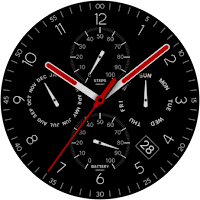
CELEST5611 Analog Watch
Personalization Contains ads
Premium analog design. 30 colors included
- Downloads
- 532+
- on Google Play
- Price
- $1.99
- No in-app purchases
- Updated
- Aug 5
- 2026
Screenshots


About CELEST5611 Analog Watch
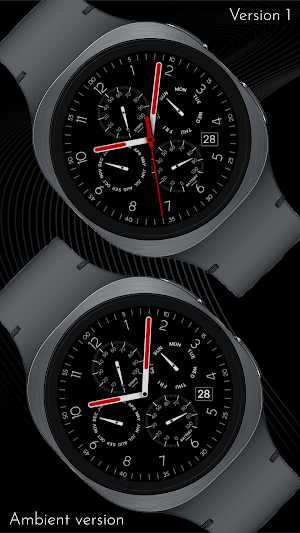
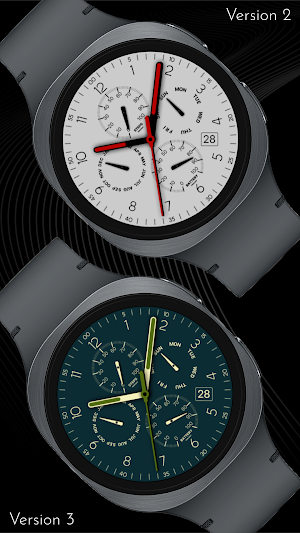
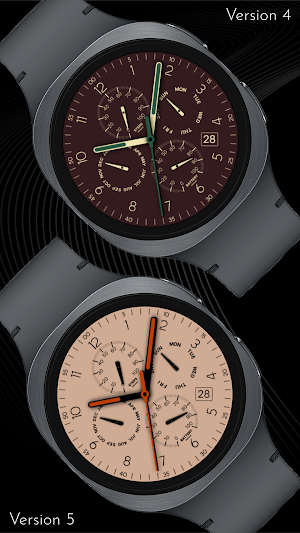
This watch face that perfectly balances classic chronograph design with modern digital functionality. The sharp, high-contrast layout ensures readability at a glance, featuring a timeless aesthetic that suits both casual and professional settings. Whether you are looking for a sporty edge or a refined traditional look, this design offers the flexibility to adapt to your personal style with ease.
True personalization is at the core of the experience. You can choose from an impressive array of 30 color variations to match your outfit or mood instantly. To further tailor the look, the watch face includes 4 marker variations, allowing you to swap the standard Arabic numbers for Roman numerals or other index styles to achieve the exact visual balance you desire.
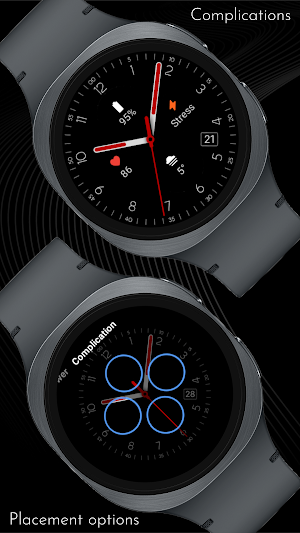
Beyond its good looks, this watch face is a powerhouse of utility. While the default layout elegantly displays your steps, month, weekday, and battery life in detailed sub-dials, you have full control over the data you see. You can hide these specific elements to reveal large, color-matched complications, giving you the freedom to display any other data—such as weather, heart rate, or next appointment—while maintaining the cohesive design of the watch.
🎨 PERSONALIZATION OPTIONS
· 30 color options
· 4 marker options
· Ability to hide the default subdials (Steps, Month, Weekday, Power)
· 4 optional color-matched large complications
📱 COMPATIBILITY
✅ Works with Galaxy Watch, Pixel Watch, and all Wear OS 5+ devices
🔧 INSTALLATION HELP
Having trouble? We've got you covered:
- Use the dropdown menu next to "Install" on your phone to select your watch model or install directly from your watch's Play Store app
- Updating weather data may take time after installation but switching to another watch face and switching back or restarting both the watch and phone usually helps
- Check out our installation and troubleshooting guide: https://celest-watches.com/installation-troubleshooting/
- Contact us at [email protected] for quick support
🏪 DISCOVER MORE
Browse our full collection of premium Wear OS watch faces:
🔗 https://celest-watches.com
💰 Exclusive discounts available
📞 SUPPORT & COMMUNITY
📧 Support: [email protected]
📱 Follow @celestwatches on Instagram or sign up to our newsletter!
True personalization is at the core of the experience. You can choose from an impressive array of 30 color variations to match your outfit or mood instantly. To further tailor the look, the watch face includes 4 marker variations, allowing you to swap the standard Arabic numbers for Roman numerals or other index styles to achieve the exact visual balance you desire.
Beyond its good looks, this watch face is a powerhouse of utility. While the default layout elegantly displays your steps, month, weekday, and battery life in detailed sub-dials, you have full control over the data you see. You can hide these specific elements to reveal large, color-matched complications, giving you the freedom to display any other data—such as weather, heart rate, or next appointment—while maintaining the cohesive design of the watch.
🎨 PERSONALIZATION OPTIONS
· 30 color options
· 4 marker options
· Ability to hide the default subdials (Steps, Month, Weekday, Power)
· 4 optional color-matched large complications
📱 COMPATIBILITY
✅ Works with Galaxy Watch, Pixel Watch, and all Wear OS 5+ devices
🔧 INSTALLATION HELP
Having trouble? We've got you covered:
- Use the dropdown menu next to "Install" on your phone to select your watch model or install directly from your watch's Play Store app
- Updating weather data may take time after installation but switching to another watch face and switching back or restarting both the watch and phone usually helps
- Check out our installation and troubleshooting guide: https://celest-watches.com/installation-troubleshooting/
- Contact us at [email protected] for quick support
🏪 DISCOVER MORE
Browse our full collection of premium Wear OS watch faces:
🔗 https://celest-watches.com
💰 Exclusive discounts available
📞 SUPPORT & COMMUNITY
📧 Support: [email protected]
📱 Follow @celestwatches on Instagram or sign up to our newsletter!
What’s new
Updated August 5, 2026
Updated to target Android 16 (API 36).
User reviews

classy

fantastic design. classic analog done right. I love the colors and tge soft white elements. it looks so good in real life. very well done.
Alternatives to CELEST5611 Analog Watch
Looking for apps like CELEST5611 Analog Watch? Here are 6 similar Android apps on Google Play. 2 of the 6 are free to download.
-
Minimal DERSON Watch face
-
BH Simple Watch Face
-
Regarder Minimal 73
-
Analogue Red Watch Face
-
CELEST5422 Minimalist Watch
-
WES24 - Nine Eleven Turbo Face
| App | Rating | Price | Installs | Last updated | Compare |
|---|---|---|---|---|---|
| CELEST5611 Analog Watch | – | $1.99 | 500+ | Aug 5, 2026 | |
| Minimal DERSON Watch face | – | Free | 10,000+ | – | Compare |
| BH Simple Watch Face | – | Free | 50,000+ | – | Compare |
| Regarder Minimal 73 | – | 1.49 USD | 500+ | Sep 1, 2025 | Compare |
| Analogue Red Watch Face | – | 1.99 USD | 100+ | Aug 10, 2026 | Compare |
| CELEST5422 Minimalist Watch | – | 1.99 USD | 100+ | Aug 5, 2026 | Compare |
| WES24 - Nine Eleven Turbo Face | – | 1.99 USD | 100+ | Jul 7, 2025 | Compare |
Similar apps on Google Play
- Minimal DERSON Watch face
- BH Simple Watch Face
- Regarder Minimal 73
- Analogue Red Watch Face
- CELEST5422 Minimalist Watch
- WES24 - Nine Eleven Turbo Face
- IWF CC gA | ISACWATCH
- KZY124
- CLA027 Sporty Hybrid
- Analog Minimal Watch face
- HMKWatch Simple 015
- Iris582 Simple Analog Watch
- Analog MINUM Watch face
- Elegant Style Watch Face
- Time Bridge Watch Face
- RHS 102 WR
- PIXEL WORLD PRO Watch Face
- ML2U 287 Watch Face
- SamWatch Simple Analog 18 2023
- IWF Heimish watch face
- Reddice Geosynk Analog D1
- Renn Analog Watch Face
- WS Simple Analog
- Orren Analog Watch Face
- Battery Saver Classic