
CELEST5596 Data Hub Watch
Personalization Contains ads
Essential metrics & weather. Clear design, 30 color options, custom spots
- Downloads
- 730+
- on Google Play
- Price
- $1.99
- No in-app purchases
- Updated
- Aug 5
- 2026
Screenshots


About CELEST5596 Data Hub Watch
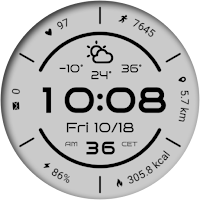
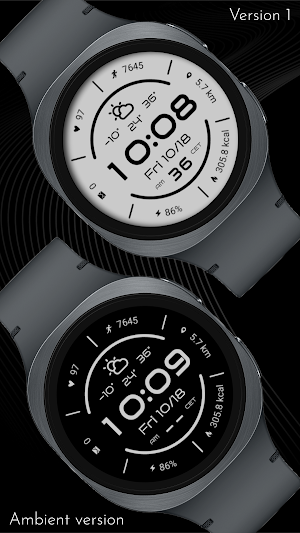
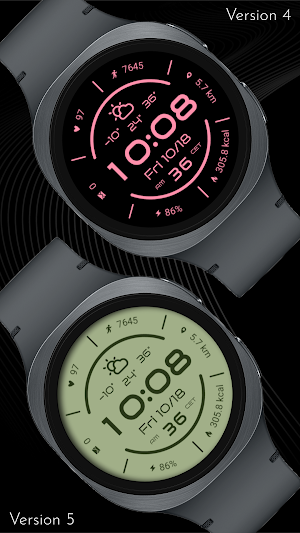
This watch face presents a comprehensive overview of daily metrics with a high-contrast, black-and-white design that ensures instant readability. Front and center is the bold digital time, date, and current weather, complemented by a wealth of fitness and activity metrics arranged along the outer edge. Stay on top of your day with crucial information like steps taken, estimated distance, estimated calories burned, your current heart rate, and essential watch stats such as battery level and unread notifications.
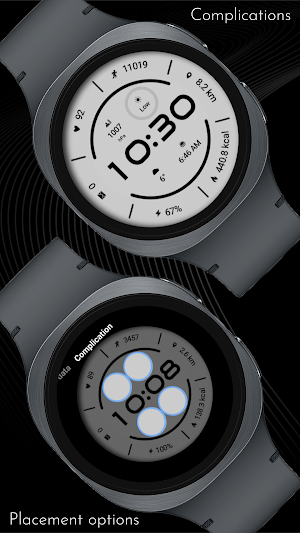
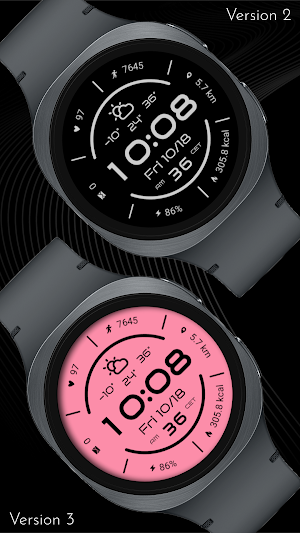
Beyond the impressive array of data points, this watch face offers deep customization to match your personal style and needs. You can choose from 30 different color variations to perfectly complement your look or mood. Furthermore, the design includes four optional circular complications positioned directly above and below the main time display, nestled between the two half-circle arcs. These spots are fully customizable, allowing you to swap out the existing data for other metrics you rely on most frequently, making the watch face uniquely yours and ensuring you always have the most relevant information front and center.
⚡ KEY FEATURES
· 30 color variations
· Option to hide inner shadow effect
· Option to hide weather data to add custom complications
· Option to hide date, seconds and other secondary data to add custom complications
· 4 optional color-matched circular complications
Please be aware that complications will not appear on the AOD for any color variations that utilize a light background.
If weather data is missing, switch to another watch face and switch back. If that doesn't work, restart your watch and phone devices.
📱 COMPATIBILITY
✅ Wear OS 5+ required (for weather functions)
✅ Works with Galaxy Watch, Pixel Watch, and all Wear OS 5+ devices
🔧 INSTALLATION HELP
Having trouble? We've got you covered:
- Use the dropdown menu next to "Install" on your phone to select your watch model or install directly from your watch's Play Store app
- Updating weather data may take time after installation but switching to another watch face and switching back or restarting both the watch and phone usually helps
- Check out our installation and troubleshooting guide: https://celest-watches.com/installation-troubleshooting/
- Contact us at [email protected] for quick support
🏪 DISCOVER MORE
Browse our full collection of premium Wear OS watch faces:
🔗 https://celest-watches.com
💰 Exclusive discounts available
📞 SUPPORT & COMMUNITY
📧 Support: [email protected]
📱 Follow @celestwatches on Instagram or sign up to our newsletter!
Beyond the impressive array of data points, this watch face offers deep customization to match your personal style and needs. You can choose from 30 different color variations to perfectly complement your look or mood. Furthermore, the design includes four optional circular complications positioned directly above and below the main time display, nestled between the two half-circle arcs. These spots are fully customizable, allowing you to swap out the existing data for other metrics you rely on most frequently, making the watch face uniquely yours and ensuring you always have the most relevant information front and center.
⚡ KEY FEATURES
· 30 color variations
· Option to hide inner shadow effect
· Option to hide weather data to add custom complications
· Option to hide date, seconds and other secondary data to add custom complications
· 4 optional color-matched circular complications
Please be aware that complications will not appear on the AOD for any color variations that utilize a light background.
If weather data is missing, switch to another watch face and switch back. If that doesn't work, restart your watch and phone devices.
📱 COMPATIBILITY
✅ Wear OS 5+ required (for weather functions)
✅ Works with Galaxy Watch, Pixel Watch, and all Wear OS 5+ devices
🔧 INSTALLATION HELP
Having trouble? We've got you covered:
- Use the dropdown menu next to "Install" on your phone to select your watch model or install directly from your watch's Play Store app
- Updating weather data may take time after installation but switching to another watch face and switching back or restarting both the watch and phone usually helps
- Check out our installation and troubleshooting guide: https://celest-watches.com/installation-troubleshooting/
- Contact us at [email protected] for quick support
🏪 DISCOVER MORE
Browse our full collection of premium Wear OS watch faces:
🔗 https://celest-watches.com
💰 Exclusive discounts available
📞 SUPPORT & COMMUNITY
📧 Support: [email protected]
📱 Follow @celestwatches on Instagram or sign up to our newsletter!
What’s new
Updated August 5, 2026
Updated to target Android 16 (API 36).
User reviews
it looks clean and nice thanks for the update !

Great design and love the clean aesthetic and layout. Would be good if the battery and distance complications could be flipped as not easy to read upside down. Update. Big thanks for fixing this!
Alternatives to CELEST5596 Data Hub Watch
Looking for apps like CELEST5596 Data Hub Watch? Here are 6 similar Android apps on Google Play. 1 of the 6 are free to download.
-
JND0004U
-
Calm- for Wear OS 5
-
OMG 456 - Minimal Grey
-
ZKin Watch Light And Shadow
-
Dotline - Light Watch Face
-
BRN174 - halo
| App | Rating | Price | Installs | Last updated | Compare |
|---|---|---|---|---|---|
| CELEST5596 Data Hub Watch | – | $1.99 | 500+ | Aug 5, 2026 | |
| JND0004U | – | 1.49 USD | 100+ | Oct 28, 2025 | Compare |
| Calm- for Wear OS 5 | – | Free | 500+ | Sep 18, 2024 | Compare |
| OMG 456 - Minimal Grey | – | 1.49 USD | 100+ | Aug 27, 2026 | Compare |
| ZKin Watch Light And Shadow | – | 2.99 USD | 100+ | Feb 13, 2025 | Compare |
| Dotline - Light Watch Face | – | 0.49 USD | 1+ | Oct 12, 2026 | Compare |
| BRN174 - halo | – | 1.99 USD | 10+ | Aug 13, 2026 | Compare |
Similar apps on Google Play
- JND0004U
- Calm- for Wear OS 5
- OMG 456 - Minimal Grey
- ZKin Watch Light And Shadow
- Dotline - Light Watch Face
- BRN174 - halo
- NW064: Digital watch face
- PW77 Simple Lady Watch Face
- CELEST5618 Data Hub Watch
- BRN105 - TEXON
- White Sports V2
- NW060: Digital watch face
- Plimora Watch Face
- Nova Bright Digital ECO 69
- EXD079: Sporty Watch Face
- Timeframe
- Simple Minimalistic Face 3
- Active Edge Hybrid
- GRBL Core
- WIN White sports digital
- Clear Type Watch Face
- Night ver 35 - watch face