
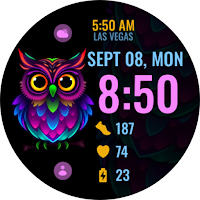
ANIMALS | Owl Neon
Personalization
Animal-Themed Watch Face for WEAR OS
- Downloads
- 264+
- on Google Play
- Price
- $0.99
- No in-app purchases
- Updated
- Sep 10
- 2025
Screenshots
Save to Pinterest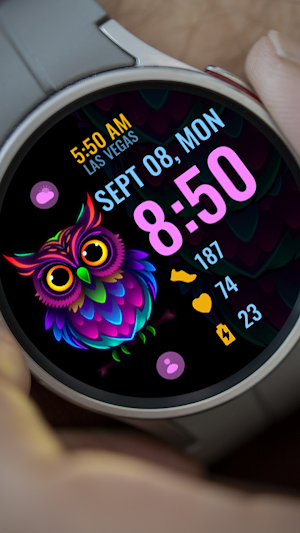
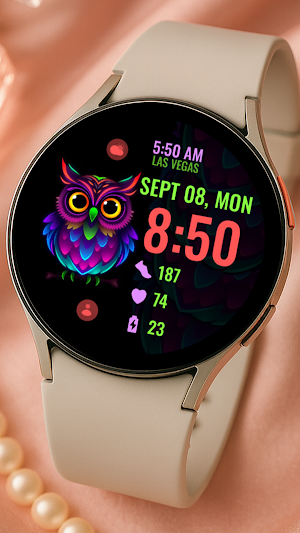

About ANIMALS | Owl Neon
📍INSTALLATION NOTES
⭐️Note for Galaxy Watch Users: The watch face editor in the Samsung Wearable app often fails to sync and load complex watch faces.
This is not an issue with the watch face. It is recommended to customize the watch face directly on the watch until Samsung resolves this issue.
📍This watch face supports all Wear OS devices with API Level 34+ | Wear OS 4 and later versions
(Some features may not be available on some watches)
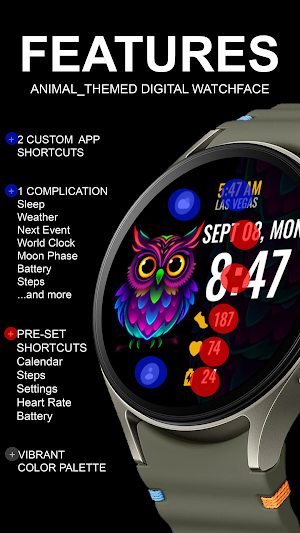
⭐️KEY FEATURES:
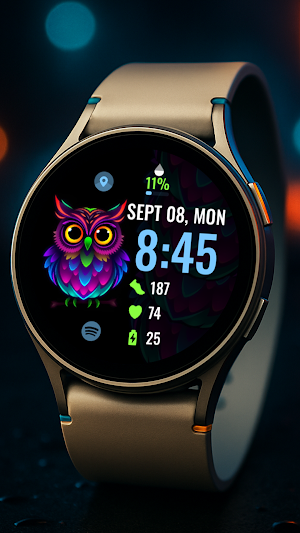
- Artistic Digital Clock
- Pre-Set App Shortcut - FIXED (Alarm, Calendar, Battery, Heart Rate and Steps)
- 2 Custom App Shortcuts
- 1 Custom Complication (you can customize the complication with the any data you want)
For example, you can select Date, weather, steps, world clock, sunset/sunrise, next appointment, distance walked and more.
***You may need to install additional third-party complications.
- Custom Color Palette
TAKE NOTE❗️❗️❗️
1️⃣ Watch faces automatically install on WEAR OS watch.
2️⃣ MAKE SURE THE WATCH IS SYNCED TO YOUR PHONE USING THE SAME EMAIL ADDRESS FOR SEAMLESS INSTALLATION.
3️⃣ After download, WAIT for a few minutes for the watch face to be transferred on watch. (There will be a notification on your watch if the watch face was successfully transferred.)
4️⃣ If incase there is no notification, Go to PLAYSTORE ON YOUR WATCH and type on the SEARCH BOX "Animals Owl Neon"
⭐️ Watch faces don't automatically display/change after successful installation. Go back to home display. Tap and hold display, swipe until the end and tap + to add the watch face. Rotate Bezel or scroll to find the watch face.
📍ALLOW / ENABLE all permissions from settings -> applications -> permissions.
⚠️⚠️⚠️ Refund is ONLY allowed within 24 hours.
Contact us at: [email protected]
Installation Tutorial: https://www.youtube.com/watch?v=vMM4Q2-rqoM
Alternatives to ANIMALS | Owl Neon
Looking for apps like ANIMALS | Owl Neon? Here are 6 similar Android apps on Google Play. The highest rated is AZ285 Valentine's Watch Face (4.8/5), and 1 of the 6 are free to download.
-
Celestial Glow Pro 3.4
-
AZ286 Valentine's Watch Face
-
AZ285 Valentine's Watch Face 4.8
-
Waves
-
Ballozi PARTICLE Digital 4.8
-
PW07 Valentine's Day Hearts
| App | Rating | Price | Installs | Last updated | Compare |
|---|---|---|---|---|---|
| ANIMALS | Owl Neon | – | $0.99 | 100+ | Sep 10, 2025 | |
| Celestial Glow Pro | 3.4 / 5 | 1.49 USD | 1,000+ | Aug 4, 2026 | Compare |
| AZ286 Valentine's Watch Face | – | 0.49 USD | 100+ | Jan 27, 2024 | Compare |
| AZ285 Valentine's Watch Face | 4.8 / 5 | Free | 1,000+ | – | Compare |
| Waves | – | 0.99 USD | 100+ | Jul 17, 2025 | Compare |
| Ballozi PARTICLE Digital | 4.8 / 5 | 1.49 USD | 1,000+ | Aug 9, 2026 | Compare |
| PW07 Valentine's Day Hearts | – | 0.99 USD | 100+ | Oct 20, 2026 | Compare |
Compare ANIMALS | Owl Neon with the top alternatives: ratings, updates, ASO score and keyword gaps →
Similar apps on Google Play
- Celestial Glow Pro
- AZ286 Valentine's Watch Face
- AZ285 Valentine's Watch Face
- Waves
- Ballozi PARTICLE Digital
- PW07 Valentine's Day Hearts
- Fluid Purple Watch Face
- Neon Cat - watch face
- Mini by Mooon
- Beautiful Floral
- Musical Beat Watch Face
- Summertime Watch Face
- PW96 Valentine's Embrace Heart
- Floral Neon Digital
- Mini II by Mooon
- Pars Digi Training
- Paint Bloom
- Stars Bloom
- 7 Owls Watch Face
- Flowers Elegant Watch Face
- PW53 Digital Flower Watch Face
- TVV Autumn 4 Watch Face
- TVV Gothic Watch Face
- WaTchG023: Digital watch face
- Clover Bloom
- CC Floral Watch Face
- Fluid Pink Watch Face
- Cyber Flower: Hybrid