
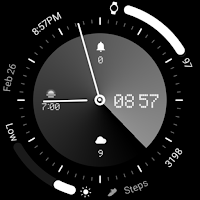
ACRO Simple Digi YD Watchface
Personalization
Watch Face with Wear os 5.0 and later support
- Rating
- 5.0
- 32 ratings
- Downloads
- 996+
- on Google Play
- Price
- $0.99
- No in-app purchases
- Updated
- Sep 2
- 2026 · v1.0.1
Screenshots


About ACRO Simple Digi YD Watchface
Watchface supports all Wear OS 5 devices above API level 34 such as Samsung Galaxy Watch 4~7, Pixel Watch
*How to install
Purchase and install the Play Store app on your smartphone (touch the right arrow to install on your watch device).
> Check the connection between the watch body and the phone.
How to install WearOS watch mode can be found in a helpful video provided by Samsung developers at (https://youtu.be/vMM4Q2-rqoM)
Find installed watchfaces
1. Press and hold the watch face > 2. Click the Decorate button > 3. Click the last right 'Add Watch Face' > Confirm the purchased watch face
*Installed watchfaces can be found in the Downloads list, not in the Favorites list.
*Installation using web browser
Copy the Play Store address of the watch face (Click the 3 dots next to the magnifying glass at the top right of the Play Store > Share)
Go to Samsung Internet and click 'Install on another device' > select watch device
How to set up Customize
Press and hold the watch face > 2. Click the Decorate button > 3. Tap each complication area to set the corresponding information > 4. Click OK
- The watch face screen shot of the smartphone app may differ from the actual downloaded watch face screen shot.
- A consent to use the sensor is required to use all functions.
- Some features may not be available on all watches.
- If the Play Store app is not compatible, install it using the web browser on your PC/laptop in addition to the app on your phone.
This watch face supports Wear OS devices.
Mobile phone battery complication app
After installing the additional app from the link below to your watch and smartphone, set the complication.
Search for the 'Phone Battery Complication' app and install it. https://play.google.com/store/apps/details?id=com.weartools.phonebattcomp
Discover new watch faces in the ACRO Store
https://play.google.com/store/apps/dev?id=7728319687716467388
For inquiries about the app, please contact us by email below.
Mail: [email protected]
*How to install
Purchase and install the Play Store app on your smartphone (touch the right arrow to install on your watch device).
> Check the connection between the watch body and the phone.
How to install WearOS watch mode can be found in a helpful video provided by Samsung developers at (https://youtu.be/vMM4Q2-rqoM)
Find installed watchfaces
1. Press and hold the watch face > 2. Click the Decorate button > 3. Click the last right 'Add Watch Face' > Confirm the purchased watch face
*Installed watchfaces can be found in the Downloads list, not in the Favorites list.
*Installation using web browser
Copy the Play Store address of the watch face (Click the 3 dots next to the magnifying glass at the top right of the Play Store > Share)
Go to Samsung Internet and click 'Install on another device' > select watch device
How to set up Customize
Press and hold the watch face > 2. Click the Decorate button > 3. Tap each complication area to set the corresponding information > 4. Click OK
- The watch face screen shot of the smartphone app may differ from the actual downloaded watch face screen shot.
- A consent to use the sensor is required to use all functions.
- Some features may not be available on all watches.
- If the Play Store app is not compatible, install it using the web browser on your PC/laptop in addition to the app on your phone.
This watch face supports Wear OS devices.
Mobile phone battery complication app
After installing the additional app from the link below to your watch and smartphone, set the complication.
Search for the 'Phone Battery Complication' app and install it. https://play.google.com/store/apps/details?id=com.weartools.phonebattcomp
Discover new watch faces in the ACRO Store
https://play.google.com/store/apps/dev?id=7728319687716467388
For inquiries about the app, please contact us by email below.
Mail: [email protected]
User reviews

perfect design 👌

Nice watch theme!!!!
Alternatives to ACRO Simple Digi YD Watchface
Looking for apps like ACRO Simple Digi YD Watchface? Here are 6 similar Android apps on Google Play. The highest rated is HMKWatch Analog 168 (5.0/5), and 2 of the 6 are free to download.
-
PW101 Elegant Minimal Watch
-
HMKWatch Analog 168 5.0
-
Minimal Black v27 watch face 4.2
-
SPRiNGING SPLoTCH watch face 3.5
-
TGC06:Watch Face 4.7
-
Final Interface Watch 2
| App | Rating | Price | Installs | Last updated | Compare |
|---|---|---|---|---|---|
| ACRO Simple Digi YD Watchface | 5.0 / 5 | $0.99 | 500+ | Sep 2, 2026 | |
| PW101 Elegant Minimal Watch | – | 0.99 USD | 1,000+ | Oct 7, 2025 | Compare |
| HMKWatch Analog 168 | 5.0 / 5 | 0.99 USD | 1,000+ | Oct 10, 2026 | Compare |
| Minimal Black v27 watch face | 4.2 / 5 | 1.49 USD | 10,000+ | Sep 28, 2026 | Compare |
| SPRiNGING SPLoTCH watch face | 3.5 / 5 | 1.99 USD | 500+ | Jul 6, 2025 | Compare |
| TGC06:Watch Face | 4.7 / 5 | Free | 10,000+ | Aug 23, 2026 | Compare |
| Final Interface Watch 2 | – | Free | 5,000+ | May 15, 2026 | Compare |
Similar apps on Google Play
- PW101 Elegant Minimal Watch
- HMKWatch Analog 168
- Minimal Black v27 watch face
- SPRiNGING SPLoTCH watch face
- TGC06:Watch Face
- Final Interface Watch 2
- Kinetik Flux 02
- TGC05:Watch Face
- A0015 VNApps Watchface
- Reddice Modern Digital DS1
- Skipper: Analog Watch Face
- A0003 VNApps
- Clear Style Analog
- BLACK CALM Watch Face
- Black Cat Watch Face
- A0004 VNApps
- Analog Digital Watch Face
- minimalist 02
- Simple Watch Face
- 24 Hour Watch Face: Era
- Always On Display – WatchFace
- Simplicity - Wear OS WatchFace
- THDesign AS1 analog simple
- DarkElegant pro
- tarcza09
- tarcza05