
Diablo Function For Wear OS
Personalization
These watch faces run on Wear OS
- Downloads
- 17+
- on Google Play
- Price
- $0.99
- No in-app purchases
- Updated
- May 5
- 2025
Screenshots


About Diablo Function For Wear OS
Diablo Function For Wear OS
These watch faces run on Wear OS
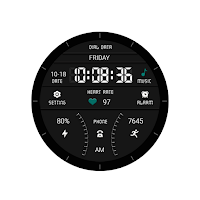
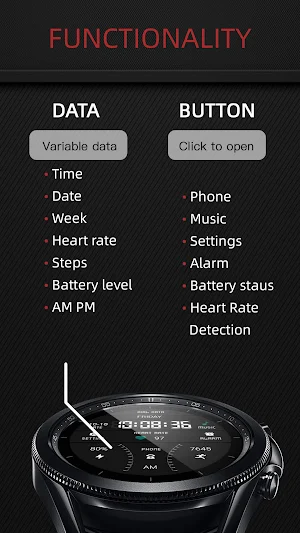
Previous: Week, Date, Time, Music
Middle: Settings, heart rate, alarm clock
Below: battery level, phone number, morning and afternoon, steps taken
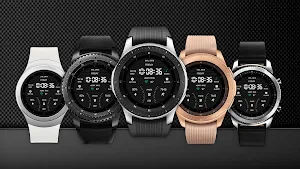
Compatible with devices: Pixel Watch, Galaxy Watch 4, Galaxy Watch 5, Galaxy Watch 6 and other devices
How do I install the watch face on WearOS ?
1. Install it from Google Play Wear Store on your watch
2. Install the companion app for fully customization (Android phone devices)
These watch faces run on Wear OS
Previous: Week, Date, Time, Music
Middle: Settings, heart rate, alarm clock
Below: battery level, phone number, morning and afternoon, steps taken
Compatible with devices: Pixel Watch, Galaxy Watch 4, Galaxy Watch 5, Galaxy Watch 6 and other devices
How do I install the watch face on WearOS ?
1. Install it from Google Play Wear Store on your watch
2. Install the companion app for fully customization (Android phone devices)
What’s new
Updated May 5, 2025
Release a new watch companion to help quickly install watch faces on mobile devices
Alternatives to Diablo Function For Wear OS
Looking for apps like Diablo Function For Wear OS? Here are 6 similar Android apps on Google Play.
-
Dream Candy For Wear OS
-
Blue Translucent For Wear OS
-
Orange Grid Pattern For WearOS
-
Dreamy Blue Shape For Wear OS
-
Sweet Orange Vision For WearOS
-
Gray Metal Block For Wear OS
| App | Rating | Price | Installs | Last updated | Compare |
|---|---|---|---|---|---|
| Diablo Function For Wear OS | – | $0.99 | 10+ | May 5, 2025 | |
| Dream Candy For Wear OS | – | 0.49 USD | 0+ | Oct 20, 2024 | Compare |
| Blue Translucent For Wear OS | – | 0.49 USD | 0+ | Oct 20, 2024 | Compare |
| Orange Grid Pattern For WearOS | – | 0.49 USD | 1+ | Oct 20, 2024 | Compare |
| Dreamy Blue Shape For Wear OS | – | 0.49 USD | 0+ | Oct 20, 2024 | Compare |
| Sweet Orange Vision For WearOS | – | 0.49 USD | 0+ | Oct 20, 2024 | Compare |
| Gray Metal Block For Wear OS | – | 0.49 USD | 0+ | Oct 20, 2024 | Compare |
Similar apps on Google Play
- Dream Candy For Wear OS
- Blue Translucent For Wear OS
- Orange Grid Pattern For WearOS
- Dreamy Blue Shape For Wear OS
- Sweet Orange Vision For WearOS
- Gray Metal Block For Wear OS
- Unreal Pink For Wear OS
- Green Pale Yellow For Wear OS
- Colorful Forest For Wear OS
- Little Sunflower For Wear OS
- Science Silver For Wear OS
- Machinery For Wear OS
- Happy Machinery For Wear OS
- Warm For Wear OS
- Gradual Fade For Wear OS
- Dark Gray Hole For Wear OS
- Orange Silver For Wear OS
- DeepSea gradient For Wear OS
- Flat Sponge For Wear OS
- Refreshing For Wear OS
- Commerce Orange For Wear OS
- Spiral Stripe For Wear OS
- Military Green For Wear OS
- Business Elegant For Wear OS
- Blue Sand For Wear OS
- Fanshaped Art For Wear OS
- Machinery Light For Wear OS
- Clear Transparent For Wear OS
- Colorful Glow For Wear OS
- Light Champers For Wear OS
- Micro Light For Wear OS
- Blackened Steel For Wear OS
- Ocean Forest For Wear OS
- Shine Science For Wear OS
- Classic Quartz For Wear OS
- Depth Business For Wear OS
- Bright Numbers For Wear OS
- Personality Arc For Wear OS
- Circuit Table For Wear OS
- Brown Texture For Wear OS
- Manga LCD For Wear OS
- Olive Grey For Wear OS
- Gray Pipeline For Wear OS
- Misty Blue Dream For Wear OS
- Blue Anomaly For Wear OS
- Mechanical Watch For Wear OS
- Autumn Wind For Wear OS
- Sand Gold Powder For Wear OS
- Cyan Technology For Wear OS
- Versatile For Wear OS
- Noctilucent For Wear OS
- Striped Mimicry For Wear OS
- Machine Heap For Wear OS
- Bubble Machine For Wear OS
- Linkage Silver For Wear OS
- Purple Sprout For Wear OS
- Grey Green For Wear OS
- Large LCD For Wear OS
- Spool Clock For Wear OS
- Mechanical Clock For Wear OS
- Dim Silver For Wear OS
- Soft Mist Grey For Wear OS
- Scallion Green For Wear OS
- LCD Grid For Wear OS
- Variable LCD For Wear OS
- LCD Circular Arc For Wear OS
- Bright Line For Wear OS
- Functional Grille For Wear OS
- Colour Light LCD For Wear OS
- White Ink LCD For Wear OS
- Tricolor LCD For Wear OS
- Blue Colors For Wear OS
- Monochrome LCD For Wear OS
- Tricolor Lines For Wear OS
- Clear LCD For Wear OS
- Brisk Mimicry For Wear OS
- Red Rock For Wear OS
- Color Space For Wear OS
- Protect Eyes For Wear OS
- Greyish mimicry For Wear OS
- Space Machine For Wear OS
- Abyssal Sea For Wear OS
- Two Splicing For Wear OS
- Coffee Meter For Wear OS
- Electric Meter For Wear OS
- Blue Wave Green For Wear OS
- Source Of Water For Wear OS
- Awakening Yellow For Wear OS
- Electrical Line For Wear OS
- Special Meter For Wear OS
- Red Blue Colors For Wear OS
- Luminous line For Wear OS
- Carbon Fiber For Wear OS
- Color Blocking For Wear OS
- Multiple Patterns For Wear OS
- Colored Circle For Wear OS
- Multicolor Neon For Wear OS
- Solid Dark Green For Wear OS
- Stacked Green For Wear OS
- Dull Polish For Wear OS
- Brilliant Green For Wear OS
- Layered LCD For Wear OS
- Sky Blue Circuit For Wear OS
- Stone Grain For Wear OS
- Rust Red For Wear OS
- Red Brown For Wear OS
- Ground Glass For Wear OS
- Fresh Mist Blue For Wear OS
- Kumquat For Wear OS
- InverseColor LCD For Wear OS
- Circuit Element For Wear OS
- Trendy Yellow For Wear OS
- Gradually Colour For Wear OS
- Colorful Changes For Wear OS
- Stacked Ring For Wear OS
- Bicolor Layering For Wear OS
- Color change For Wear OS
- Green White For Wear OS
- Sea Components For Wear OS
- Texture Pattern For Wear OS
- Monochrome Circle For Wear OS
- Ring Green For Wear OS
- Wave Green For Wear OS
- Blue White Ink For Wear OS
- Golden Green For Wear OS
- Texture Pink For Wear OS
- Porcelain White For Wear OS
- Quartz White Ink For Wear OS
- White Quartz For Wear OS
- Frosted White For Wear OS
- Water Green For Wear OS
- Mirror Machine For Wear OS
- Orange Ink Black For Wear OS
- Scalding Circuit For Wear OS
- Red Blue Line For Wear OS
- Red Glow For Wear OS
- Jelly Machine For Wear OS
- Grey Warehouse For Wear OS
- Bay Green For Wear OS
- Floating Cloud For Wear OS
- Green Bamboo For Wear OS
- Microworld For Wear OS
- Green Brown For Wear OS
- Phantom Purple For Wear OS
- Emerald Stone For Wear OS
- Heaven And Earth For Wear OS
- Silver Cyan For Wear OS
- Grey Green Tea For Wear OS
- Heavy Machinery For Wear OS
- Business Affairs For Wear OS