
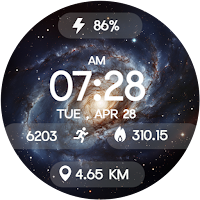
Galaxy Aura Watch Face
Shagun Clock Watch Faces Tools Contains ads
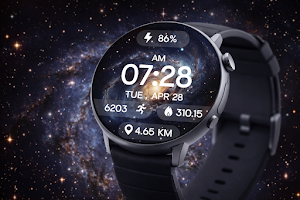
Stunning galaxy watch face with glowing nebulas, time, steps & battery.
- Rating
- 4.8
- 18 ratings
- Downloads
- 2.6K+
- on Google Play
- Price
- Free
- No in-app purchases
- Updated
- Jul 24
- 2026
Screenshots
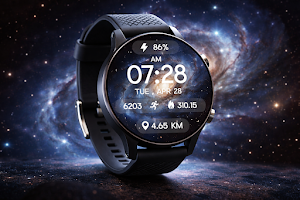
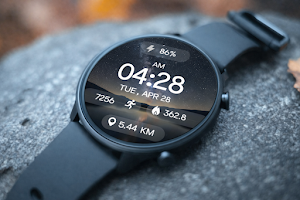
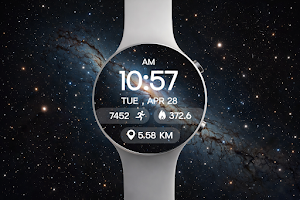


About Galaxy Aura Watch Face
Immerse yourself in the spectacular beauty of the cosmos with the Galaxy Aura Watch Face—a breathtaking digital watch face for Wear OS. Featuring vibrant glowing nebulas, majestic star clusters, and serene starry nights, this watch face flawlessly combines ethereal space art with essential daily fitness tracking.
🌌 Perfect For:
★ Space enthusiasts, astronomy lovers, dreamers, and anyone who wants a stunning, futuristic, and highly functional digital watch face.
🎉 Ideal for All Occasions:
★ Whether you're relaxing under the night sky, heading to the office, or looking for a bold statement piece for daily wear, this gorgeous galaxy theme adds a mesmerizing, out-of-this-world touch to your smartwatch.
✨ Key Features:
★ Ethereal Space Art: High-quality, vibrant backgrounds featuring glowing cosmic nebulas, sweeping milky way galaxies, and dazzling starry nightscapes.
★ Comprehensive Digital Display: Crisp, beautifully centered presentation of time, date, step counter, calories burned, distance traveled, and battery percentage .
★ Always-On Display (AOD) Support: A meticulously optimized dark mode layout that intelligently keeps your essential daily stats elegantly visible against the starry void while preserving your battery life.
★ Optimized for smooth, reliable, and battery-efficient performance on all modern Wear OS devices.
⚙️ Phone App Features :
★ The mobile app acts as a companion tool to help easily install and locate the watch face on your Wear OS smartwatch.
⚙️ Watch Face Features :
• 12/24h Digital Time
• Date & Day Display
• Step Counter
• Calories Burned Estimate
• Distance Tracker (KM)
• Battery Level Indicator
• Stunning High-Def Galaxy & Nebula Backgrounds
• Always-On Display (AOD) Support
📲 Installation Instructions:
1. Open the Companion App on your phone.
2. Tap "Install on Watch." On your watch, select Galaxy Aura Watch Face from your settings or gallery.
✅ Compatibility:
★ Works seamlessly with all Wear OS devices (API 33+), including Google Pixel Watch & Samsung Galaxy Watch.
❌ Not suitable for rectangular watches.
★ Wear the universe on your wrist. Elevate your smartwatch style with the mesmerizing Galaxy Aura Watch Face today! ✨🚀
🌌 Perfect For:
★ Space enthusiasts, astronomy lovers, dreamers, and anyone who wants a stunning, futuristic, and highly functional digital watch face.
🎉 Ideal for All Occasions:
★ Whether you're relaxing under the night sky, heading to the office, or looking for a bold statement piece for daily wear, this gorgeous galaxy theme adds a mesmerizing, out-of-this-world touch to your smartwatch.
✨ Key Features:
★ Ethereal Space Art: High-quality, vibrant backgrounds featuring glowing cosmic nebulas, sweeping milky way galaxies, and dazzling starry nightscapes.
★ Comprehensive Digital Display: Crisp, beautifully centered presentation of time, date, step counter, calories burned, distance traveled, and battery percentage .
★ Always-On Display (AOD) Support: A meticulously optimized dark mode layout that intelligently keeps your essential daily stats elegantly visible against the starry void while preserving your battery life.
★ Optimized for smooth, reliable, and battery-efficient performance on all modern Wear OS devices.
⚙️ Phone App Features :
★ The mobile app acts as a companion tool to help easily install and locate the watch face on your Wear OS smartwatch.
⚙️ Watch Face Features :
• 12/24h Digital Time
• Date & Day Display
• Step Counter
• Calories Burned Estimate
• Distance Tracker (KM)
• Battery Level Indicator
• Stunning High-Def Galaxy & Nebula Backgrounds
• Always-On Display (AOD) Support
📲 Installation Instructions:
1. Open the Companion App on your phone.
2. Tap "Install on Watch." On your watch, select Galaxy Aura Watch Face from your settings or gallery.
✅ Compatibility:
★ Works seamlessly with all Wear OS devices (API 33+), including Google Pixel Watch & Samsung Galaxy Watch.
❌ Not suitable for rectangular watches.
★ Wear the universe on your wrist. Elevate your smartwatch style with the mesmerizing Galaxy Aura Watch Face today! ✨🚀
Alternatives to Galaxy Aura Watch Face
Looking for apps like Galaxy Aura Watch Face? Here are 6 similar Android apps on Google Play. 1 of the 6 are free to download.
-
ACD002 Planets Orbit
-
Waves Animated
-
Black Void Watch Face
-
Digital Space Watch Face
-
HMKWatch Digital 071 Cosmos
-
Mountain Glow DigitalWatchFace
| App | Rating | Price | Installs | Last updated | Compare |
|---|---|---|---|---|---|
| Galaxy Aura Watch Face | 4.8 / 5 | Free | 1,000+ | Jul 24, 2026 | |
| ACD002 Planets Orbit | – | 1.49 USD | 100+ | – | Compare |
| Waves Animated | – | 0.99 USD | 50+ | Aug 23, 2026 | Compare |
| Black Void Watch Face | – | 1.99 USD | 100+ | Sep 1, 2026 | Compare |
| Digital Space Watch Face | – | 0.99 USD | 500+ | Aug 12, 2024 | Compare |
| HMKWatch Digital 071 Cosmos | – | 1.49 USD | 5,000+ | Oct 11, 2026 | Compare |
| Mountain Glow DigitalWatchFace | – | Free | 1,000+ | Jul 24, 2026 | Compare |
Similar apps on Google Play
- ACD002 Planets Orbit
- Waves Animated
- Black Void Watch Face
- Digital Space Watch Face
- HMKWatch Digital 071 Cosmos
- Mountain Glow DigitalWatchFace
- Quasar
- Morning Dew Watch Face
- Bridge to Fresh - Watch Face
- Stellar Pulse Galaxy Face
- Galaxy Space Watch Face
- BFF16- Weather Forecast Galaxy
- Earth Pulse Digital WatchFace
- ZKin WatchFace Mountain Shadow
- Space Storm Watch Face
- Earth & Space Watch Face
- Galaxy Watch Face
- Ocean Paradise Watch Face
- Space Galaxy
- Watch Face - Heaven
- Galaxy Road Universe Space
- RHS 116 WR
- Space Galaxy Universe Stars
- Outer Space Watch face
- Stellar Sphere Watch Face