
SpeedCube Timer
Tools In-app purchases Contains ads
Precision speedcubing timer with two-hand gesture control and WCA statistics.
- Downloads
- 33.2K+
- on Google Play
- Price
- Free
- In-app purchases
- Updated
- Sep 28
- 2026 · v1.0.16
Screenshots


About SpeedCube Timer
How does the timer work?
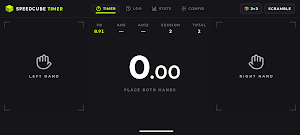
Place both thumbs on the screen and hold until the green signal appears. Lift your hands and the timer starts. Tap anywhere to stop. That's how a WCA-style timer works - no extra buttons, no distractions.
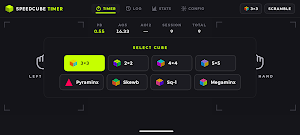
Supported puzzle types:
- 3x3 - classic cube (20 moves, WCA)
- 2x2 - pocket cube (11 moves)
- 4x4 - standard 4x4 cube (40 moves)
- 5x5 - standard 5x5 cube (60 moves)
- Pyraminx
- Skewb
- Square-1
- Megaminx
WCA-compliant scrambles
Every solve begins with a randomly generated scramble with the correct number of moves for each puzzle type, following World Cube Association standards.
Statistics
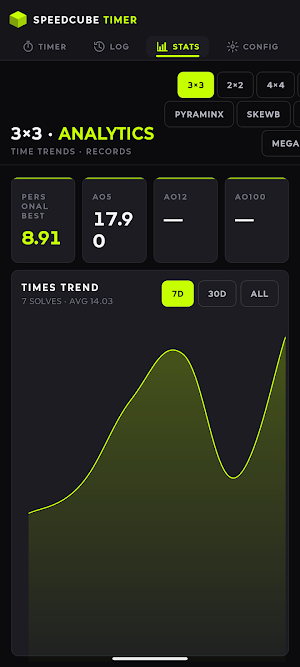
The app automatically calculates Ao5, Ao12, and Ao100 (trimmed mean averages, following WCA rules). The results chart helps you track progress over time and compare training sessions.
Solve history
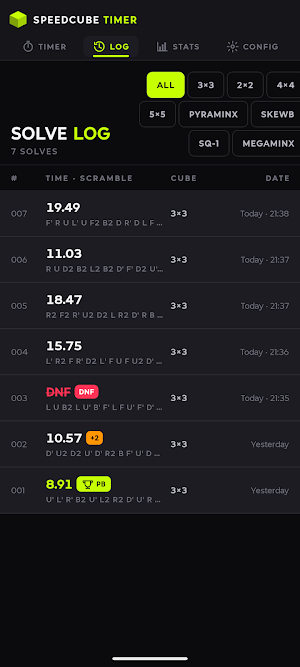
All results are saved locally on your device. Browse your history, filter by puzzle type, mark solves as DNF or +2 seconds, and delete unwanted entries.
Personal best detection (PB)
The app automatically detects and highlights every personal best as soon as you stop the timer.
Settings
- Hold time: 0.3-2.0 s - adjust the hold time before the timer starts
- Hide the clock during a solve (blind mode)
- Haptic feedback - subtle vibration at each timer phase
- Two themes: Carbon (dark) and Race (light)
Landscape mode
The app runs in landscape only, just like how you hold your cube while solving. The interface is fully optimized for this orientation.
SpeedCube Timer works completely offline. Your results stay on your device.
Enjoying the app? Leave a rating - it helps other speedcubers discover the app.
Place both thumbs on the screen and hold until the green signal appears. Lift your hands and the timer starts. Tap anywhere to stop. That's how a WCA-style timer works - no extra buttons, no distractions.
Supported puzzle types:
- 3x3 - classic cube (20 moves, WCA)
- 2x2 - pocket cube (11 moves)
- 4x4 - standard 4x4 cube (40 moves)
- 5x5 - standard 5x5 cube (60 moves)
- Pyraminx
- Skewb
- Square-1
- Megaminx
WCA-compliant scrambles
Every solve begins with a randomly generated scramble with the correct number of moves for each puzzle type, following World Cube Association standards.
Statistics
The app automatically calculates Ao5, Ao12, and Ao100 (trimmed mean averages, following WCA rules). The results chart helps you track progress over time and compare training sessions.
Solve history
All results are saved locally on your device. Browse your history, filter by puzzle type, mark solves as DNF or +2 seconds, and delete unwanted entries.
Personal best detection (PB)
The app automatically detects and highlights every personal best as soon as you stop the timer.
Settings
- Hold time: 0.3-2.0 s - adjust the hold time before the timer starts
- Hide the clock during a solve (blind mode)
- Haptic feedback - subtle vibration at each timer phase
- Two themes: Carbon (dark) and Race (light)
Landscape mode
The app runs in landscape only, just like how you hold your cube while solving. The interface is fully optimized for this orientation.
SpeedCube Timer works completely offline. Your results stay on your device.
Enjoying the app? Leave a rating - it helps other speedcubers discover the app.
What’s new
Version 1.0.16 · Updated September 28, 2026
What's new in 1.0.16: - After regular use of the timer, you may occasionally see a request to rate the app. It appears after a solve, when the timer is idle.
User reviews

good
Alternatives to SpeedCube Timer
Looking for apps like SpeedCube Timer? Here are 6 similar Android apps on Google Play. The highest rated is Ukulele Tuner (4.8/5), and all 6 are free to download.
-
Ukulele Tuner 4.8
-
Stationhead 2.4
-
UnitedMasters: Release Music 4.5
-
Resistance Band Training App 4.4
-
CogniFit - Test & Brain Games 4.0
-
Scientific Calculator He-580 4.7
| App | Rating | Price | Installs | Last updated | Compare |
|---|---|---|---|---|---|
| SpeedCube Timer | – | Free | 10,000+ | Sep 28, 2026 | |
| Ukulele Tuner | 4.8 / 5 | Free | 500,000+ | Mar 18, 2025 | Compare |
| Stationhead | 2.4 / 5 | Free | 1,000,000+ | May 16, 2026 | Compare |
| UnitedMasters: Release Music | 4.5 / 5 | Free | 1,000,000+ | Sep 16, 2026 | Compare |
| Resistance Band Training App | 4.4 / 5 | Free | 100,000+ | Aug 16, 2025 | Compare |
| CogniFit - Test & Brain Games | 4.0 / 5 | Free | 1,000,000+ | Oct 20, 2026 | Compare |
| Scientific Calculator He-580 | 4.7 / 5 | Free | 1,000,000+ | Sep 14, 2026 | Compare |
Compare SpeedCube Timer with the top alternatives: ratings, updates, ASO score and keyword gaps →