
Media master
p3startup Art & Design Contains ads
Film idea management app, creative narrative requests and digital book collection
- Downloads
- 42+
- on Google Play
- Price
- Free
- No in-app purchases
- Updated
- May 18
- 2026 · v1.0
Screenshots


About Media master
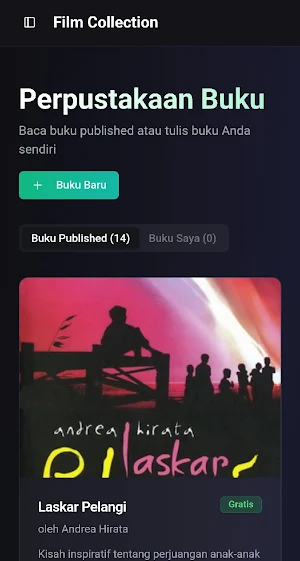
The series of images depicts an app called "Film Collection" (with the tagline "Ideas & Dreams"). This app is designed as a creative platform for filmmakers, writers, or film enthusiasts to manage ideas, request professional narrative assistance, and access literary content.
Here's a breakdown of the functionality by page:
A. Main Concept & Dashboard
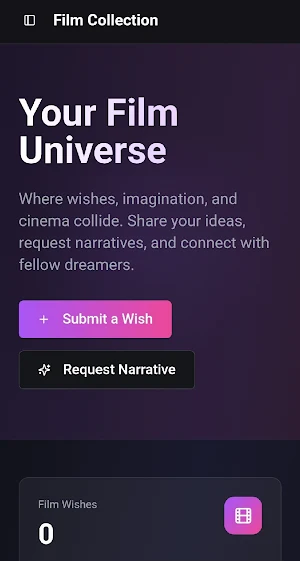
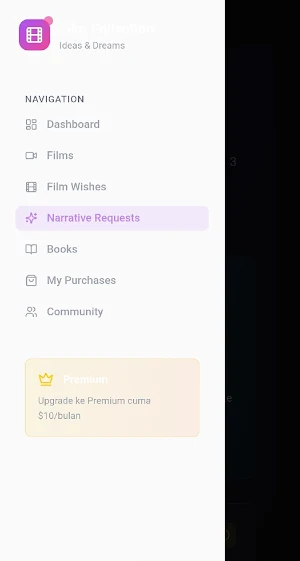
The main page, titled "Your Film Universe," gives a futuristic feel with a dark background and purple-pink gradient. Here, users are encouraged to share ideas and connect with fellow dreamers. A "Film Wishes" statistic shows the number of ideas submitted. The sidebar navigation demonstrates the app's clean structure, including:
Dashboard: Activity summary.
Films & Film Wishes: A gallery of film collections and a wish list of film ideas.
Narrative Requests: A dedicated service for requesting story development.
Books: A digital literature collection.
My Purchases & Community: Transaction history and social interactions.
Premium: A $10/month subscription.
B. Idea Submission: "Submit a Wish"
This feature allows users to document their film vision in a structured manner. The input form includes:
Title and detailed description of the film vision.
Category (such as "Already Made") and Type (such as "Wish").
Genre (e.g., Drama) and an optional field for an image URL for visual reference.
C. Premium Service: "Narrative Requests"
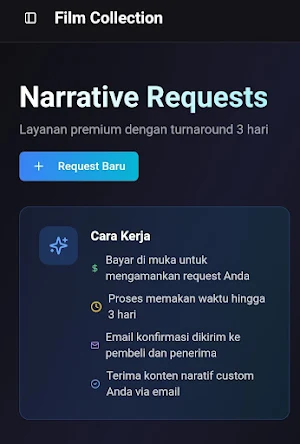
This is a paid feature where users can order custom narrative content with a three-day turnaround time.
Workflow: Users pay upfront, wait a maximum of three days for processing, and receive results via email.
Order Form: Users must fill in the desired content details, buyer email, admin email, and payment amount (in the example, $100 is shown).
D. Library & Book Writing
This app also explores the world of literacy through the "Book Library" feature.
Reading & Writing: Users can read published books (e.g., "Laskar Pelangi" by Andrea Hirata) or write their own books using the "New Book" button.
Book Data Input: The add-book form includes Title, Author, Genre, Description, and a book cover upload feature with Indonesian language instructions ("Click to upload cover").
Visual Conclusion & User Experience (UX):
The app uses a consistent Dark Mode with bright color accents (light blue and pink-purple gradients) for the main action buttons (Call to Action). The language used is a mix of English and Indonesian, reflecting the local target audience but with a global design style standard. The interface is modern, clean, and focused on easy, creative data input.
Here's a breakdown of the functionality by page:
A. Main Concept & Dashboard
The main page, titled "Your Film Universe," gives a futuristic feel with a dark background and purple-pink gradient. Here, users are encouraged to share ideas and connect with fellow dreamers. A "Film Wishes" statistic shows the number of ideas submitted. The sidebar navigation demonstrates the app's clean structure, including:
Dashboard: Activity summary.
Films & Film Wishes: A gallery of film collections and a wish list of film ideas.
Narrative Requests: A dedicated service for requesting story development.
Books: A digital literature collection.
My Purchases & Community: Transaction history and social interactions.
Premium: A $10/month subscription.
B. Idea Submission: "Submit a Wish"
This feature allows users to document their film vision in a structured manner. The input form includes:
Title and detailed description of the film vision.
Category (such as "Already Made") and Type (such as "Wish").
Genre (e.g., Drama) and an optional field for an image URL for visual reference.
C. Premium Service: "Narrative Requests"
This is a paid feature where users can order custom narrative content with a three-day turnaround time.
Workflow: Users pay upfront, wait a maximum of three days for processing, and receive results via email.
Order Form: Users must fill in the desired content details, buyer email, admin email, and payment amount (in the example, $100 is shown).
D. Library & Book Writing
This app also explores the world of literacy through the "Book Library" feature.
Reading & Writing: Users can read published books (e.g., "Laskar Pelangi" by Andrea Hirata) or write their own books using the "New Book" button.
Book Data Input: The add-book form includes Title, Author, Genre, Description, and a book cover upload feature with Indonesian language instructions ("Click to upload cover").
Visual Conclusion & User Experience (UX):
The app uses a consistent Dark Mode with bright color accents (light blue and pink-purple gradients) for the main action buttons (Call to Action). The language used is a mix of English and Indonesian, reflecting the local target audience but with a global design style standard. The interface is modern, clean, and focused on easy, creative data input.
What’s new
Version 1.0 · Updated May 18, 2026
Mediamaster launching
Alternatives to Media master
Looking for apps like Media master? Here are 6 similar Android apps on Google Play. All of them are free to download.


| App | Rating | Price | Installs | Last updated | Compare |
|---|---|---|---|---|---|
| Media master | – | Free | 10+ | May 18, 2026 | |
| optimvest | – | Free | 10+ | May 17, 2026 | Compare |
| Zenith | – | Free | 10+ | May 13, 2026 | Compare |
| edutoaction | – | Free | 10+ | May 11, 2026 | Compare |
| Nexbot | – | Free | 100+ | Sep 23, 2026 | Compare |
| vent | – | Free | 10+ | – | Compare |
| Creator | – | Free | 50+ | – | Compare |
Compare Media master with the top alternatives: ratings, updates, ASO score and keyword gaps →