
App Lock Advanced
Tools Contains ads
Lock apps with PIN or pattern, custom themes, and flexible privacy controls
- Downloads
- 49+
- on Google Play
- Price
- Free
- No in-app purchases
- Updated
- Sep 26
- 2026 · v0.1.1
Screenshots


About App Lock Advanced
KEY FEATURES
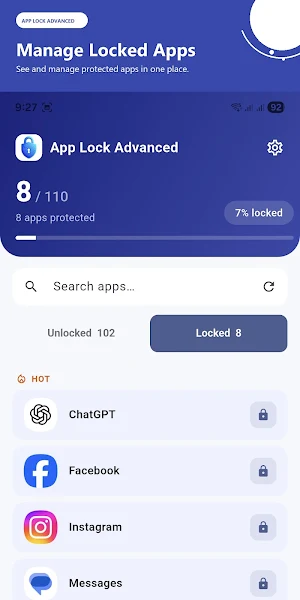
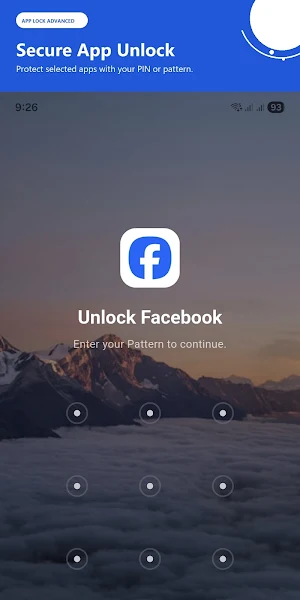
Lock selected apps with your own PIN or pattern
Optional phone lock and biometric authentication support
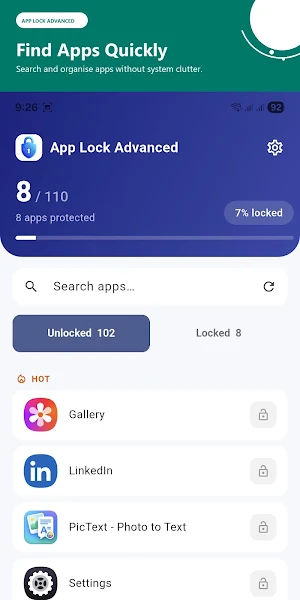
Quick search to find installed apps easily
Flexible lock timing when switching between apps
Custom lock screen themes
Choose from solid colours and preset backgrounds
Upload your own lock screen image from your gallery
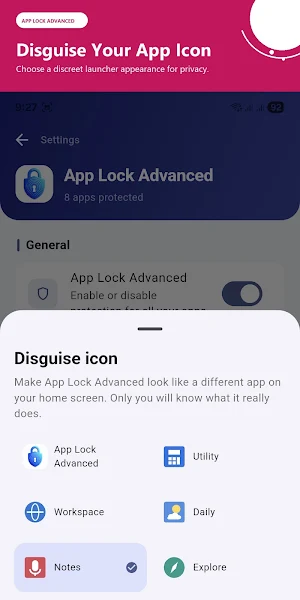
Optional neutral launcher appearance for additional privacy
Optional uninstall protection using Android Device Administrator
Simple and modern interface
PRIVACY-FIRST DESIGN
App Lock Advanced performs its core protection features locally on your device. Your PIN, pattern, selected app list, and custom lock screen background are not uploaded to W3Park Technologies servers.
The app displays only launcher-visible apps in the protection list. System services and internal Android components are excluded to keep the app list clean and easy to use.
HOW IT WORKS
Create your PIN or pattern.
Enable the required Android permissions.
Select the apps you want to protect.
Open a protected app and complete the unlock screen.
REQUIRED ANDROID ACCESS
App Lock Advanced requires Usage Access to detect when a protected app is opened and Display Over Other Apps permission to show the unlock screen. A visible foreground service notification keeps protection active while the feature is enabled.
OPTIONAL FEATURES
Phone lock support allows Android to handle your device PIN, password, pattern, or biometric confirmation. App Lock Advanced does not receive or store your device credentials or biometric data.
Uninstall protection can be enabled optionally using Android Device Administrator. This feature can be disabled from the app or Android settings before uninstalling.
CUSTOMISE YOUR LOCK SCREEN
Personalise the unlock experience with solid colours, built-in backgrounds, or an image selected from your gallery.
App Lock Advanced is designed for simple setup, local protection, and clear privacy controls.
What’s new
Version 0.1.1 · Updated September 26, 2026
- Lock selected apps with a PIN or pattern - Optional phone lock and biometric authentication support - Custom lock screen themes with colours, preset images, and gallery uploads - Flexible lock timing when switching between apps - Privacy launcher icon options - Optional uninstall protection - Local-only storage for your settings and protected app list - Improved app search and category organisation
Alternatives to App Lock Advanced
Looking for apps like App Lock Advanced? Here are 6 similar Android apps on Google Play. The highest rated is eCalendar - Daily Planner (4.7/5), and all 6 are free to download.
-
Pavlok 4.0
-
LockTrip 4.5
-
Total Drive - Cloud Storage 3.4
-
eCalendar - Daily Planner 4.7
-
Quikshort: Shortcut Creator 4.1
-
Fortect Mobile Security 4.2
| App | Rating | Price | Installs | Last updated | Compare |
|---|---|---|---|---|---|
| App Lock Advanced | – | Free | 10+ | Sep 26, 2026 | |
| Pavlok | 4.0 / 5 | Free | 50,000+ | Oct 1, 2026 | Compare |
| LockTrip | 4.5 / 5 | Free | 50,000+ | – | Compare |
| Total Drive - Cloud Storage | 3.4 / 5 | Free | 500,000+ | Jul 27, 2026 | Compare |
| eCalendar - Daily Planner | 4.7 / 5 | Free | 100,000+ | Sep 29, 2026 | Compare |
| Quikshort: Shortcut Creator | 4.1 / 5 | Free | 100,000+ | Sep 5, 2026 | Compare |
| Fortect Mobile Security | 4.2 / 5 | Free | 10,000+ | Aug 17, 2026 | Compare |
Compare App Lock Advanced with the top alternatives: ratings, updates, ASO score and keyword gaps →