
Music Equalizer-Volume Booster & Bass Booster
Voice Text Music & Audio In-app purchases Contains ads
Improve the sound quality of your android device with the Bass & Volume Booster
- Rating
- 4.3
- 203 ratings
- Downloads
- 10K+
- on Google Play
- Price
- Free
- In-app purchases
- Updated
- Oct 13
- 2020 · v1.0
Screenshots




About Music Equalizer-Volume Booster & Bass Booster
Volume Booster is a free android app that boosts speaker sound or volume extensively. The app is developed to resolve the complaint of users regarding the low volume of their smartphones. Basically, it is a music enhancer app that pushes the audio volume beyond the limits of the default system.
Features of Volume Booster
The Volume Booster app has the following features in its domain.
◼ The app has an audio booster function to increase the sound of the song or media user is listening to.
◼ Users can play songs through the media MP3 player of the sound booster app.
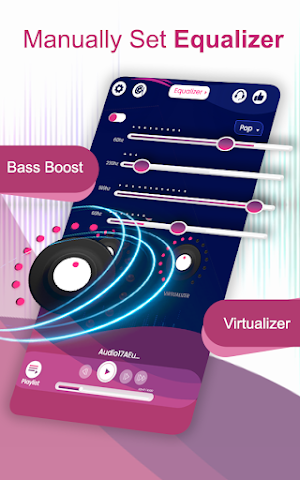
◼ The volume booster has a Music Equalizer function to set Bass booster
◼ Disable headphones option is also available in the bass booster app. It is provided to control all the media related to mp3 audio playing at maximum volume.
◼ Different Themes are also available for sound booster functions.
Advantages of Volume Booster
When you are playing any kind of music on the app, it will raise the audio sound to the maximum level. It can be done through the sound amplifier of the volume booster. The sound amplifier sets the audio volume to 200 percent to get the ultimate experience. As a user, it is a flexible app to have different features such as an audio booster, themes, an mp3 player, and disable headphones. In this way, a user can have multiple functionalities on the tip of one hand by using the volume booster app in its smartphone.
How to Use it?
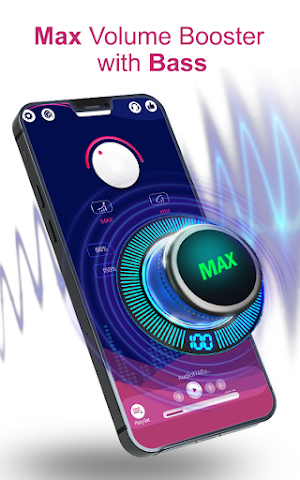
The bass booster app has simple functionality and layout for the user. You can easily set the volume level to 60, 100, 150, and 200 percent with the help of available buttons. However, there is a sinner available in the sound amplifier feature through which a user can increase the audio speed at the desired level. Besides this, app themes can be changed from the top bar of the app. However, the user has to subscribe to getting VIP themes of the volume booster app.
Note: Users can subscribe to remove the ads from the app to get the best experience of the volume booster functions.
Features of Volume Booster
The Volume Booster app has the following features in its domain.
◼ The app has an audio booster function to increase the sound of the song or media user is listening to.
◼ Users can play songs through the media MP3 player of the sound booster app.
◼ The volume booster has a Music Equalizer function to set Bass booster
◼ Disable headphones option is also available in the bass booster app. It is provided to control all the media related to mp3 audio playing at maximum volume.
◼ Different Themes are also available for sound booster functions.
Advantages of Volume Booster
When you are playing any kind of music on the app, it will raise the audio sound to the maximum level. It can be done through the sound amplifier of the volume booster. The sound amplifier sets the audio volume to 200 percent to get the ultimate experience. As a user, it is a flexible app to have different features such as an audio booster, themes, an mp3 player, and disable headphones. In this way, a user can have multiple functionalities on the tip of one hand by using the volume booster app in its smartphone.
How to Use it?
The bass booster app has simple functionality and layout for the user. You can easily set the volume level to 60, 100, 150, and 200 percent with the help of available buttons. However, there is a sinner available in the sound amplifier feature through which a user can increase the audio speed at the desired level. Besides this, app themes can be changed from the top bar of the app. However, the user has to subscribe to getting VIP themes of the volume booster app.
Note: Users can subscribe to remove the ads from the app to get the best experience of the volume booster functions.
User reviews

🖤🖤🖤

Great Really good eq app...

ணணணண

Good one

I love when the booster plays my music videos loudly

When you listen to music it gives you a nice and easy sound clearly and gives you happiness to life.
Alternatives to Music Equalizer-Volume Booster & Bass Booster
Looking for apps like Music Equalizer-Volume Booster & Bass Booster? Here are 4 similar Android apps on Google Play. The highest rated is Volume Booster - Sound Speaker (4.7/5), and all 4 are free to download.
-
AmpMe - Speaker Booster 3.1
-
Equalizer Pro—Bass Booster&Vol 4.6
-
Volume Booster - Sound Speaker 4.7
-
faidr 4.0
| App | Rating | Price | Installs | Last updated | Compare |
|---|---|---|---|---|---|
| Music Equalizer-Volume Booster & Bass Booster | 4.3 / 5 | Free | 10,000+ | Oct 13, 2020 | |
| AmpMe - Speaker Booster | 3.1 / 5 | Free | 10,000,000+ | Nov 1, 2023 | Compare |
| Equalizer Pro—Bass Booster&Vol | 4.6 / 5 | Free | 10,000,000+ | Sep 20, 2026 | Compare |
| Volume Booster - Sound Speaker | 4.7 / 5 | Free | 100+ | Jun 30, 2022 | Compare |
| faidr | 4.0 / 5 | Free | 100,000+ | Oct 20, 2026 | Compare |