
OneLink Device management
VNPT Technology Productivity
Mesh Network
- Downloads
- 14.9K+
- on Google Play
- Price
- Free
- No in-app purchases
- Updated
- Jul 31
- 2026 · v2.4.5
Screenshots

About OneLink Device management
Compliance with Firmware EW12_02RTM_RC02 or above
User must to connect to the Mesh AP wifi default network with the following information:
SSID: EW_xxxxxx
Password: EW@xxxxxx
with "xxxxxx" is the last 6 digrit of Mesh AP's MAC address
Check network connection
Scan and show SSID list if no connection
Allow user to select and connect to any wifi network in scanned list
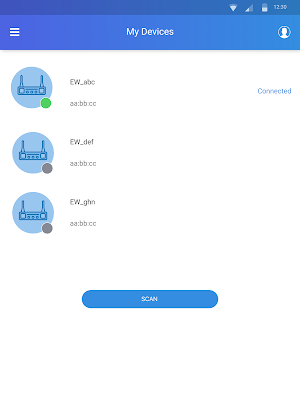
Auto scan all VNPT devices in current network if the network is available
Auto Save and show all scanned VNPT device info: Device name /model number/ serial number/Mac/ location/ ip/Online status/control status
Allow user select and connect to any online device using use name and password
Support difference UI and function based on specific Model Number: EW12S; EW12C; EW12HC; EW12HS; R4G22N
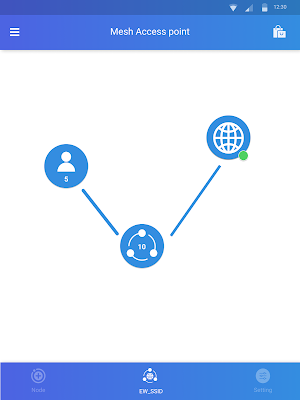
Show overall mesh network status: Internet status, Mesh name, status and device number, User number
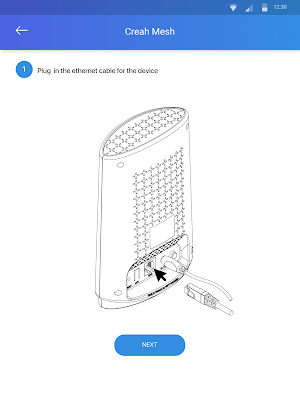
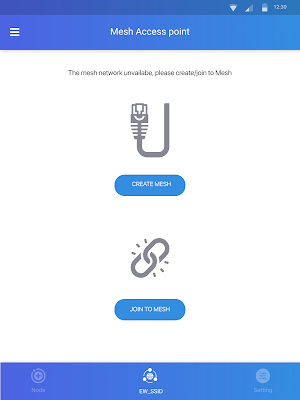
Allow user to setup a mesh network or connect to a current mesh network: setting up guide, SSID configuration if it is unavailable mesh
Show detail Internet connection: Wan type, Wan mode, RSSI, bitrate, total up-down, Mac, IP, Netmask, gateway,dns
Show detail mesh network:
"Topology: node (device name, online statusc), connection: hope, connection type"
Show detail node:
"Device name, Location, model number, serial, mac, IP, connection quality, LED state"
Show user device list: User device information: device name, vendor, Band, Connection quality (bassed RSSI), Total up/down
Allow user to connect to other mesh network: configure SSID and trigger connecting
Show current Wan: Connection type, Wan mode (bridge/router), Service, IP, Net mask, Gateway, DNS
Wan setting : Wan mode (bridge/router),Interface, Service, IP, Net mask, Gateway, DNS
Show current radio configuration: enale/disable, channel, Power; SSID configuration: name/password
Radio setting (dual band): enale/disable, channel, Power
SSID setting: name/password
Show current Guest nework: SSID name & password
Allow user to configure a guest network: add/delete; change band, SSID name & password
Show current repeater configuration: Band, SSID name & password
Allow user to configure repeater: Band, SSID name & password
User must to connect to the Mesh AP wifi default network with the following information:
SSID: EW_xxxxxx
Password: EW@xxxxxx
with "xxxxxx" is the last 6 digrit of Mesh AP's MAC address
Check network connection
Scan and show SSID list if no connection
Allow user to select and connect to any wifi network in scanned list
Auto scan all VNPT devices in current network if the network is available
Auto Save and show all scanned VNPT device info: Device name /model number/ serial number/Mac/ location/ ip/Online status/control status
Allow user select and connect to any online device using use name and password
Support difference UI and function based on specific Model Number: EW12S; EW12C; EW12HC; EW12HS; R4G22N
Show overall mesh network status: Internet status, Mesh name, status and device number, User number
Allow user to setup a mesh network or connect to a current mesh network: setting up guide, SSID configuration if it is unavailable mesh
Show detail Internet connection: Wan type, Wan mode, RSSI, bitrate, total up-down, Mac, IP, Netmask, gateway,dns
Show detail mesh network:
"Topology: node (device name, online statusc), connection: hope, connection type"
Show detail node:
"Device name, Location, model number, serial, mac, IP, connection quality, LED state"
Show user device list: User device information: device name, vendor, Band, Connection quality (bassed RSSI), Total up/down
Allow user to connect to other mesh network: configure SSID and trigger connecting
Show current Wan: Connection type, Wan mode (bridge/router), Service, IP, Net mask, Gateway, DNS
Wan setting : Wan mode (bridge/router),Interface, Service, IP, Net mask, Gateway, DNS
Show current radio configuration: enale/disable, channel, Power; SSID configuration: name/password
Radio setting (dual band): enale/disable, channel, Power
SSID setting: name/password
Show current Guest nework: SSID name & password
Allow user to configure a guest network: add/delete; change band, SSID name & password
Show current repeater configuration: Band, SSID name & password
Allow user to configure repeater: Band, SSID name & password
What’s new
Version 2.4.5 · Updated July 31, 2026
This update provides security fix.
User reviews

Good app. 👍
Alternatives to OneLink Device management
Looking for apps like OneLink Device management? Here are 3 similar Android apps on Google Play. All of them are free to download.