

Onix : AI Video Editor app
PVH infotech Video Players & Editors In-app purchases Contains ads
Easy video editor to trim, cut, merge clips & add logo. Export in HD quality.
- Downloads
- 3.9K+
- on Google Play
- Price
- Free
- In-app purchases
- Updated
- Sep 27
- 2026 · v1.0.11
Screenshots

About Onix : AI Video Editor app
🎬 ONIX VIDEO EDITOR — Edit. Create. Inspire.
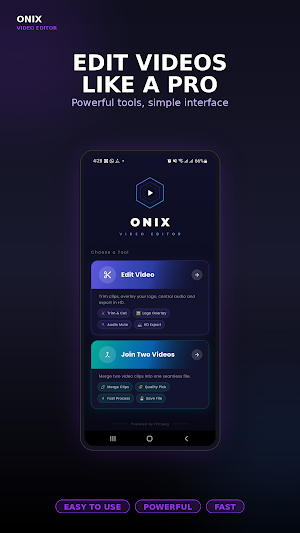
Onix is a powerful yet simple video editor that turns your phone into a professional editing studio. Whether you want to trim a clip, merge multiple videos, add your logo, or export in stunning HD quality — Onix makes it fast and easy.
No complicated tools. No confusing menus. Just clean, powerful video editing in your pocket.
━━━━━━━━━━━━━━━━━━━━
✨ KEY FEATURES
✂️ TRIM & CUT VIDEOS
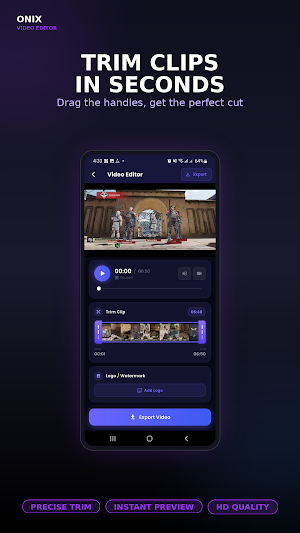
Cut out the parts you don't need with precision. Drag the trim handles on the filmstrip to find the perfect start and end point — no guesswork, no wasted time.
🔗 MERGE TWO VIDEOS
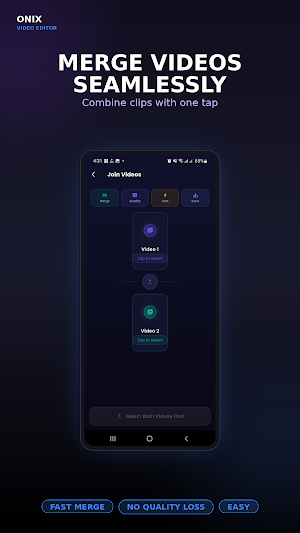
Combine two video clips into one seamless file. Perfect for joining moments, creating compilations, or stitching together short clips into a single video.
🖼️ ADD LOGO / WATERMARK
Brand your videos with your own logo or watermark. Drag and pinch to move and resize it anywhere on your video — full creative control.
🔊 AUDIO CONTROL
Mute the original audio when you want a clean, silent video for music overlays or voiceovers later.
📺 HD & 4K EXPORT
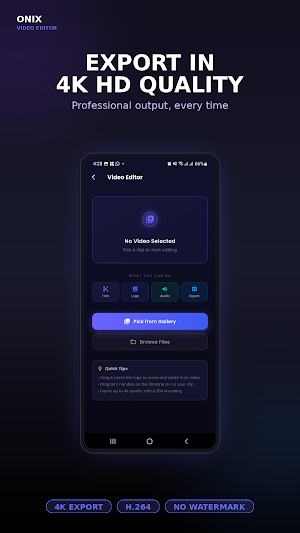
Export your videos in stunning quality — up to 4K resolution with H.264 encoding. Share videos that look as good as they feel.
⚡ FAST PROCESSING
Powered by FFmpeg, Onix processes your videos quickly without losing quality. Get your edits done in seconds, not minutes.
━━━━━━━━━━━━━━━━━━━━
🎯 WHO IS ONIX FOR?
✓ Content creators making YouTube videos, Reels, and Shorts
✓ Social media users who want quick edits before posting
✓ Gamers editing gameplay clips
✓ Vloggers and travel video makers
✓ Anyone who wants a simple, no-nonsense video editor
━━━━━━━━━━━━━━━━━━━━
💡 WHY CHOOSE ONIX?
✅ Clean & Modern Interface — designed for speed
✅ No Watermark on exported videos
✅ No Complicated Timeline — just the tools you need
✅ Lightweight & Fast — works smoothly on most phones
✅ Powered by FFmpeg — industry-standard video processing
✅ HD & 4K Export — share videos in best quality
✅ Drag-and-Drop Logo — full creative freedom
━━━━━━━━━━━━━━━━━━━━
🛠️ WHAT YOU CAN DO WITH ONIX
• Trim long videos into short clips
• Cut unwanted sections from any video
• Join two videos into one file
• Add your brand logo or personal watermark
• Move, resize, and position logos anywhere
• Mute background audio for clean visuals
• Export in HD, Full HD, or 4K quality
• Process videos fast with no quality loss
━━━━━━━━━━━━━━━━━━━━
📲 HOW TO USE ONIX
1. Open the app and choose a tool — Edit Video or Join Two Videos
2. Pick your clip from the gallery
3. Trim, add logo, or mute audio as needed
4. Tap Export and save in HD or 4K
5. Share your video anywhere — done!
━━━━━━━━━━━━━━━━━━━━
🎥 PERFECT FOR:
YouTube videos • Instagram Reels • TikTok clips • WhatsApp Status • Facebook Stories • Gameplay highlights • Travel vlogs • Tutorial videos • Marketing clips • Personal memories
━━━━━━━━━━━━━━━━━━━━
📩 FEEDBACK & SUPPORT
We're constantly improving Onix based on your feedback. If you have suggestions, found a bug, or want a new feature — please reach out. Your feedback helps make Onix better for everyone.
📧 Email: [email protected]
━━━━━━━━━━━━━━━━━━━━
Download Onix today and start creating videos that stand out. No experience needed. Just open the app and edit.
🎬 Edit. Create. Inspire. — with Onix.
Onix is a powerful yet simple video editor that turns your phone into a professional editing studio. Whether you want to trim a clip, merge multiple videos, add your logo, or export in stunning HD quality — Onix makes it fast and easy.
No complicated tools. No confusing menus. Just clean, powerful video editing in your pocket.
━━━━━━━━━━━━━━━━━━━━
✨ KEY FEATURES
✂️ TRIM & CUT VIDEOS
Cut out the parts you don't need with precision. Drag the trim handles on the filmstrip to find the perfect start and end point — no guesswork, no wasted time.
🔗 MERGE TWO VIDEOS
Combine two video clips into one seamless file. Perfect for joining moments, creating compilations, or stitching together short clips into a single video.
🖼️ ADD LOGO / WATERMARK
Brand your videos with your own logo or watermark. Drag and pinch to move and resize it anywhere on your video — full creative control.
🔊 AUDIO CONTROL
Mute the original audio when you want a clean, silent video for music overlays or voiceovers later.
📺 HD & 4K EXPORT
Export your videos in stunning quality — up to 4K resolution with H.264 encoding. Share videos that look as good as they feel.
⚡ FAST PROCESSING
Powered by FFmpeg, Onix processes your videos quickly without losing quality. Get your edits done in seconds, not minutes.
━━━━━━━━━━━━━━━━━━━━
🎯 WHO IS ONIX FOR?
✓ Content creators making YouTube videos, Reels, and Shorts
✓ Social media users who want quick edits before posting
✓ Gamers editing gameplay clips
✓ Vloggers and travel video makers
✓ Anyone who wants a simple, no-nonsense video editor
━━━━━━━━━━━━━━━━━━━━
💡 WHY CHOOSE ONIX?
✅ Clean & Modern Interface — designed for speed
✅ No Watermark on exported videos
✅ No Complicated Timeline — just the tools you need
✅ Lightweight & Fast — works smoothly on most phones
✅ Powered by FFmpeg — industry-standard video processing
✅ HD & 4K Export — share videos in best quality
✅ Drag-and-Drop Logo — full creative freedom
━━━━━━━━━━━━━━━━━━━━
🛠️ WHAT YOU CAN DO WITH ONIX
• Trim long videos into short clips
• Cut unwanted sections from any video
• Join two videos into one file
• Add your brand logo or personal watermark
• Move, resize, and position logos anywhere
• Mute background audio for clean visuals
• Export in HD, Full HD, or 4K quality
• Process videos fast with no quality loss
━━━━━━━━━━━━━━━━━━━━
📲 HOW TO USE ONIX
1. Open the app and choose a tool — Edit Video or Join Two Videos
2. Pick your clip from the gallery
3. Trim, add logo, or mute audio as needed
4. Tap Export and save in HD or 4K
5. Share your video anywhere — done!
━━━━━━━━━━━━━━━━━━━━
🎥 PERFECT FOR:
YouTube videos • Instagram Reels • TikTok clips • WhatsApp Status • Facebook Stories • Gameplay highlights • Travel vlogs • Tutorial videos • Marketing clips • Personal memories
━━━━━━━━━━━━━━━━━━━━
📩 FEEDBACK & SUPPORT
We're constantly improving Onix based on your feedback. If you have suggestions, found a bug, or want a new feature — please reach out. Your feedback helps make Onix better for everyone.
📧 Email: [email protected]
━━━━━━━━━━━━━━━━━━━━
Download Onix today and start creating videos that stand out. No experience needed. Just open the app and edit.
🎬 Edit. Create. Inspire. — with Onix.
What’s new
Version 1.0.11 · Updated September 27, 2026
Video property add.
User reviews

good editing app

Good video editing app

Bahut hi accha editing app hai. Interface simple aur user-friendly hai, jisse photo aur video edit karna bahut aasaan ho jata hai. Isme kaafi saare filters, effects aur editing tools available hain jo professional quality ka result dete hain.

Bahut achha video editing app hai. Interface simple aur user-friendly hai. Editing tools aur effects kaafi useful hain. Beginners aur content creators dono ke liye recommended.

The video editing quality is excellent. The transitions, effects, and background music are perfectly synchronized. The final output looks professional and clean. Very satisfied with the service and would definitely recommend it.
Alternatives to Onix : AI Video Editor app
Looking for apps like Onix : AI Video Editor app? Here are 5 similar Android apps on Google Play. The highest rated is Barbell Medicine (4.6/5), and all 5 are free to download.
-
Barbell Medicine 4.6
-
MYCPE ONE 4.4
-
Sunsational Swim Instructor
-
Orchard Church - Murrieta
-
Grounds 4.5
| App | Rating | Price | Installs | Last updated | Compare |
|---|---|---|---|---|---|
| Onix : AI Video Editor app | – | Free | 1,000+ | Sep 27, 2026 | |
| Barbell Medicine | 4.6 / 5 | Free | 1,000+ | Oct 23, 2026 | Compare |
| MYCPE ONE | 4.4 / 5 | Free | 1,000+ | Oct 28, 2026 | Compare |
| Sunsational Swim Instructor | – | Free | 1,000+ | Jul 25, 2026 | Compare |
| Orchard Church - Murrieta | – | Free | 1,000+ | Sep 14, 2026 | Compare |
| Grounds | 4.6 / 5 | Free | 10,000+ | Oct 8, 2026 | Compare |