
FrameFlow Maker
Lifestyle
FrameFlow Maker: Craft visual tales
- Downloads
- 1K+
- on Google Play
- Price
- Free
- No in-app purchases
- Updated
- Mar 24
- 2025 · v1.0.4
Screenshots
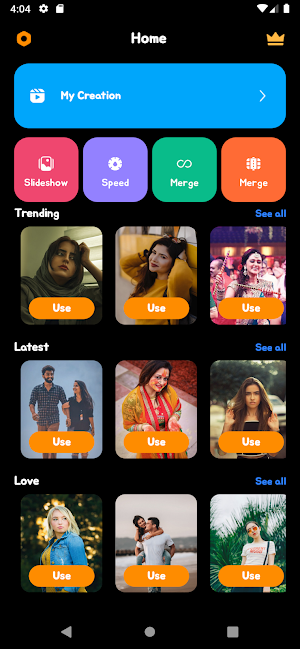
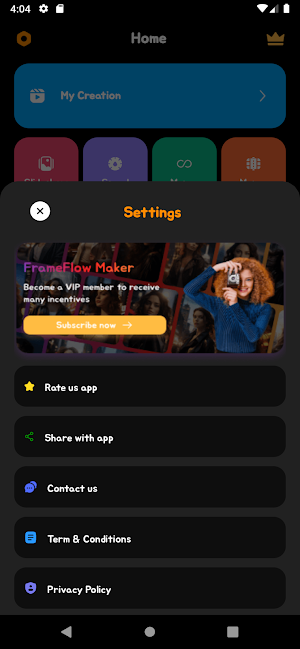
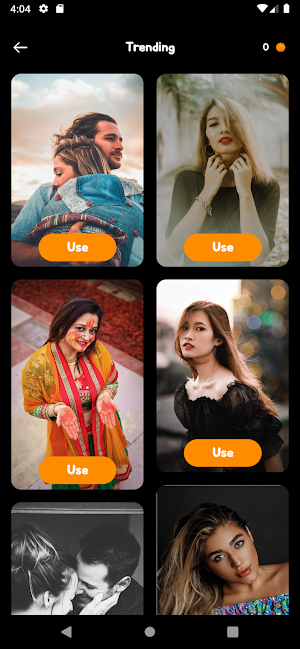
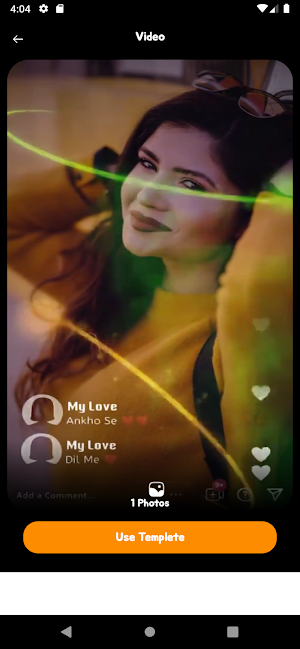

About FrameFlow Maker
In the vibrant landscape of video creation and editing, Adem Tech proudly presents FrameFlow Maker—a groundbreaking application poised to elevate the art of visual storytelling. With a robust suite of features encompassing seamless image-to-video conversion, video playlist management, playback acceleration, cutting, and merging capabilities, FrameFlow Maker stands as an innovative toolkit tailored to meet the diverse needs of content creators across various spheres.
At its essence, FrameFlow Maker excels in seamlessly transforming static images into dynamic, compelling video narratives. The image-to-video conversion feature, marked by its simplicity and adaptability, caters to a broad spectrum of needs—from personal storytelling to the creation of impactful promotional content. Adem Tech's dedication to user-friendly interactions is evident in the seamless integration of this foundational feature, ensuring accessibility and expressive freedom for users of all levels.
A notable facet of FrameFlow Maker lies in its robust video playlist management system. This functionality empowers users to structure and organize their creative space efficiently, whether managing content streams for social media or curating a cohesive brand presence for businesses. The playlist management ensures versatility and ease of use, providing a seamless experience for creators to streamline their video content.
Acknowledging the accelerated pace of modern communication, FrameFlow Maker introduces an innovative playback acceleration feature. Users can dynamically adjust the speed of their videos, unlocking creative possibilities. Whether crafting captivating time-lapse sequences or delivering information with a heightened tempo, this feature adds a layer of creativity and practicality to the video creation process.
Precision in video editing is a cornerstone of FrameFlow Maker, evident in its cutting and merging capabilities. Users can seamlessly trim unwanted segments, maintaining a polished and streamlined quality in their videos. The merging feature enhances creative possibilities, allowing the combination of multiple clips to craft cohesive and impactful visual narratives.
Beyond its feature-rich offerings, FrameFlow Maker distinguishes itself with an intuitive and user-friendly interface. Designed to cater to both novice and seasoned content creators, the application ensures a smooth and intuitive navigation experience. Clear menus and concise instructions guide users through the video creation journey, fostering an inclusive platform for individuals with varying levels of technical proficiency.
In conclusion, FrameFlow Maker by Adem Tech transcends the boundaries of conventional applications; it is a dynamic canvas for unparalleled creativity and storytelling. With its seamless image-to-video conversion, playlist management, acceleration, cutting, and merging features, FrameFlow Maker caters to a diverse audience of content creators. Whether one is a social media influencer, a business professional, or an aspiring artist, FrameFlow Maker empowers users to bring their visual stories to life while adhering to policies and guidelines.
At its essence, FrameFlow Maker excels in seamlessly transforming static images into dynamic, compelling video narratives. The image-to-video conversion feature, marked by its simplicity and adaptability, caters to a broad spectrum of needs—from personal storytelling to the creation of impactful promotional content. Adem Tech's dedication to user-friendly interactions is evident in the seamless integration of this foundational feature, ensuring accessibility and expressive freedom for users of all levels.
A notable facet of FrameFlow Maker lies in its robust video playlist management system. This functionality empowers users to structure and organize their creative space efficiently, whether managing content streams for social media or curating a cohesive brand presence for businesses. The playlist management ensures versatility and ease of use, providing a seamless experience for creators to streamline their video content.
Acknowledging the accelerated pace of modern communication, FrameFlow Maker introduces an innovative playback acceleration feature. Users can dynamically adjust the speed of their videos, unlocking creative possibilities. Whether crafting captivating time-lapse sequences or delivering information with a heightened tempo, this feature adds a layer of creativity and practicality to the video creation process.
Precision in video editing is a cornerstone of FrameFlow Maker, evident in its cutting and merging capabilities. Users can seamlessly trim unwanted segments, maintaining a polished and streamlined quality in their videos. The merging feature enhances creative possibilities, allowing the combination of multiple clips to craft cohesive and impactful visual narratives.
Beyond its feature-rich offerings, FrameFlow Maker distinguishes itself with an intuitive and user-friendly interface. Designed to cater to both novice and seasoned content creators, the application ensures a smooth and intuitive navigation experience. Clear menus and concise instructions guide users through the video creation journey, fostering an inclusive platform for individuals with varying levels of technical proficiency.
In conclusion, FrameFlow Maker by Adem Tech transcends the boundaries of conventional applications; it is a dynamic canvas for unparalleled creativity and storytelling. With its seamless image-to-video conversion, playlist management, acceleration, cutting, and merging features, FrameFlow Maker caters to a diverse audience of content creators. Whether one is a social media influencer, a business professional, or an aspiring artist, FrameFlow Maker empowers users to bring their visual stories to life while adhering to policies and guidelines.
Alternatives to FrameFlow Maker
Looking for apps like FrameFlow Maker? Here are 6 similar Android apps on Google Play. The highest rated is Private Photo Vault - Keepsafe (4.7/5), and all 6 are free to download.
-
Apowersoft Background Eraser 3.0
-
VideoFX Music Video Maker 4.3
-
Music Video Maker - Slide Show 4.4
-
Smart Video Crop - Video Cut 3.9
-
GOGH: Animated Drawings
-
Private Photo Vault - Keepsafe 4.7
| App | Rating | Price | Installs | Last updated | Compare |
|---|---|---|---|---|---|
| FrameFlow Maker | – | Free | 1,000+ | Mar 24, 2025 | |
| Apowersoft Background Eraser | 3.0 / 5 | Free | 1,000,000+ | Jul 24, 2026 | Compare |
| VideoFX Music Video Maker | 4.3 / 5 | Free | 10,000,000+ | Sep 30, 2026 | Compare |
| Music Video Maker - Slide Show | 4.4 / 5 | Free | 5,000,000+ | Nov 11, 2025 | Compare |
| Smart Video Crop - Video Cut | 3.9 / 5 | Free | 5,000,000+ | Oct 29, 2025 | Compare |
| GOGH: Animated Drawings | – | Free | 10,000+ | Oct 23, 2025 | Compare |
| Private Photo Vault - Keepsafe | 4.7 / 5 | Free | 50,000,000+ | Oct 1, 2026 | Compare |
Compare FrameFlow Maker with the top alternatives: ratings, updates, ASO score and keyword gaps →
Similar apps on Google Play
- Apowersoft Background Eraser
- VideoFX Music Video Maker
- Music Video Maker - Slide Show
- Smart Video Crop - Video Cut
- GOGH: Animated Drawings
- Private Photo Vault - Keepsafe
- Photo Video Maker: Slideshows
- Zoho Show: Presentation Maker
- PhotoPad Photo Editor
- Music Video Editor - inMelo
- Glitch Photo Editor & Glitch V
- Snapfish: Prints + Photo Books
- Blend AI Logo Background Maker
- Collage Maker - Selfie Camera
- MakerFlo
- Video Wallpaper Maker Lite
- Filo: Homework & Exam Help
- Fotoo - Photo Frame Slideshow
- PICNIC - photo filter for sky
- Add Music To Video & AI Editor
- Gallery - Photo Editor & Vault
- PhotoCopy — photo locations
- Music Video Maker Photo Editor
- Vskit: Short Video, Link More
- fooView - FV Float Viewer
- Eli Kids
- Podcast Guru - Podcast App
- InstaSquare Photo Editor
- TON: Filters for Video & Photo
- fileee - No more paperwork
- LR Presets - Photo Editor
- Gallery - Simple and fast
- Noteshelf - Notes, Annotations
- Photo Editor by BeFunky
- Tempo - Music Video Maker
- Cut Cut: Photo Editor & CutOut
- Background Eraser - BG Remover
- Easy Draw Animals
- Fonty - Draw and Make Fonts
- Vivi PhotoBook
- Motion Ninja Video Editor
- BeatSync: Photo & Music Videos
- Background Remover & Eraser
- Farm Progress
- Savndo: Save and Do More
- Video Converter Pro
- ActionDirector - Video Editing
- Photo Lock: Hide Videos, Pics
- Square Blur-Pic Editor Effect
- Zeemo: AI Captions & Subtitles
- PicWish: AI Photo Editor
- Magisto - Video Editor & Music
- Linkfly - Build link site tree
- LockMyPix Safe Photo Vault
- Kyte: POS, Inventory and Store
- Splice - Video Editor & Maker
- Photo Studio: pictures editor!
- AI Video Maker - Renderforest
- FX File Explorer
- Reelsapp video trends
- Thetan Creator: Create & Play
- Photo Finish: Automatic Timing
- Wideo
- Trendy Transfers
- Blend Photos - Photo Blender
- Background Eraser Photo Editor
- EarthProject
- Funlearn: Kids Bedtime stories
- Video Editor VideoShowLite
- Collage Maker - Grid & Frames
- Shining Star Boutique
- Eventer - Unforgettable Events
- Wedding Invitation Card Maker
- Knack - Tutoring Simplified
- Huion Note : Easy note-taking
- eZy Watermark Photos Pro
- PixelFlow: Intro Video maker
- Vroom: Early Learning
- Frameo: Share to photo frames
- SCRIBZEE®
- ScreenMaster:Screenshot Markup
- Picsart Animator: GIF & Video
- Artisse - Realistic AI Photos
- PicsKit Photo Editor & Design
- Photo Editor Pro - Square Pic
- Background remover - remove.bg
- VIMAGE 3D Live Photo Animation
- Mimic - AI Photo Face Animator
- Stop Motion Studio
- GoCut - Effect Video Editor
- VLLO - Video Editor Vlog Edits
- Your Little Hero: Kids Stories
- Gallery
- Unfold: Story & Reels Maker
- PrivacyBlur
- Node Video - Pro Video Editor
- InFrame - Photo Editor & Frame
- Photo Editor:Pic Collage Maker
- Pixelcut AI Photo Editor