

BulkDial: CSV & Excel Dialer
Vidagdhan Technologies Business In-app purchases
Auto dialer for CSV & Excel lists. Bulk call contacts and save hours every day.
- Downloads
- 2.6K+
- on Google Play
- Price
- Free
- In-app purchases
- Updated
- Sep 26
- 2026 · v29.0.35
Screenshots



About BulkDial: CSV & Excel Dialer
Stop dialing numbers manually and start closing more deals with BulkDial.
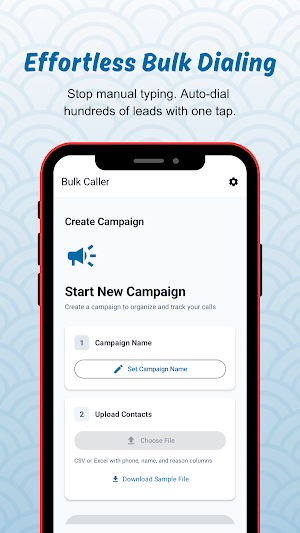
Whether you are in sales, real estate, recruitment, or telemarketing, BulkDial turns your phone into a high-speed outbound calling machine. Simply upload your contact list and let the app handle the rest.
🚀 How it Works:
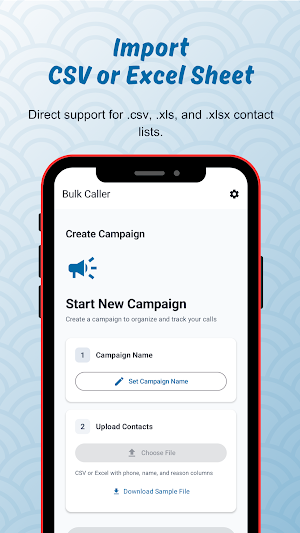
Upload: Import your CSV or Excel (.xlsx) file directly from your phone or cloud storage.
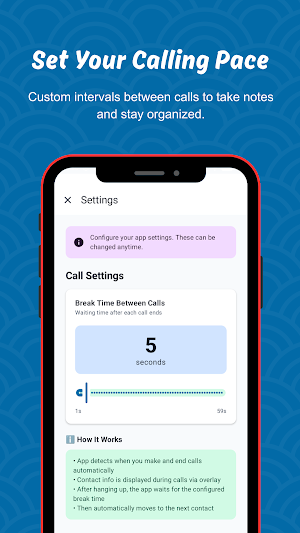
Configure: Set your desired delay (duration) between calls to give yourself time to take notes.
Start: Hit "Start" and the app will automatically dial each number in your list sequentially.
🛠️ Key Features:
Seamless Integration: Fully supports CSV, XLS, and XLSX file formats.
Auto-Sequential Dialing: No more switching between your spreadsheet and the dial pad.
Custom Intervals: Set a 5, 10, or 30-second break between calls to stay organized.
Hands-Free Workflow: Focus on the conversation, not the dialing process.
Call History: Keep track of who you’ve reached and who is left on your list.
🎯 Who is this for?
Sales Professionals: Hit your daily outreach targets in half the time.
Real Estate Agents: Follow up on leads and cold-call property lists effortlessly.
Small Business Owners: Notify your customers about updates or promotions.
Recruiters: Efficiently screen large batches of candidates.
Download BulkDial today and automate your daily calling workflow!
Whether you are in sales, real estate, recruitment, or telemarketing, BulkDial turns your phone into a high-speed outbound calling machine. Simply upload your contact list and let the app handle the rest.
🚀 How it Works:
Upload: Import your CSV or Excel (.xlsx) file directly from your phone or cloud storage.
Configure: Set your desired delay (duration) between calls to give yourself time to take notes.
Start: Hit "Start" and the app will automatically dial each number in your list sequentially.
🛠️ Key Features:
Seamless Integration: Fully supports CSV, XLS, and XLSX file formats.
Auto-Sequential Dialing: No more switching between your spreadsheet and the dial pad.
Custom Intervals: Set a 5, 10, or 30-second break between calls to stay organized.
Hands-Free Workflow: Focus on the conversation, not the dialing process.
Call History: Keep track of who you’ve reached and who is left on your list.
🎯 Who is this for?
Sales Professionals: Hit your daily outreach targets in half the time.
Real Estate Agents: Follow up on leads and cold-call property lists effortlessly.
Small Business Owners: Notify your customers about updates or promotions.
Recruiters: Efficiently screen large batches of candidates.
Download BulkDial today and automate your daily calling workflow!
User reviews

good experience but not working from 1 day. kindly help us we love this app
Alternatives to BulkDial: CSV & Excel Dialer
Looking for apps like BulkDial: CSV & Excel Dialer? Here are 6 similar Android apps on Google Play. 5 of the 6 are free to download.
-
Tube Tail: Creator Tracker
-
RubriDrop: PC File Transfer
-
MojoDial: Sales CRM & Dialer
-
ReplyKoala: Auto Responder
-
Rubrisign: Easy PDF Signer
-
Rubrisign: PDF Sign Unlimited
| App | Rating | Price | Installs | Last updated | Compare |
|---|---|---|---|---|---|
| BulkDial: CSV & Excel Dialer | – | Free | 1,000+ | Sep 26, 2026 | |
| Tube Tail: Creator Tracker | – | Free | 10+ | Jun 23, 2026 | Compare |
| RubriDrop: PC File Transfer | – | Free | 5+ | Apr 4, 2026 | Compare |
| MojoDial: Sales CRM & Dialer | – | Free | 10+ | May 28, 2026 | Compare |
| ReplyKoala: Auto Responder | – | Free | 10+ | Jul 23, 2026 | Compare |
| Rubrisign: Easy PDF Signer | – | Free | 1+ | Apr 4, 2026 | Compare |
| Rubrisign: PDF Sign Unlimited | – | 3.49 USD | 1+ | Feb 13, 2026 | Compare |