

CAMPOINT
Veracity Video Players & Editors
CCTV installation app for use with the Veracity POINTSOURCE and PINPOINT devices
- Downloads
- 2.6K+
- on Google Play
- Price
- Free
- No in-app purchases
- Updated
- Sep 18
- 2026 · v1.6.8
Screenshots

About CAMPOINT
Companion app for the Veracity POINTSOURCE-Wireless and PINPOINT-Wireless devices to assist with CCTV camera installation.
At this early stage, rather than rating the app, please report errors and feedback to [email protected]. Please provide as much information as possible including make/model of handheld, and make/model of camera.
FEATURES
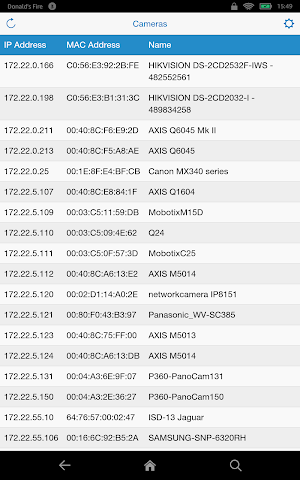
★ Lists IP cameras discovered by POINTSOURCE / PINPOINT (Bonjour & WS-Discovery).
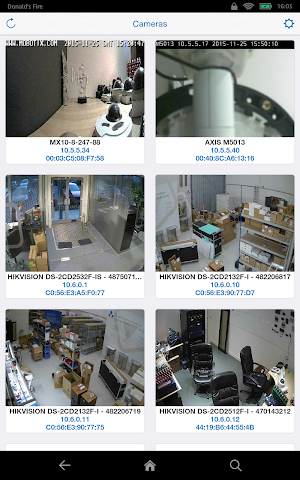
★ Displays camera thumbnail + IP address + MAC address.
★ View camera video.
★ View camera configuration pages.
★ Access POINTSOURCE / PINPOINT device settings.
★ Retains history of URLs and credentials.
★ Built-in data for over 100 camera manufacturers.
★ Predicts values for video URL, configuration URL and credentials.
★ Upgrade your POINTSOURCE / PINPOINT firmware.
Currently, cameras from the following manufacturers have been tested: AXIS, HikVision, ISD, Mobotix, Samsung, and UDP Technology. CAMPOINT is not compatible with ACTi cameras.
Not all cameras display a thumbnail image, and some thumbnails will not appear until correct camera credentials have been entered.
Normally you plug a single camera into POINTSOURCE. However if you need to connect it to a network, for best performance, ensure that no more than 10 devices are on the network.
For best results, use POINTSOURCE / PINPOINT firmware version 1.1.6 +. (The app does not work with 1.0.11.)
HOW TO USE
1) Install and run the app.
2) If VLC Player is not already installed, the app will offer to install it. Install VLC Player and restart the app.
3) If you are not already connected to a POINTSOURCE / PINPOINT device, the app will present a link to the handheld's Wi-Fi settings. Connect your handheld to the POINTSOURCE / PINPOINT Wi-Fi.
4) The app will retrieve a list of cameras from the POINTSOURCE / PINPOINT and display them in a grid.
5) The camera list refreshes automatically every 10 secs, but you can force a refresh by tapping the refresh icon in the top-bar.
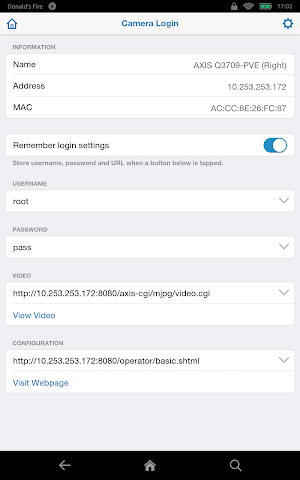
6) Clicking on a camera takes you to the Camera Login Panel where you can enter the camera's credentials and then view live camera video or visit the camera's configuration pages.
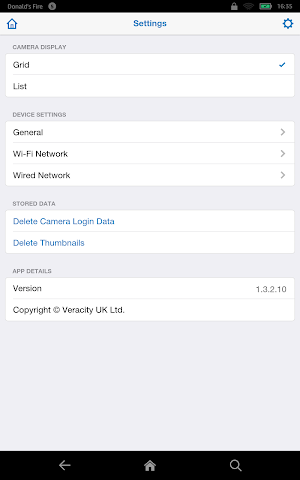
7) Tap on the settings icon in the top-bar (gear symbol) to access app settings and POINTSOURCE / PINPOINT settings.
CAMERA LOGIN DATA
The Camera Login Panel form fields (username, password, video URL and configuration URL) may be pre-filled. CAMPOINT chooses values...
* Using previously saved values for this ip-address.
* From saved values for a camera of the same manufacturer.
* From the built-in manufacturer data.
For the configuration URL only, if no suitable candidate can be found using the above, CAMPOINT falls back to suggesting just the camera's ip-address.
You can also manually edit the form fields or select from the history of previously entered values.
CONFIGURING VLC PLAYER
If you need low-latency video, best results may be obtained by turning off hardware acceleration and minimising the network buffer. However, this can result in lower quality video.
Launch VLC Player, then...
Menu > Preferences > Hardware Acceleration: Disabled
Menu > Preferences > Advanced > Network Caching Value: 100
KNOWN ISSUES
* After connecting to the POINTSOURCE Wi-Fi, it can take a few 10s of seconds before the app recognises this.
** This app is only of use if you have one of these Veracity devices **
At this early stage, rather than rating the app, please report errors and feedback to [email protected]. Please provide as much information as possible including make/model of handheld, and make/model of camera.
A fairly high spec mobile/tablet is recommended for viewing high resolution video. ARMv7 only, Intel processors are not supported.
FEATURES
★ Lists IP cameras discovered by POINTSOURCE / PINPOINT (Bonjour & WS-Discovery).
★ Displays camera thumbnail + IP address + MAC address.
★ View camera video.
★ View camera configuration pages.
★ Access POINTSOURCE / PINPOINT device settings.
★ Retains history of URLs and credentials.
★ Built-in data for over 100 camera manufacturers.
★ Predicts values for video URL, configuration URL and credentials.
★ Upgrade your POINTSOURCE / PINPOINT firmware.
Currently, cameras from the following manufacturers have been tested: AXIS, HikVision, ISD, Mobotix, Samsung, and UDP Technology. CAMPOINT is not compatible with ACTi cameras.
Not all cameras display a thumbnail image, and some thumbnails will not appear until correct camera credentials have been entered.
Normally you plug a single camera into POINTSOURCE. However if you need to connect it to a network, for best performance, ensure that no more than 10 devices are on the network.
For best results, use POINTSOURCE / PINPOINT firmware version 1.1.6 +. (The app does not work with 1.0.11.)
HOW TO USE
1) Install and run the app.
2) If VLC Player is not already installed, the app will offer to install it. Install VLC Player and restart the app.
3) If you are not already connected to a POINTSOURCE / PINPOINT device, the app will present a link to the handheld's Wi-Fi settings. Connect your handheld to the POINTSOURCE / PINPOINT Wi-Fi.
4) The app will retrieve a list of cameras from the POINTSOURCE / PINPOINT and display them in a grid.
5) The camera list refreshes automatically every 10 secs, but you can force a refresh by tapping the refresh icon in the top-bar.
6) Clicking on a camera takes you to the Camera Login Panel where you can enter the camera's credentials and then view live camera video or visit the camera's configuration pages.
7) Tap on the settings icon in the top-bar (gear symbol) to access app settings and POINTSOURCE / PINPOINT settings.
CAMERA LOGIN DATA
The Camera Login Panel form fields (username, password, video URL and configuration URL) may be pre-filled. CAMPOINT chooses values...
* Using previously saved values for this ip-address.
* From saved values for a camera of the same manufacturer.
* From the built-in manufacturer data.
For the configuration URL only, if no suitable candidate can be found using the above, CAMPOINT falls back to suggesting just the camera's ip-address.
You can also manually edit the form fields or select from the history of previously entered values.
CONFIGURING VLC PLAYER
If you need low-latency video, best results may be obtained by turning off hardware acceleration and minimising the network buffer. However, this can result in lower quality video.
Launch VLC Player, then...
Menu > Preferences > Hardware Acceleration: Disabled
Menu > Preferences > Advanced > Network Caching Value: 100
KNOWN ISSUES
* After connecting to the POINTSOURCE Wi-Fi, it can take a few 10s of seconds before the app recognises this.
What’s new
Version 1.6.8 · Updated September 18, 2026
· Digest Authentication added · Now supports PSTI version of VAD-PSW (1.3.5)
User reviews

عالی
Alternatives to CAMPOINT
Looking for apps like CAMPOINT? Here are 6 similar Android apps on Google Play. The highest rated is Hubspace (4.6/5), and all 6 are free to download.
-
VicoHome: Smart Home Camera 4.5
-
Philips Avent Baby Monitor+ 4.5
-
Hubspace 4.6
-
Homey — A better smart home 4.2
-
Pioneer Smart Sync 3.1
-
Fing - Network Tools 4.5
| App | Rating | Price | Installs | Last updated | Compare |
|---|---|---|---|---|---|
| CAMPOINT | – | Free | 1,000+ | Sep 18, 2026 | |
| VicoHome: Smart Home Camera | 4.5 / 5 | Free | 1,000,000+ | Oct 23, 2026 | Compare |
| Philips Avent Baby Monitor+ | 4.5 / 5 | Free | 100,000+ | Sep 30, 2026 | Compare |
| Hubspace | 4.6 / 5 | Free | 1,000,000+ | Oct 13, 2026 | Compare |
| Homey — A better smart home | 4.2 / 5 | Free | 100,000+ | Oct 23, 2026 | Compare |
| Pioneer Smart Sync | 3.1 / 5 | Free | 1,000,000+ | Jun 21, 2026 | Compare |
| Fing - Network Tools | 4.5 / 5 | Free | 50,000,000+ | Oct 19, 2026 | Compare |
Compare CAMPOINT with the top alternatives: ratings, updates, ASO score and keyword gaps →
Similar apps on Google Play
- VicoHome: Smart Home Camera
- Philips Avent Baby Monitor+
- Hubspace
- Homey — A better smart home
- Pioneer Smart Sync
- Fing - Network Tools
- IP Camera Viewer
- Trend Micro ID Protection
- Navimow
- ecobee
- nzb360 - Media Server Manager
- Video Surveillance Ivideon
- Froling Connect
- SolaXCloud
- YI Life
- GHome - GHome Smart
- eero wifi system
- CloudEdge
- DREO
- Home Assistant
- Rheem EcoNet
- Dzees Home
- Linksys
- Aeromatic: AeroPress Recipes
- WiFi Mouse Pro
- Viidure-Dashcam Viewer
- Sensi
- Avigilon Unity Video
- ConnectLife
- Litchi for DJI Drones
- Home V
- Viome
- Plume Home
- Miele app – Smart Home
- SPYPOINT
- NETGEAR Orbi – WiFi System App
- Kasa Smart
- UniFi
- IFSTA Instructor 9