
WorkTimes.hr Mobile
directa.hr Business
WorkTimes.hr Companion App
- Downloads
- 116+
- on Google Play
- Price
- Free
- No in-app purchases
- Updated
- Feb 25
- 2026 · v2.3.9
Screenshots


About WorkTimes.hr Mobile
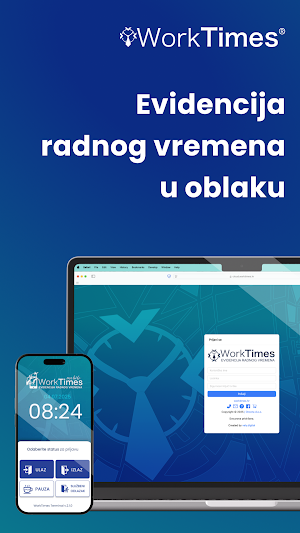
WorkTimes Mobile is the companion app for the WorkTimes.hr Web Cloud SaaS platform, allowing employees to easily and securely record their working hours via a mobile device.
The app provides reliable attendance tracking with instant synchronization and data visibility through the WorkTimes.hr web interface. All entries are sent directly to the WorkTimes Cloud and are available in real time.
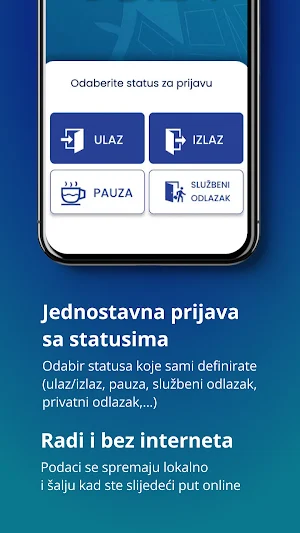
If an internet connection is unavailable, records are stored on the device and automatically uploaded once the connection is restored.
IMPORTANT: The app is free to download, but an active WorkTimes.hr subscription is required to use it. The mobile app alone is not functional without the web platform.
Main Features
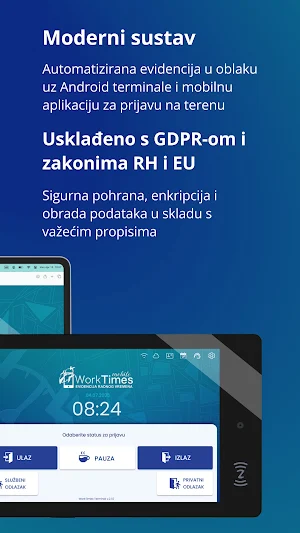
Select status when clocking in (entry, exit, break, business leave, etc.)
Clock in and out using a PIN code, QR code, or NFC card/key tag
Read and register cards (if your device supports NFC)
Submit absence requests (vacation, day off, etc.)
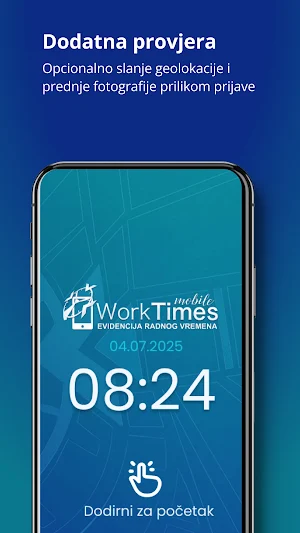
(Optional) Send geolocation when clocking in
(Optional) Send a front camera photo of the user during clock-in
(Optional) Select a WorkSite (location or project)
Why WorkTimes Mobile?
The app is an extension of the modern Web Cloud SaaS platform, whose greatest advantage is its high adaptability to different business environments.
Its behavior and available features depend on system configuration.
- Easy on-site workforce management
- Support for multiple employees using a single device
- Advanced customization available only through the web platform
- Online and offline operation modes
- Encrypted data storage and transmission for maximum security
- Additional verification via geolocation and photo capture
- Real-time visibility of check-ins
- Geofenced check-ins – limit clock-ins within a defined radius
- Live GeoIP – track device location during working hours
- Companion Mode – mobile license linked to a specific employee (no need for manual identification each time)
- Visual and sound notifications for successful or failed check-ins
How It Works
WorkTimes Mobile synchronizes all data with the WorkTimes.hr Cloud platform, ensuring all entries and exits are available in real time.
When an employee clocks in via mobile, the record is immediately stored in the company’s database and appears in reports that can later be reviewed, edited, or exported.
The mobile app is just one part of the system — the real power lies in the WorkTimes.hr web application.
Through the web interface, administrators can:
- View real-time reports
- Edit and approve employee entries
- Plan work schedules and shifts
- Manage and approve absence requests (vacation, day off, etc.)
- Track vacation and sick leave balances
- Monitor locations and projects (WorkSites)
- Generate and print official reports
- Integrate working hours with accounting systems (API)
For more information, visit:
https://worktimes.hr
The app provides reliable attendance tracking with instant synchronization and data visibility through the WorkTimes.hr web interface. All entries are sent directly to the WorkTimes Cloud and are available in real time.
If an internet connection is unavailable, records are stored on the device and automatically uploaded once the connection is restored.
IMPORTANT: The app is free to download, but an active WorkTimes.hr subscription is required to use it. The mobile app alone is not functional without the web platform.
Main Features
Select status when clocking in (entry, exit, break, business leave, etc.)
Clock in and out using a PIN code, QR code, or NFC card/key tag
Read and register cards (if your device supports NFC)
Submit absence requests (vacation, day off, etc.)
(Optional) Send geolocation when clocking in
(Optional) Send a front camera photo of the user during clock-in
(Optional) Select a WorkSite (location or project)
Why WorkTimes Mobile?
The app is an extension of the modern Web Cloud SaaS platform, whose greatest advantage is its high adaptability to different business environments.
Its behavior and available features depend on system configuration.
- Easy on-site workforce management
- Support for multiple employees using a single device
- Advanced customization available only through the web platform
- Online and offline operation modes
- Encrypted data storage and transmission for maximum security
- Additional verification via geolocation and photo capture
- Real-time visibility of check-ins
- Geofenced check-ins – limit clock-ins within a defined radius
- Live GeoIP – track device location during working hours
- Companion Mode – mobile license linked to a specific employee (no need for manual identification each time)
- Visual and sound notifications for successful or failed check-ins
How It Works
WorkTimes Mobile synchronizes all data with the WorkTimes.hr Cloud platform, ensuring all entries and exits are available in real time.
When an employee clocks in via mobile, the record is immediately stored in the company’s database and appears in reports that can later be reviewed, edited, or exported.
The mobile app is just one part of the system — the real power lies in the WorkTimes.hr web application.
Through the web interface, administrators can:
- View real-time reports
- Edit and approve employee entries
- Plan work schedules and shifts
- Manage and approve absence requests (vacation, day off, etc.)
- Track vacation and sick leave balances
- Monitor locations and projects (WorkSites)
- Generate and print official reports
- Integrate working hours with accounting systems (API)
For more information, visit:
https://worktimes.hr
What’s new
Version 2.3.9 · Updated February 25, 2026
More stabile version: enhanced GEO IP and faster NFC card reading with V1 read type.
Alternatives to WorkTimes.hr Mobile
Looking for apps like WorkTimes.hr Mobile? Here are 6 similar Android apps on Google Play. All of them are free to download.





| App | Rating | Price | Installs | Last updated | Compare |
|---|---|---|---|---|---|
| WorkTimes.hr Mobile | – | Free | 100+ | Feb 25, 2026 | |
| Visy | – | Free | 500+ | Sep 16, 2026 | Compare |
| NCIA Asset Management | – | Free | 50+ | Feb 10, 2026 | Compare |
| PerSHR | – | Free | 100+ | Aug 4, 2026 | Compare |
| TAURON Muzyka 24H | – | Free | 50+ | Apr 28, 2020 | Compare |
| ASSET M | – | Free | 5+ | – | Compare |
| AskMarcel: AI HVAC Diagnostic | – | Free | 10+ | – | Compare |
Similar apps on Google Play
- Visy
- NCIA Asset Management
- PerSHR
- TAURON Muzyka 24H
- ASSET M
- AskMarcel: AI HVAC Diagnostic
- Akon Pharma
- Livevnv Business
- SimbaNFe
- Mais Prático Mobile
- QS.on
- RHS Dashboard
- Apilex: Hukuk Asistanı
- Allied Auctioneers
- Réseau-Connect
- B WEBWIZ
- Gresham St Paul’s
- RigBay
- TrustSales
- SmartMobility
- O:der Signage
- LTS&DC 2026
- Pilüt
- Bogenraith
- トリニティーClub