

RapidShare: Fast File Transfer
Vasundhara Infotech LLP Tools In-app purchases Contains ads
Share files instantly with QR codes! Transfer effortlessly across devices.
- Downloads
- 50+
- on Google Play
- Price
- Free
- In-app purchases
- Updated
- Oct 30
- 2024 · v1.6
Screenshots
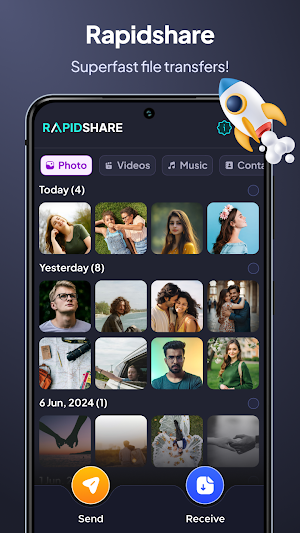
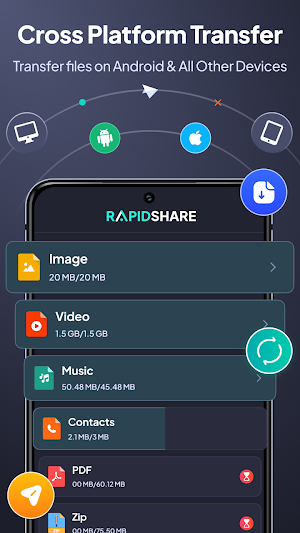
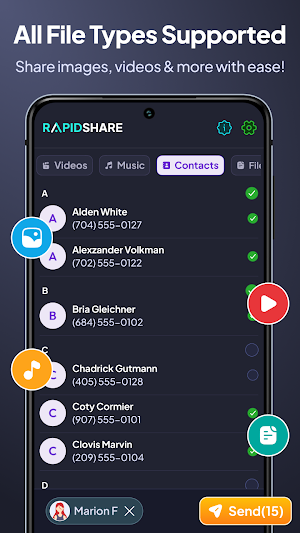


About RapidShare: Fast File Transfer
Introducing RapidShare: Fast File Transfer! With AnyShare - File Sharing, sharing photos, videos, music, files, contacts, Applications and more. Enjoy secure, lightning-fast transfers of large files without using your data. Send anywhere ensures safe and seamless file transfers whether you're online or offline. Transfer files effortlessly between mobile devices, Web, PC, it's never been easier or faster!
This RapidShare: Fast File Transfer is securely share content between mobile devices or transfer data from one phone to another, or even consolidate multiple old devices into one. It uses HotSpot/WiFi networks for secure and efficient file transfers, including large files.
Want to transfer files between phones or between your phone and PC? Give send anywhere a try it's the fastest all-in-one file transfer documents, photos, videos, and more instantly with just a few taps. It's not just for transferring between other devices.
Key Features of RapidShare: Fast File Transfer
1. Perfect File Transfer Between Mobile and PC:
This feature ensures that you can easily transfer files between their mobile devices (like smartphones or tablets) and their personal computers (PCs). It allows for smooth and uninterrupted transfer of various types of files, such as photos, videos, documents, and more, without any difficulty.
2. Share Files Offline with Ease:
With Send Anywhere, you can share files without needing an active internet connection. It enables offline file sharing between devices, making use of technologies like Wi-Fi Direct or Bluetooth to establish a direct connection between devices.
3. User-Friendly Design:
The design of this file transfer solution is intuitive and easy to use. It provides a simple interface that allows users to navigate through the functions effortlessly.
4. Effortlessly Send Large Files:
File sharing app enables to send large files quickly and efficiently. It eliminates the frustrations associated with slow transfer speeds or file size limitations commonly encountered with other methods.
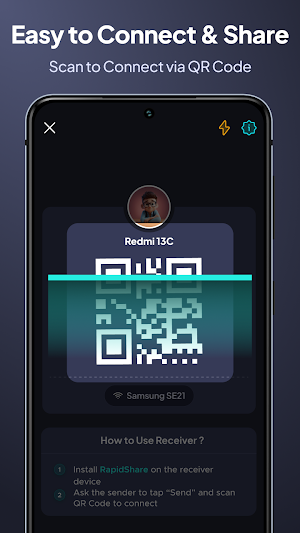
5. Share Files Instantly with QR Codes for Enhanced Connectivity
You can conveniently connect using QR codes. Generate a personalized QR code to share multiple files effortlessly. Recipients simply scan the QR code to start downloading files instantly to their phones, all without needing to touch your keyboard.
6. Quick Share: Fast and Secure File Sharing
Quick Share enables you to swiftly transfer photos, videos, apps, and more between Android, and other nearby devices. Enjoy Send file even without an Internet connection. Rest assured, your transfers are private and secured with end-to-end encryption for added peace of mind.
What's Inside RapidShare: Fast File Transfer :
- No need for USB, internet, or data usage!
- Transfers all types of files: documents, photos, audios, videos, Applications (APK Files) !
- Lightning-fast: transfer videos to friends in seconds!
- Supports cross-platform file transfer between other devices.
Send files wirelessly from your phone to your computer in seconds using RapidShare: Fast File Transfer. Easily upload files from your computer to your phone through a web browser and download files from your phone to your computer. All you need is an Internet connection and to have easy share installed on your phone!
This RapidShare: Fast File Transfer is securely share content between mobile devices or transfer data from one phone to another, or even consolidate multiple old devices into one. It uses HotSpot/WiFi networks for secure and efficient file transfers, including large files.
Want to transfer files between phones or between your phone and PC? Give send anywhere a try it's the fastest all-in-one file transfer documents, photos, videos, and more instantly with just a few taps. It's not just for transferring between other devices.
Key Features of RapidShare: Fast File Transfer
1. Perfect File Transfer Between Mobile and PC:
This feature ensures that you can easily transfer files between their mobile devices (like smartphones or tablets) and their personal computers (PCs). It allows for smooth and uninterrupted transfer of various types of files, such as photos, videos, documents, and more, without any difficulty.
2. Share Files Offline with Ease:
With Send Anywhere, you can share files without needing an active internet connection. It enables offline file sharing between devices, making use of technologies like Wi-Fi Direct or Bluetooth to establish a direct connection between devices.
3. User-Friendly Design:
The design of this file transfer solution is intuitive and easy to use. It provides a simple interface that allows users to navigate through the functions effortlessly.
4. Effortlessly Send Large Files:
File sharing app enables to send large files quickly and efficiently. It eliminates the frustrations associated with slow transfer speeds or file size limitations commonly encountered with other methods.
5. Share Files Instantly with QR Codes for Enhanced Connectivity
You can conveniently connect using QR codes. Generate a personalized QR code to share multiple files effortlessly. Recipients simply scan the QR code to start downloading files instantly to their phones, all without needing to touch your keyboard.
6. Quick Share: Fast and Secure File Sharing
Quick Share enables you to swiftly transfer photos, videos, apps, and more between Android, and other nearby devices. Enjoy Send file even without an Internet connection. Rest assured, your transfers are private and secured with end-to-end encryption for added peace of mind.
What's Inside RapidShare: Fast File Transfer :
- No need for USB, internet, or data usage!
- Transfers all types of files: documents, photos, audios, videos, Applications (APK Files) !
- Lightning-fast: transfer videos to friends in seconds!
- Supports cross-platform file transfer between other devices.
Send files wirelessly from your phone to your computer in seconds using RapidShare: Fast File Transfer. Easily upload files from your computer to your phone through a web browser and download files from your phone to your computer. All you need is an Internet connection and to have easy share installed on your phone!
User reviews

Best application for tranfer Android to iOS
Alternatives to RapidShare: Fast File Transfer
Looking for apps like RapidShare: Fast File Transfer? Here are 6 similar Android apps on Google Play. The highest rated is GPS Area Measurements (4.0/5), and all 6 are free to download.
-
Tagofy - Geotag Map Camera 3.2
-
AI Math Scanner: Maths Solver 3.9
-
GPS Area Measurements 4.0
-
Messages - SMS Text Messenger
-
Typing Test - Typing Master 3.4
-
Auto Wallpaper Changer 3.6
| App | Rating | Price | Installs | Last updated | Compare |
|---|---|---|---|---|---|
| RapidShare: Fast File Transfer | – | Free | 50+ | Oct 30, 2024 | |
| Tagofy - Geotag Map Camera | 3.2 / 5 | Free | 10,000,000+ | Aug 8, 2025 | Compare |
| AI Math Scanner: Maths Solver | 3.9 / 5 | Free | 10,000,000+ | – | Compare |
| GPS Area Measurements | 4.0 / 5 | Free | 10,000,000+ | Oct 6, 2026 | Compare |
| Messages - SMS Text Messenger | – | Free | 1,000+ | Oct 30, 2024 | Compare |
| Typing Test - Typing Master | 3.4 / 5 | Free | 10,000+ | Dec 17, 2020 | Compare |
| Auto Wallpaper Changer | 3.6 / 5 | Free | 500,000+ | – | Compare |
Similar apps on Google Play
- Tagofy - Geotag Map Camera
- AI Math Scanner: Maths Solver
- GPS Area Measurements
- Messages - SMS Text Messenger
- Typing Test - Typing Master
- Auto Wallpaper Changer
- Fonts Keyboard - Stylish Fonts
- Spell Check on Any Occassion
- PDF Reader : Edit & View
- AI Gallery - Photo Vault
- Bank Balance Check - Passbook
- AI Photo Editor - AI Enhancer
- Smart Ultra Zoom HD Camera 100
- Calendar - Task Planner
- Timer and Stopwatch
- Scanner - Text Barcode QR, PDF
- Photo Crop - Video Crop