

US-SAVE PAY
US AI Tech Finance
US-SAVE PAY merchant app: charges, Tap to Pay, cash flow and receivables.
- Price
- Free
- No in-app purchases
- Updated
- Aug 15
- 2026 · v1.0.2
Screenshots

About US-SAVE PAY
US-SAVE PAY is the working app for merchants and sales teams. It brings the daily financial routine to your phone: create charges, take payments, follow your cash flow and clear pending items without going back to a desktop.
Access is limited to operators already enabled on the US-SAVE PAY platform. Accounts are created by US-SAVE PAY together with the contracted merchant, and there is no public sign-up inside the app.
CHARGES
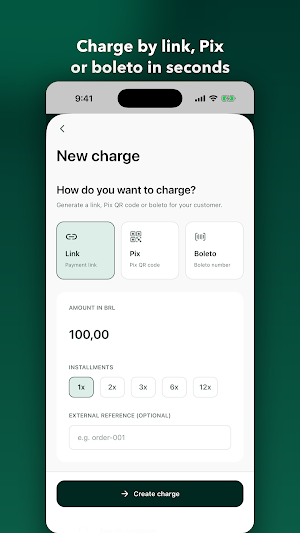
• Create a charge in a few taps, choosing the payment method and card installments
• Track the status of every charge and see the moment a payment is confirmed
• Share the receipt and QR code with your customer right away
• Review the full charge history for each customer
TAP TO PAY
• Accept contactless payments using the phone itself
• Device readiness checklist before you start a charge
• Immediate transaction result, with a clear approved, declined or cancelled state
• Card capture is handled by the partner's certified payment component
CUSTOMERS
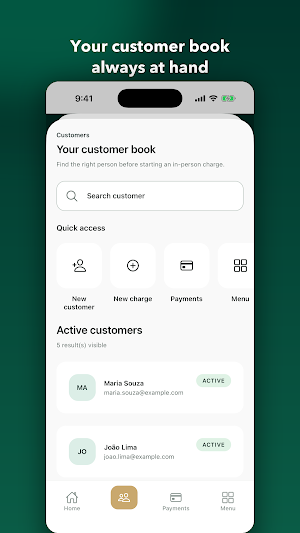
• Create and edit customers with name, tax ID (CPF or CNPJ), email and phone
• See the charge and payment history of each customer
• Find any customer or charge from a single search
FINANCE
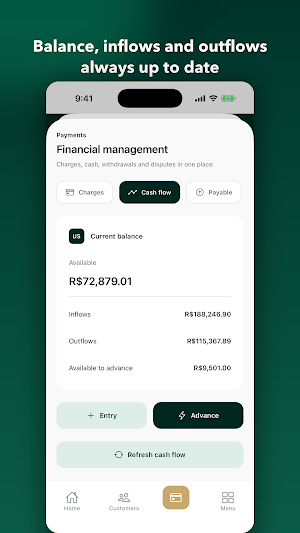
• Cash flow with inflows, outflows and balance for the period
• Accounts payable and accounts receivable, with due dates and details
• Receivables advance, with a simulation before you confirm
• Withdrawals and settlement tracking
• Manual entries to record operating expenses
DISPUTES
• Open chargeback cases and follow each one through
• Check deadlines, amounts and the history of every dispute
REPORTS AND MONITORING
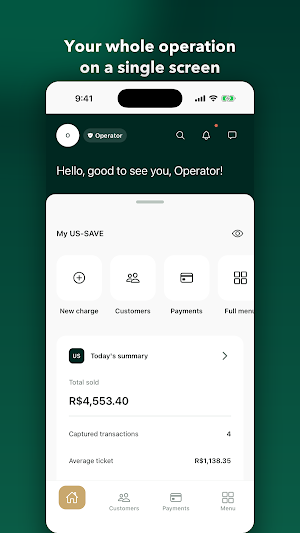
• Daily summary right on the home screen
• Reports on sales, settlements and how the operation is performing
• Notifications for confirmed payments, overdue charges and account activity
ACCESS CONTROL AND SECURITY
• Owner, admin and staff profiles, with different permissions for sensitive actions
• All traffic to the server is protected with HTTPS
• The session is stored in the Android protected key store and is only unlocked with the device
• The app does not store card data
WHAT YOU NEED
• An active account on the US-SAVE PAY platform
• An internet connection
• For Tap to Pay: an Android device with NFC support
SUPPORT
For access, company permissions or questions about charges, talk to the person responsible for your operation or to the US-SAVE PAY team.
Access is limited to operators already enabled on the US-SAVE PAY platform. Accounts are created by US-SAVE PAY together with the contracted merchant, and there is no public sign-up inside the app.
CHARGES
• Create a charge in a few taps, choosing the payment method and card installments
• Track the status of every charge and see the moment a payment is confirmed
• Share the receipt and QR code with your customer right away
• Review the full charge history for each customer
TAP TO PAY
• Accept contactless payments using the phone itself
• Device readiness checklist before you start a charge
• Immediate transaction result, with a clear approved, declined or cancelled state
• Card capture is handled by the partner's certified payment component
CUSTOMERS
• Create and edit customers with name, tax ID (CPF or CNPJ), email and phone
• See the charge and payment history of each customer
• Find any customer or charge from a single search
FINANCE
• Cash flow with inflows, outflows and balance for the period
• Accounts payable and accounts receivable, with due dates and details
• Receivables advance, with a simulation before you confirm
• Withdrawals and settlement tracking
• Manual entries to record operating expenses
DISPUTES
• Open chargeback cases and follow each one through
• Check deadlines, amounts and the history of every dispute
REPORTS AND MONITORING
• Daily summary right on the home screen
• Reports on sales, settlements and how the operation is performing
• Notifications for confirmed payments, overdue charges and account activity
ACCESS CONTROL AND SECURITY
• Owner, admin and staff profiles, with different permissions for sensitive actions
• All traffic to the server is protected with HTTPS
• The session is stored in the Android protected key store and is only unlocked with the device
• The app does not store card data
WHAT YOU NEED
• An active account on the US-SAVE PAY platform
• An internet connection
• For Tap to Pay: an Android device with NFC support
SUPPORT
For access, company permissions or questions about charges, talk to the person responsible for your operation or to the US-SAVE PAY team.
What’s new
Version 1.0.2 · Updated August 15, 2026
Initial Release.
Alternatives to US-SAVE PAY
Looking for apps like US-SAVE PAY? Here are 4 similar Android apps on Google Play. The highest rated is Spendable: AI Money Tracker (4.9/5), and all 4 are free to download.
-
MoneyTool – Budget Tracker 3.8
-
Keepr: Money & Budget Tracker 3.9
-
Spendable: AI Money Tracker 4.9
-
Timely – Bookings & payments 2.4
| App | Rating | Price | Installs | Last updated | Compare |
|---|---|---|---|---|---|
| US-SAVE PAY | – | Free | 0+ | Aug 15, 2026 | |
| MoneyTool – Budget Tracker | 3.8 / 5 | Free | 10,000+ | Oct 16, 2026 | Compare |
| Keepr: Money & Budget Tracker | 3.9 / 5 | Free | 50,000+ | Sep 27, 2026 | Compare |
| Spendable: AI Money Tracker | 4.9 / 5 | Free | 10,000+ | Oct 19, 2026 | Compare |
| Timely – Bookings & payments | 2.4 / 5 | Free | 50,000+ | Sep 30, 2026 | Compare |
Compare US-SAVE PAY with the top alternatives: ratings, updates, ASO score and keyword gaps →