
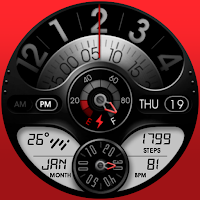
UsA ScalarX Premium - USA140
Personalization
Unique Industrial Analog Digital Style for Wear OS
- Rating
- 4.3
- 84 ratings
- Downloads
- 4.1K+
- on Google Play
- Price
- $1.49
- No in-app purchases
- Updated
- Oct 30
- 2025
Screenshots


About UsA ScalarX Premium - USA140
Unique analog-digital combination with industrial-inspired styles. The bottom LCD area is designed for displaying digital information. Each part can be customized to suit your style.
This watch face requires Wear OS API 28 or newer. Compatible with Galaxy Watch 4/5 Series and newer, Tic Watch, latest Fossil, and many others.
Installation Notes
Installing may take a few minutes, and you can find the watch face on the "add watch face" menu on the watch (check the companion guide). Tap and hold the current watch face, scroll to the far right, and tap the (+) add watch face button. Find the watch face there.
To speed up installation you can also install directly from watch, open Play Store app on the watch and search for USA140.
Features
- 12-hour only unique analog-style
- Battery gauge
- Heart Rate
- Custom hour plate style
- Custom minute plate style
- Custom watch accent
- Custom LCD color
- Custom text to match LCD color
- Custom LCD color in AOD
- 2 custom complication, the left LCD complication best for weather, please set it from customize menu
- 2 custom app shortcuts without icon
- Special Designed AOD
Customizing
Tap and hold the watch face and go to the "customize" menu (or settings icon under the watch face) to change the styles and also manage the custom shortcut complication.
Heart Rate
To show the heart rate, stay still and tap the heart rate area. It will blink and measure your heart rate. The heart rate will be shown after the successful reading. The default usually shows 0 before the reading is complete. Make sure to allow "sensor" permission to be able showing the heart rate.
Support
Installation and troubleshooting guide here:
https://developer.samsung.com/sdp/blog/en-us/2022/11/15/install-watch-faces-for-galaxy-watch5-and-one-ui-watch-45
Join our Telegram group for live support and discussion
https://t.me/usadesignwatchface
This watch face requires Wear OS API 28 or newer. Compatible with Galaxy Watch 4/5 Series and newer, Tic Watch, latest Fossil, and many others.
Installation Notes
Installing may take a few minutes, and you can find the watch face on the "add watch face" menu on the watch (check the companion guide). Tap and hold the current watch face, scroll to the far right, and tap the (+) add watch face button. Find the watch face there.
To speed up installation you can also install directly from watch, open Play Store app on the watch and search for USA140.
Features
- 12-hour only unique analog-style
- Battery gauge
- Heart Rate
- Custom hour plate style
- Custom minute plate style
- Custom watch accent
- Custom LCD color
- Custom text to match LCD color
- Custom LCD color in AOD
- 2 custom complication, the left LCD complication best for weather, please set it from customize menu
- 2 custom app shortcuts without icon
- Special Designed AOD
Customizing
Tap and hold the watch face and go to the "customize" menu (or settings icon under the watch face) to change the styles and also manage the custom shortcut complication.
Heart Rate
To show the heart rate, stay still and tap the heart rate area. It will blink and measure your heart rate. The heart rate will be shown after the successful reading. The default usually shows 0 before the reading is complete. Make sure to allow "sensor" permission to be able showing the heart rate.
Support
Installation and troubleshooting guide here:
https://developer.samsung.com/sdp/blog/en-us/2022/11/15/install-watch-faces-for-galaxy-watch5-and-one-ui-watch-45
Join our Telegram group for live support and discussion
https://t.me/usadesignwatchface
What’s new
Updated October 30, 2025
Add support for WearOS 5 (GW7 series and Pixel Watch 3 or newer)
User reviews

Beautiful watch face, unique design. Thank you Dev

So beautiful and elegant but I think that the gold font color in LCD screen would fit the full black design, so I wish we had it in the next update⭐⭐⭐⭐⭐

Just awesome

Excellent watch face! Love the different modifications tou can do with it.

USA Design has some of the best unique and functional watchfaces there are to be found. Thanks for sharing your hardwork and imagination with us. 5 stars all the way, looks and works great on my GW4

This is a beautiful design. The craftsmanship on this is amazing. Great colors, complications and shortcuts. Excellent attention to detail!!!
Alternatives to UsA ScalarX Premium - USA140
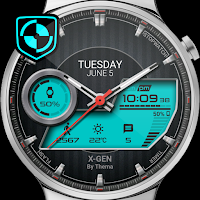
Looking for apps like UsA ScalarX Premium - USA140? Here are 3 similar Android apps on Google Play. The highest rated is X-Gen Watch Face (4.3/5), and all 3 are free to download.


| App | Rating | Price | Installs | Last updated | Compare |
|---|---|---|---|---|---|
| UsA ScalarX Premium - USA140 | 4.3 / 5 | $1.49 | 1,000+ | Oct 30, 2025 | |
| J&J Fitness | – | Free | 100+ | Jan 14, 2023 | Compare |
| X-Gen Watch Face | 4.3 / 5 | Free | 100,000+ | Sep 5, 2026 | Compare |
| FOX 10 Phoenix: News | 3.9 / 5 | Free | 100,000+ | Jun 24, 2020 | Compare |