
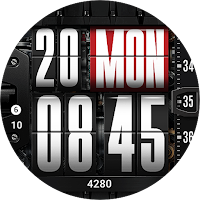
UsA Flip Watch Face - USA189
Personalization
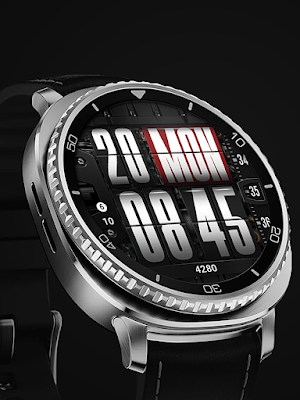
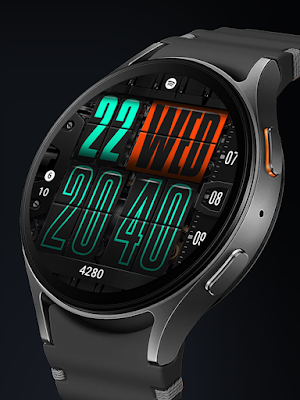
Flip style design watch face for Wear OS
- Rating
- 4.8
- 25 ratings
- Downloads
- 844+
- on Google Play
- Price
- $1.49
- No in-app purchases
- Updated
- Jan 30
- 2026
Screenshots


About UsA Flip Watch Face - USA189
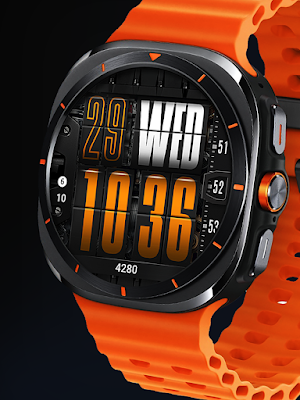
Flip clock style digital watch face, with many color combination options with scrolling seconds.
This watch face requires Wear OS API 34+ (Wear OS 5 or newer). Compatible with Galaxy Watch 4/5/6/7/8 Series and newer, Pixel Watch series and other watch face with Wear OS 5 or newer.
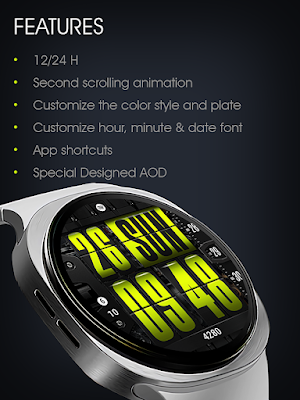
Features:
- Flip style watch face (non animated)
- Scrolling second
- Color style options
- Outline style option
- 2 custom info
- 1 custom app shortcut
- Minimal AOD
Make sure you are purchasing using the same Google account registered on your watch. The installation should begin automatically on the watch after a few moments.
After the installation is completed on your watch, do these steps to open the watch face on your watch :
1. Open the watch face list on your watch (tap and hold the current watch face)
2. Scroll to the right and tap "add watch face"
3. Scroll down and find new installed watch face in the "downloaded" section
Tap and hold the watch face and go to the "customize" menu (or settings icon under the watch face) to change the styles and also manage the custom shortcut complication.
To change between 12 or 24-hour mode (on digital time layout), go to your phone date and time settings and there is an option to use 24-hour mode or 12-hour mode. The watch will sync with your new settings after a few moments.
Special designed Always On Display ambient mode. Turn on the Always On Display mode on your watch settings to show a low power display on idle. Please be aware, this feature will use more batteries.
Join our Telegram group for live support and discussion
https://t.me/usadesignwatchface
This watch face requires Wear OS API 34+ (Wear OS 5 or newer). Compatible with Galaxy Watch 4/5/6/7/8 Series and newer, Pixel Watch series and other watch face with Wear OS 5 or newer.
Features:
- Flip style watch face (non animated)
- Scrolling second
- Color style options
- Outline style option
- 2 custom info
- 1 custom app shortcut
- Minimal AOD
Make sure you are purchasing using the same Google account registered on your watch. The installation should begin automatically on the watch after a few moments.
After the installation is completed on your watch, do these steps to open the watch face on your watch :
1. Open the watch face list on your watch (tap and hold the current watch face)
2. Scroll to the right and tap "add watch face"
3. Scroll down and find new installed watch face in the "downloaded" section
Tap and hold the watch face and go to the "customize" menu (or settings icon under the watch face) to change the styles and also manage the custom shortcut complication.
To change between 12 or 24-hour mode (on digital time layout), go to your phone date and time settings and there is an option to use 24-hour mode or 12-hour mode. The watch will sync with your new settings after a few moments.
Special designed Always On Display ambient mode. Turn on the Always On Display mode on your watch settings to show a low power display on idle. Please be aware, this feature will use more batteries.
Join our Telegram group for live support and discussion
https://t.me/usadesignwatchface
What’s new
Updated January 30, 2026
First Release
User reviews

Thank you 🍻 🎸

excellent work 👏

One of the best watch face

beautiful wf!!

Awesome design,great job, congrats

love this watchface, awesome 👍👍
Alternatives to UsA Flip Watch Face - USA189
Looking for apps like UsA Flip Watch Face - USA189? Here are 6 similar Android apps on Google Play. The highest rated is Flip Clock V4 (5.0/5), and 1 of the 6 are free to download.
-
【Digital】Time Transmission
-
Flip Clock MB354
-
Key098 Digital Watch Face
-
Flip Clock V4 5.0
-
Outliner Watch Face 009
-
Watch Face H6 - Wear OS 4.3
| App | Rating | Price | Installs | Last updated | Compare |
|---|---|---|---|---|---|
| UsA Flip Watch Face - USA189 | 4.8 / 5 | $1.49 | 500+ | Jan 30, 2026 | |
| 【Digital】Time Transmission | – | 2.99 USD | 100+ | Oct 14, 2026 | Compare |
| Flip Clock MB354 | – | 1.49 USD | 1,000+ | Aug 10, 2026 | Compare |
| Key098 Digital Watch Face | – | 0.49 USD | 500+ | Sep 24, 2026 | Compare |
| Flip Clock V4 | 5.0 / 5 | 1.99 USD | 1,000+ | Aug 7, 2026 | Compare |
| Outliner Watch Face 009 | – | 0.49 USD | 100+ | Oct 29, 2024 | Compare |
| Watch Face H6 - Wear OS | 4.3 / 5 | Free | 10,000+ | Mar 6, 2024 | Compare |
Similar apps on Google Play
- 【Digital】Time Transmission
- Flip Clock MB354
- Key098 Digital Watch Face
- Flip Clock V4
- Outliner Watch Face 009
- Watch Face H6 - Wear OS
- Cube Chronos Watch Face
- ZKin Watch Page Turning Digit
- Digital Watch MB417
- Tancha S52 Digital Watch Face
- Neo Premium Watch Face
- Sensor0004
- [SSP] - Key Dial
- NTV158 - Digital Flip Style
- Flip Clock
- Big Sweet Pink Watch Face
- Digital Flip Dark
- DIGI FLIP v2 URX83 Watch face
- Flip Clock MB366
- UsA Slices - USA128
- Key WF028 Digital Watch Face
- Digital 2
- Digital Fliptime Watch face
- MB297 Digital Watch Face
- Scroll - Watch Face
- DADAM50: AMOLED Watch Face
- Classic Hybrid Watch Face