

English Vocabulary Trainer, Dictionary, Flashcards
NEXUS Education In-app purchases Contains ads
One of the best platform to boost your English vocabulary fast and easy.
- Rating
- 4.7
- 255 ratings
- Downloads
- 50K+
- on Google Play
- Price
- Free
- In-app purchases
- Updated
- Jul 11
- 2023 · v1.10.30
Screenshots



About English Vocabulary Trainer, Dictionary, Flashcards
Vocabulary trainer with 200K+ Words, Offline dictionary with definition, synonyms and antonyms.
Online translation with 104 languages.
Are you facing problem learning English vocabulary? If yes, you are in the right place, English Vocabulary trainer would help you learn new words, track your progress and master them using interactive Flashcards.
Features:
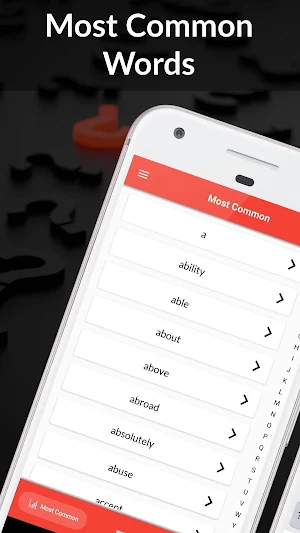
Most Common English Words: Most common words can be explored and can be learned using FlashCards, alphabetical index is also provided.
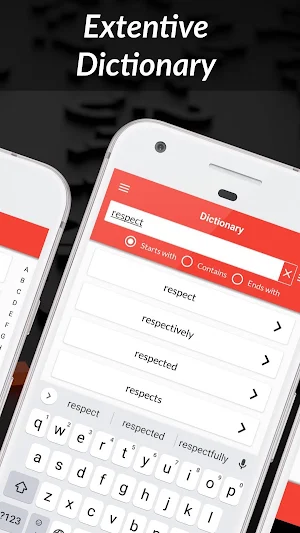
Extensive Dictionary: English Dictionary with voice to text input, sorting based on usage and filters.
My Words: words that you want to learn add them to “My Words” and learn them using flashCards or manage them from the “My Words” section.
Flashcards: Learn new words using FlashCards from “most common words” and “My Words”,
Select Number of Cards, Enable Translation, Autoplay Audio, Click to reveal the definition and select the learning level.
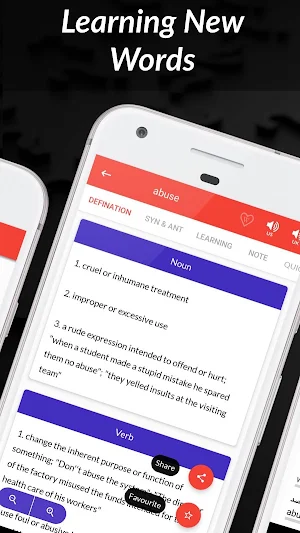
Word Definition: Word definition based on its type and ability to change font size at runtime, share the definition, Add to My Words, Add to favourites if added to My Words.
Speak Word: speak words for both US and UK English.
Synonyms and Antonyms.
Learning Level: My Words can be marked based on learning level ( New, Learning, Advanced, Mastered), learning history is also provided.
Notes: add Note for My Word.
Quick Links: quick links to important resources like Google definition, Google images and several other resources.
Translation: Translation to 104 languages.
Scan Text from Image/Camera: Scan and translate text from images.
Scan Barcode/QR Codes: Scan QR codes for Text, Contacts, Email, Geo Location, Calendar Event, ISBN, Driving License, Phone Number, Sms, Url, Wifi .
Backup and Restore: backup/restore “My Words”, ”Recent Words” and cached translations data.
Default Translation Language: default translation language can be changed from settings.
Permission: Internet permission is required for requesting translations, Storage permission is required for backup & restore.
Privacy policy:
Our app doesn’t collect any user personal information. For more detail read our privacy policy which is within the app.
deedc5194f
Online translation with 104 languages.
Are you facing problem learning English vocabulary? If yes, you are in the right place, English Vocabulary trainer would help you learn new words, track your progress and master them using interactive Flashcards.
Features:
Most Common English Words: Most common words can be explored and can be learned using FlashCards, alphabetical index is also provided.
Extensive Dictionary: English Dictionary with voice to text input, sorting based on usage and filters.
My Words: words that you want to learn add them to “My Words” and learn them using flashCards or manage them from the “My Words” section.
Flashcards: Learn new words using FlashCards from “most common words” and “My Words”,
Select Number of Cards, Enable Translation, Autoplay Audio, Click to reveal the definition and select the learning level.
Word Definition: Word definition based on its type and ability to change font size at runtime, share the definition, Add to My Words, Add to favourites if added to My Words.
Speak Word: speak words for both US and UK English.
Synonyms and Antonyms.
Learning Level: My Words can be marked based on learning level ( New, Learning, Advanced, Mastered), learning history is also provided.
Notes: add Note for My Word.
Quick Links: quick links to important resources like Google definition, Google images and several other resources.
Translation: Translation to 104 languages.
Scan Text from Image/Camera: Scan and translate text from images.
Scan Barcode/QR Codes: Scan QR codes for Text, Contacts, Email, Geo Location, Calendar Event, ISBN, Driving License, Phone Number, Sms, Url, Wifi .
Backup and Restore: backup/restore “My Words”, ”Recent Words” and cached translations data.
Default Translation Language: default translation language can be changed from settings.
Permission: Internet permission is required for requesting translations, Storage permission is required for backup & restore.
Privacy policy:
Our app doesn’t collect any user personal information. For more detail read our privacy policy which is within the app.
deedc5194f
User reviews

Very useful I like this

This app is very helpful.. Thanks to nexus team😇

Love

Good for translation and pronunciation of the word correctly And it has a collection of words like library, dictionaries but it gives synonyms antonyms where the word is used with a example

This app is super cool because of you also translate , definition s ,etc that's why I'm think this app has to be five rate 😊😊😉😉

Really helpful. Vast vocab. That's all I have to say.
Alternatives to English Vocabulary Trainer, Dictionary, Flashcards
Looking for apps like English Vocabulary Trainer, Dictionary, Flashcards? Here are 3 similar Android apps on Google Play. The highest rated is Glosbe Dictionary (4.5/5), and all 3 are free to download.



| App | Rating | Price | Installs | Last updated | Compare |
|---|---|---|---|---|---|
| English Vocabulary Trainer, Dictionary, Flashcards | 4.7 / 5 | Free | 50,000+ | Jul 11, 2023 | |
| WOLA - dictionary and chat | 4.1 / 5 | Free | 5,000+ | Dec 23, 2021 | Compare |
| Cambridge English Dictionary | 3.0 / 5 | Free | 500,000+ | Oct 21, 2019 | Compare |
| Glosbe Dictionary | 4.5 / 5 | Free | 100,000+ | Aug 29, 2025 | Compare |