
Developer Tools Browser
Karpeles Lab Inc. Tools
Browser with built-in Chrome DevTools. Inspect and debug on your phone.
- Rating
- 3.7
- 62 ratings
- Downloads
- 13.8K+
- on Google Play
- Price
- Free
- No in-app purchases
- Updated
- Mar 17
- 2026 · v0.1.0
Screenshots


About Developer Tools Browser
Developer Tools Browser gives you real Chrome DevTools running entirely on your Android device. No laptop, no ADB, no external device needed.
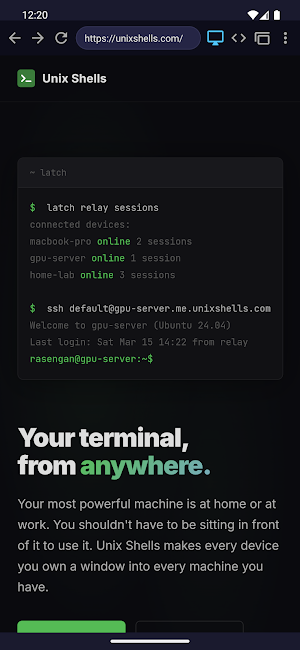
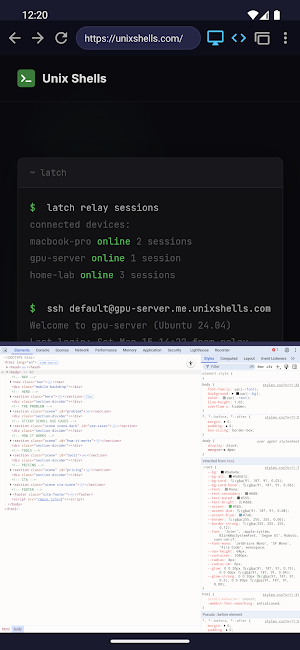
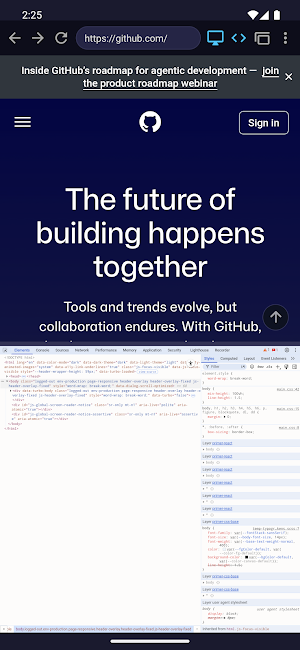
Browse any website and instantly open a full DevTools panel — Elements, Console, Sources, Network, Performance, Lighthouse, and everything else you'd expect from Chrome DevTools on desktop.
How it works: two WebViews run side by side. One is your browser, the other runs the real Chrome DevTools frontend built from Chromium source. A local proxy bridges them via the Chrome DevTools Protocol. Everything runs on-device.
Features:
• Full Chrome DevTools — Elements, Console, Network, Sources, Performance, Application, Lighthouse, and more
• Inspect and edit HTML/CSS in real time
• Debug JavaScript with the Console
• Monitor network requests
• Desktop and mobile user-agent modes
• Multiple tabs
• Find in page
• Dock DevTools to bottom or right
Built for developers who code on Android — the missing piece between your terminal, your editor, and your browser.
By Unix Shells
Browse any website and instantly open a full DevTools panel — Elements, Console, Sources, Network, Performance, Lighthouse, and everything else you'd expect from Chrome DevTools on desktop.
How it works: two WebViews run side by side. One is your browser, the other runs the real Chrome DevTools frontend built from Chromium source. A local proxy bridges them via the Chrome DevTools Protocol. Everything runs on-device.
Features:
• Full Chrome DevTools — Elements, Console, Network, Sources, Performance, Application, Lighthouse, and more
• Inspect and edit HTML/CSS in real time
• Debug JavaScript with the Console
• Monitor network requests
• Desktop and mobile user-agent modes
• Multiple tabs
• Find in page
• Dock DevTools to bottom or right
Built for developers who code on Android — the missing piece between your terminal, your editor, and your browser.
By Unix Shells
What’s new
Version 0.1.0 · Updated March 17, 2026
Initial release.
User reviews

i'm giving 5 stars because i'm also a dev and i know the work that goes in making this. however, if i have to nitpick, is the ability to copy what's in the devTools. you can select items, but the menu to copy does not appear.

good for playing evoworld.io with f12

its ad free. so i like more more

👍👍👍👍

looks great from initial viewing one thing would make it best is a magnifying glass so you can see the code in Dev area easier

By far the best app I have used. Fast, easy to use, everything works flowless.
Alternatives to Developer Tools Browser
Looking for apps like Developer Tools Browser? Here are 6 similar Android apps on Google Play. The highest rated is nzb360 - Media Server Manager (4.9/5), and all 6 are free to download.
-
nzb360 - Media Server Manager 4.9
-
Stargon Browser 4.0
-
Soul Browser 4.4
-
Coast: Native Work Order CMMS 4.4
-
Android System WebView Dev 4.1
-
ASVAB Air Force Mastery 2026 4.8
| App | Rating | Price | Installs | Last updated | Compare |
|---|---|---|---|---|---|
| Developer Tools Browser | 3.7 / 5 | Free | 10,000+ | Mar 17, 2026 | |
| nzb360 - Media Server Manager | 4.9 / 5 | Free | 100,000+ | Sep 26, 2026 | Compare |
| Stargon Browser | 4.0 / 5 | Free | 500,000+ | Oct 8, 2026 | Compare |
| Soul Browser | 4.4 / 5 | Free | 1,000,000+ | Dec 10, 2025 | Compare |
| Coast: Native Work Order CMMS | 4.4 / 5 | Free | 50,000+ | Oct 26, 2026 | Compare |
| Android System WebView Dev | 4.1 / 5 | Free | 1,000,000+ | – | Compare |
| ASVAB Air Force Mastery 2026 | 4.8 / 5 | Free | 50,000+ | Oct 1, 2026 | Compare |