
Scan360 - PDF Scanner
UMXE Productivity Contains ads
Scan, Sign, Protect, Compress, Merge, Split PDF & Create ID Photos All-in-one.
- Downloads
- 5K+
- on Google Play
- Price
- Free
- No in-app purchases
- Updated
- Aug 19
- 2026 · v1.3.9
Screenshots


About Scan360 - PDF Scanner
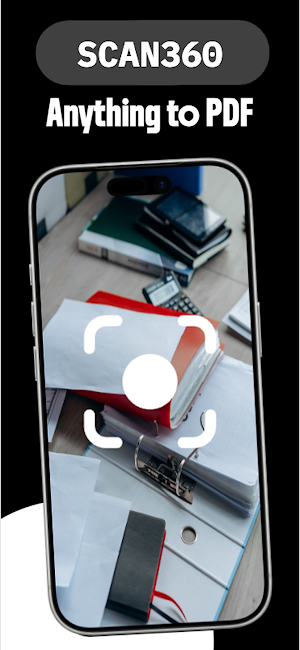
Transform your phone into a powerful pocket office with Scan360 – the all-in-one PDF Scanner, PDF Editor, PDF Converter, OCR Scanner, PDF Reader, PDF Compressor, Protect & Secure PDF and ID Photo Maker.
Whether you need to scan documents, convert PDFs, compress large files, merge or split PDFs, extract text with OCR, create passport photos, or digitally sign important documents, Scan360 provides everything you need in one fast, secure, and easy-to-use app.
📄 PDF & Document Scanner
• Scan receipts, invoices, books, notes, forms, contracts, and certificates.
• Scan ID cards, passports, licenses, and business cards.
• Camera to PDF and Image to PDF.
• Auto edge detection and smart crop.
• Perspective correction.
• HD scan quality.
• Multi-page scanning.
• Magic Color, Grayscale & Black/White filters.
📝 PDF Editor & Viewer
• View PDF files.
• Rearrange, rotate, add, and delete pages.
• Highlight text.
• Add notes and text.
• Smooth PDF reading experience.
🔄 PDF Converter
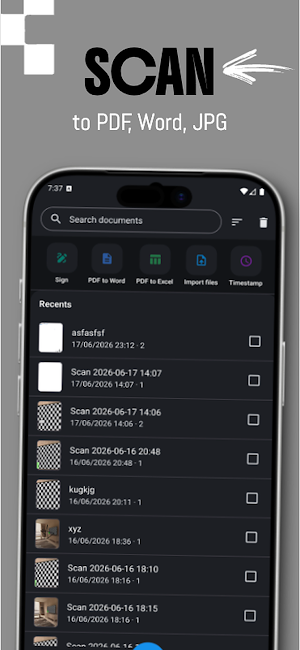
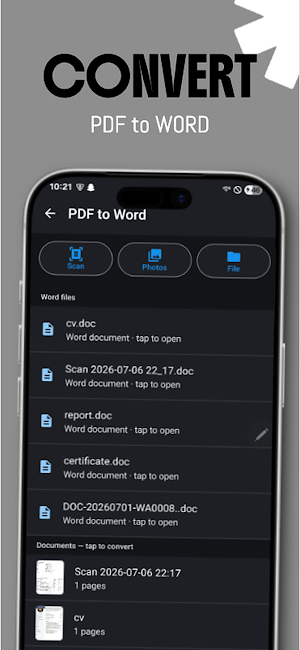
• PDF to Word
• PDF to Excel
• JPG/PNG/Image to PDF
• Camera to PDF
🗜️ Compress PDF
• Compress large PDF files.
• Save device storage.
• Faster uploads and sharing.
• Multiple compression levels.
• Perfect for email attachments and online submissions.
✂️ Split PDF
• Split PDFs into multiple files.
• Extract selected pages.
• Save only the pages you need.
• Organize large documents.
🔗 Merge PDF
• Combine multiple PDFs.
• Merge reports, invoices, and scanned pages.
• Create a single organized PDF in seconds.
🔐 Protect & Secure PDF
• Password-protect sensitive PDFs with custom encryption.
• Secure confidential documents like IDs, tax forms, financial records, and contracts.
• Keep files safe before sharing or uploading to cloud storage.
• 100% local processing—your files and passwords never leave your device.
• Universal compatibility with Adobe Acrobat, Google Drive, and standard PDF readers.
🔍 OCR - Extract Text
• Extract text from PDFs and images.
• Copy editable text instantly.
• Search scanned documents.
• OCR for images and documents.
• Share text as .txt file.
🪪 ID Photo Maker
• Passport photo maker.
• Visa & ID photo creator.
• License photo.
• Multiple country sizes.
• Ready for print or digital use.
• Automatic background adjustment.
✍️ Electronic Signature
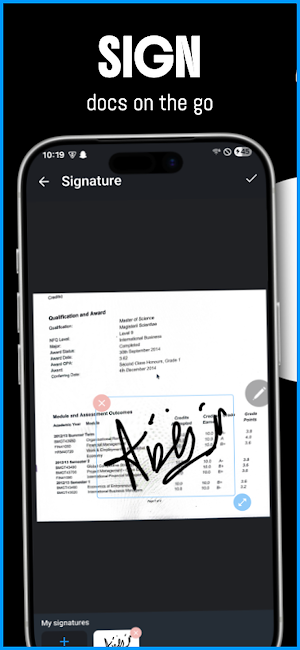
• Create your handwritten digital signature.
• Save multiple signatures.
• Add signatures to PDF documents.
• Sign contracts, invoices, agreements, and forms.
🕒 Date, Time & Location Stamp
• Add date, time, and GPS location to documents.
• Perfect for legal, business, inspection, and official documentation.
📤 Easy Sharing
Export as PDF, Word, JPG, or Long Image and share via Email, WhatsApp, Google Drive, Dropbox, or any app.
🚀 Why Choose Scan360?
✔ PDF Scanner
✔ Document Scanner
✔ OCR Scanner
✔ PDF Reader
✔ PDF Editor
✔ PDF Compressor
✔ Merge PDF
✔ Split PDF
✔ PDF to Word
✔ PDF to Excel
✔ Image to PDF
✔ ID Photo Maker
✔ Electronic Signature
✔ Fast & Secure
✔ Easy to Use
Perfect for students, teachers, professionals, freelancers, businesses, accountants, lawyers, office workers, and anyone who needs a reliable PDF scanner.
Whether you're scanning books, receipts, invoices, contracts, homework, tax documents, certificates, passports, IDs, or business paperwork, Scan360 lets you scan, edit, convert, compress, merge, split, extract text, sign, organize, and share documents with ease.
Download Scan360 today and experience the complete PDF Scanner, OCR Scanner, PDF Editor, PDF Converter, PDF Reader, PDF Compressor, Merge PDF, Split PDF, and ID Photo Maker in one app.
Whether you need to scan documents, convert PDFs, compress large files, merge or split PDFs, extract text with OCR, create passport photos, or digitally sign important documents, Scan360 provides everything you need in one fast, secure, and easy-to-use app.
📄 PDF & Document Scanner
• Scan receipts, invoices, books, notes, forms, contracts, and certificates.
• Scan ID cards, passports, licenses, and business cards.
• Camera to PDF and Image to PDF.
• Auto edge detection and smart crop.
• Perspective correction.
• HD scan quality.
• Multi-page scanning.
• Magic Color, Grayscale & Black/White filters.
📝 PDF Editor & Viewer
• View PDF files.
• Rearrange, rotate, add, and delete pages.
• Highlight text.
• Add notes and text.
• Smooth PDF reading experience.
🔄 PDF Converter
• PDF to Word
• PDF to Excel
• JPG/PNG/Image to PDF
• Camera to PDF
🗜️ Compress PDF
• Compress large PDF files.
• Save device storage.
• Faster uploads and sharing.
• Multiple compression levels.
• Perfect for email attachments and online submissions.
✂️ Split PDF
• Split PDFs into multiple files.
• Extract selected pages.
• Save only the pages you need.
• Organize large documents.
🔗 Merge PDF
• Combine multiple PDFs.
• Merge reports, invoices, and scanned pages.
• Create a single organized PDF in seconds.
🔐 Protect & Secure PDF
• Password-protect sensitive PDFs with custom encryption.
• Secure confidential documents like IDs, tax forms, financial records, and contracts.
• Keep files safe before sharing or uploading to cloud storage.
• 100% local processing—your files and passwords never leave your device.
• Universal compatibility with Adobe Acrobat, Google Drive, and standard PDF readers.
🔍 OCR - Extract Text
• Extract text from PDFs and images.
• Copy editable text instantly.
• Search scanned documents.
• OCR for images and documents.
• Share text as .txt file.
🪪 ID Photo Maker
• Passport photo maker.
• Visa & ID photo creator.
• License photo.
• Multiple country sizes.
• Ready for print or digital use.
• Automatic background adjustment.
✍️ Electronic Signature
• Create your handwritten digital signature.
• Save multiple signatures.
• Add signatures to PDF documents.
• Sign contracts, invoices, agreements, and forms.
🕒 Date, Time & Location Stamp
• Add date, time, and GPS location to documents.
• Perfect for legal, business, inspection, and official documentation.
📤 Easy Sharing
Export as PDF, Word, JPG, or Long Image and share via Email, WhatsApp, Google Drive, Dropbox, or any app.
🚀 Why Choose Scan360?
✔ PDF Scanner
✔ Document Scanner
✔ OCR Scanner
✔ PDF Reader
✔ PDF Editor
✔ PDF Compressor
✔ Merge PDF
✔ Split PDF
✔ PDF to Word
✔ PDF to Excel
✔ Image to PDF
✔ ID Photo Maker
✔ Electronic Signature
✔ Fast & Secure
✔ Easy to Use
Perfect for students, teachers, professionals, freelancers, businesses, accountants, lawyers, office workers, and anyone who needs a reliable PDF scanner.
Whether you're scanning books, receipts, invoices, contracts, homework, tax documents, certificates, passports, IDs, or business paperwork, Scan360 lets you scan, edit, convert, compress, merge, split, extract text, sign, organize, and share documents with ease.
Download Scan360 today and experience the complete PDF Scanner, OCR Scanner, PDF Editor, PDF Converter, PDF Reader, PDF Compressor, Merge PDF, Split PDF, and ID Photo Maker in one app.
What’s new
Version 1.3.9 · Updated August 19, 2026
- Fixed a crash that could occur when opening certain screens. - Added analytics tracking to help us improve the app based on how it's used. - Improved ad reliability — smarter retry handling when ads fail to load.
User reviews

Great app for quick scanning! Scan360 makes it easy to digitize documents on the go — the interface is clean, scans come out sharp, and exporting to PDF is fast and hassle-free. Highly recommend for anyone who needs a reliable scanner app on their phone.

highly recommended

recommended

nice and easy UI, scan documents quickly and image quality is clear. highly recommend
Alternatives to Scan360 - PDF Scanner
Looking for apps like Scan360 - PDF Scanner? Here are 6 similar Android apps on Google Play. The highest rated is Smallpdf: Scanner & PDF Editor (4.5/5), and all 6 are free to download.
-
Easy Invoice & Quotation Maker 3.9
-
PDFelement-PDF Editor & Reader 4.2
-
Smallpdf: Scanner & PDF Editor 4.5
-
pdfFiller Edit, fill, sign PDF 3.9
-
PDF Reader(KDAN PDF): Edit PDF 3.7
-
PDF Merge: Scan, Sign & Edit 3.8
| App | Rating | Price | Installs | Last updated | Compare |
|---|---|---|---|---|---|
| Scan360 - PDF Scanner | – | Free | 5,000+ | Aug 19, 2026 | |
| Easy Invoice & Quotation Maker | 3.9 / 5 | Free | 100,000+ | Feb 5, 2026 | Compare |
| PDFelement-PDF Editor & Reader | 4.2 / 5 | Free | 5,000,000+ | Oct 16, 2026 | Compare |
| Smallpdf: Scanner & PDF Editor | 4.5 / 5 | Free | 5,000,000+ | Oct 7, 2026 | Compare |
| pdfFiller Edit, fill, sign PDF | 3.9 / 5 | Free | 5,000,000+ | Oct 22, 2026 | Compare |
| PDF Reader(KDAN PDF): Edit PDF | 3.7 / 5 | Free | 10,000,000+ | – | Compare |
| PDF Merge: Scan, Sign & Edit | 3.8 / 5 | Free | 5,000,000+ | Feb 2, 2026 | Compare |
Similar apps on Google Play
- Easy Invoice & Quotation Maker
- PDFelement-PDF Editor & Reader
- Smallpdf: Scanner & PDF Editor
- pdfFiller Edit, fill, sign PDF
- PDF Reader(KDAN PDF): Edit PDF
- PDF Merge: Scan, Sign & Edit
- Falcon PDF - Editor & Tools
- PDF Editor – Edit Everything!
- UPDF - AI-Powered PDF Editor
- yescan - PDF OCR Scanner
- vFlat Scan - PDF Scanner, OCR
- Foxit PDF Editor
- Mobi PDF・Editor・Scanner・Reader
- Regula Document Reader
- PDF Scanner Plus - Doc Scanner
- Tiny Scanner - PDF Scanner App
- iLovePDF: PDF Editor & Scanner
- Mobile Scanner App - Scan PDF
- CS PDF Reader - PDF Editor
- Genius Scan - PDF Scanner