
Textora BL Tools
Sajid BL dev Tools
Repeat, style, and transform text easily with Textora BL Tools utility suite.
- Downloads
- 10+
- on Google Play
- Price
- Free
- No in-app purchases
- Updated
- Jun 16
- 2026 · v2.2.0
Screenshots
About Textora BL Tools
Unlock the power of text with Textora BL Tools – your all-in-one text utility toolkit!
Textora BL Tools is a versatile and lightweight application designed to help you manipulate, style, and transform your text for social media, messaging, and creative projects. Whether you want to repeat a message multiple times or convert your text into stylish fonts, Textora BL Tools provides a seamless and professional experience.
Key Features:
•
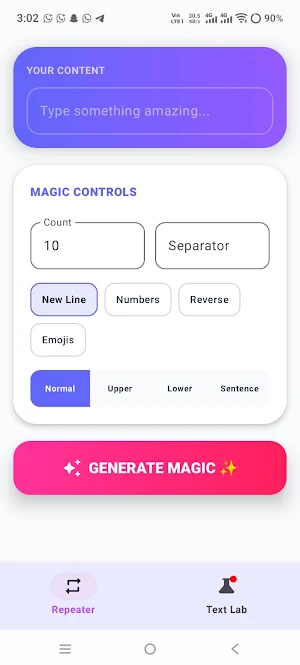
Powerful Text Repeater: Effortlessly repeat any text as many times as you need. Customize your output with separators, new lines, and automatic numbering for organized lists.
•
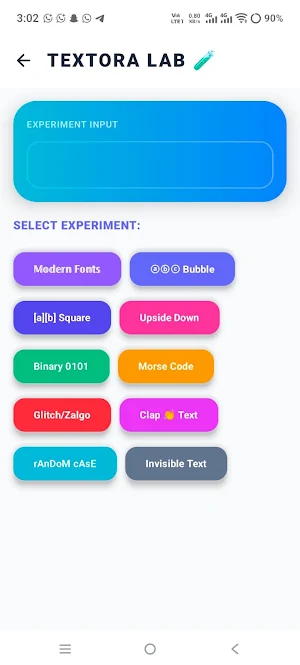
Creative Text Lab: Experiment with your words! Convert text into stylish fonts (𝕄𝕠𝕕𝕖𝕣𝕟 𝔽𝕠𝕟𝕥𝕤), bubble text (ⓐⓑⓒ), or square brackets ([A][B]).
•
Unique Transformations: Flip your text upside down, convert it into Binary (0101) or Morse Code, or add a "Clap" effect between words.
•
Smart Case Converter: Quickly change text cases (UPPERCASE, lowercase, or Sentence case) and reverse your entire text with a single tap.
•
Emoji Integration: Add a touch of personality to your repeated text by automatically injecting random emojis.
•
Seamless Sharing: Copy your creations to the clipboard or share them directly to your favorite social media and messaging platforms instantly.
•
Modern UI: Enjoy a sleek design with smooth animations and an intuitive user interface that makes text editing a breeze.
Why Choose Textora BL Tools?
•
Policy Compliant: A clean and professional tool focused on utility without misleading claims.
•
User Privacy: We respect your data; Textora BL Tools processes everything locally on your device. We do not collect or store your personal text inputs.
•
Lightweight & Fast: Optimized to work efficiently without consuming excessive device resources.
How to Use:
1.
Enter your text in the "Your Content" section.
2.
Use the "Magic Controls" to set repeat counts or choose transformations.
3.
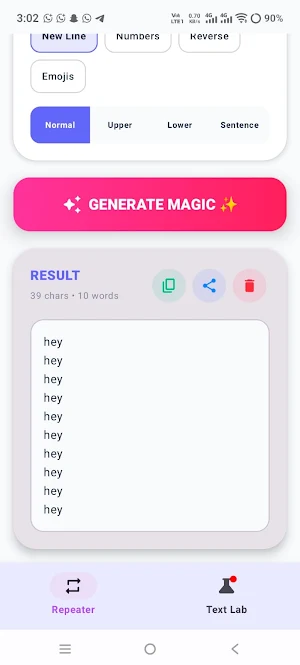
Tap "Generate Magic" to see the result.
4.
Copy or Share your styled text anywhere!
Download Textora BL Tools today and start transforming your text like a pro!
Textora BL Tools is a versatile and lightweight application designed to help you manipulate, style, and transform your text for social media, messaging, and creative projects. Whether you want to repeat a message multiple times or convert your text into stylish fonts, Textora BL Tools provides a seamless and professional experience.
Key Features:
•
Powerful Text Repeater: Effortlessly repeat any text as many times as you need. Customize your output with separators, new lines, and automatic numbering for organized lists.
•
Creative Text Lab: Experiment with your words! Convert text into stylish fonts (𝕄𝕠𝕕𝕖𝕣𝕟 𝔽𝕠𝕟𝕥𝕤), bubble text (ⓐⓑⓒ), or square brackets ([A][B]).
•
Unique Transformations: Flip your text upside down, convert it into Binary (0101) or Morse Code, or add a "Clap" effect between words.
•
Smart Case Converter: Quickly change text cases (UPPERCASE, lowercase, or Sentence case) and reverse your entire text with a single tap.
•
Emoji Integration: Add a touch of personality to your repeated text by automatically injecting random emojis.
•
Seamless Sharing: Copy your creations to the clipboard or share them directly to your favorite social media and messaging platforms instantly.
•
Modern UI: Enjoy a sleek design with smooth animations and an intuitive user interface that makes text editing a breeze.
Why Choose Textora BL Tools?
•
Policy Compliant: A clean and professional tool focused on utility without misleading claims.
•
User Privacy: We respect your data; Textora BL Tools processes everything locally on your device. We do not collect or store your personal text inputs.
•
Lightweight & Fast: Optimized to work efficiently without consuming excessive device resources.
How to Use:
1.
Enter your text in the "Your Content" section.
2.
Use the "Magic Controls" to set repeat counts or choose transformations.
3.
Tap "Generate Magic" to see the result.
4.
Copy or Share your styled text anywhere!
Download Textora BL Tools today and start transforming your text like a pro!
What’s new
Version 2.2.0 · Updated June 16, 2026
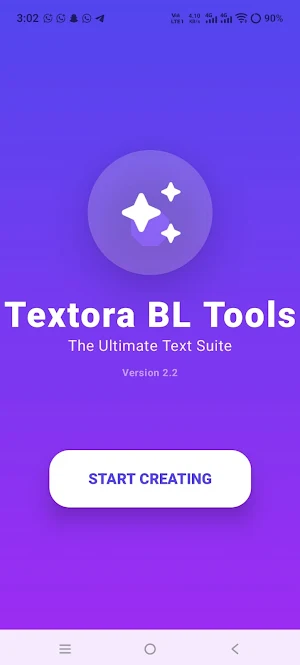
Officially rebranded to Textora BL Tools for a consistent and professional identity. Enhanced UI with a new polished splash screen and updated app icon. Improved text processing engine for faster repetition and transformations. Optimized performance and full compliance with the latest Google Play policies.
Alternatives to Textora BL Tools
Looking for apps like Textora BL Tools? Here are 4 similar Android apps on Google Play. All of them are free to download.



| App | Rating | Price | Installs | Last updated | Compare |
|---|---|---|---|---|---|
| Textora BL Tools | – | Free | 10+ | Jun 16, 2026 | |
| WATER WAVES SK TOOLS | – | Free | 10+ | Jun 2, 2026 | Compare |
| TaplixTap Counter | – | Free | 10+ | Jun 2, 2026 | Compare |
| Battora TR | – | Free | 10+ | Jun 1, 2026 | Compare |
| MemoGlow Notepad | – | Free | 10+ | May 25, 2026 | Compare |
Compare Textora BL Tools with the top alternatives: ratings, updates, ASO score and keyword gaps →