
Cube Forge: Speedcube Trainer
The Wolf Pack Mind Education
Learn and train 2x2–5x5 cubes and Megaminx with timers, algorithms and 3D guides
- Downloads
- 5+
- on Google Play
- Price
- Free
- No in-app purchases
- Updated
- Sep 17
- 2026 · v1.1.1
Screenshots
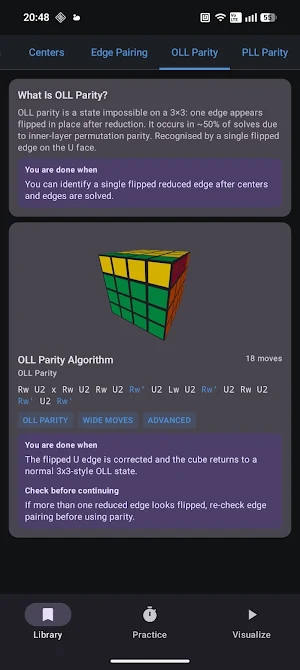
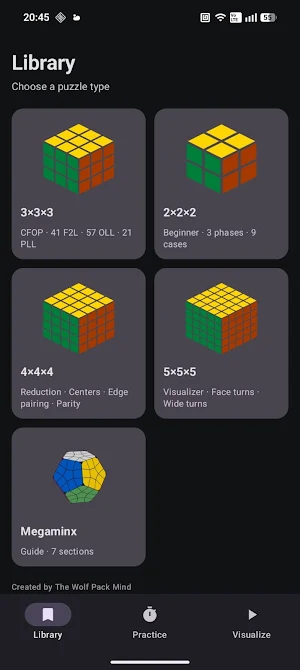
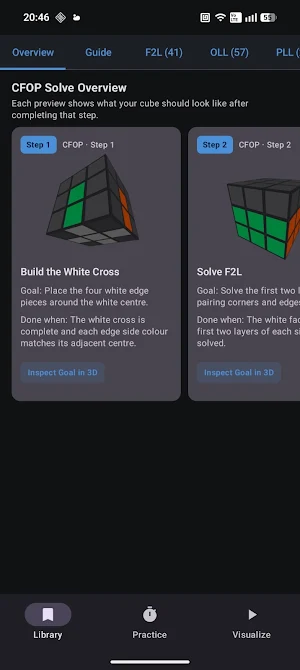
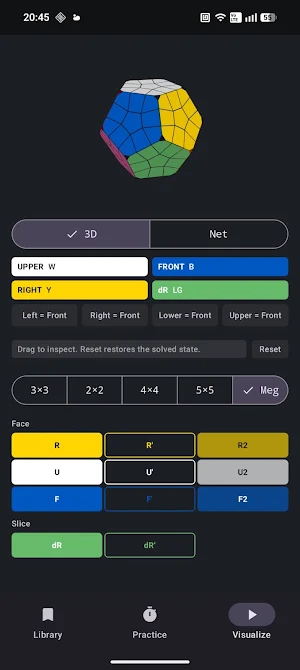


About Cube Forge: Speedcube Trainer
Whether you're solving your first cube or refining advanced techniques, CubeForge provides clear step-by-step guides, algorithm references, and interactive puzzle visualizations to help you understand every stage of the solve.
Supported Puzzles
- Beginner solving methods
- CFOP algorithms
- 2×2, 3×3, 4×4 and 5×5 support
- Megaminx solving and scrambling
- Interactive 3D visualizer
- Practice timer with Ao5 and Ao12
- Scramble generation
- Offline-first operation
Features
✓ Interactive 3D puzzle visualizers
✓ Step-by-step solve overviews
✓ Visual progress milestones
✓ CFOP learning guides
✓ F2L, OLL, and PLL algorithm libraries
✓ Goal-state previews
✓ Algorithm playback and move animation
✓ Practice and training tools
✓ Beginner-friendly explanations
✓ Offline functionality
✓ No account required
Learn Faster
CubeForge focuses on understanding rather than memorization.
Each guide shows visual goal states and solve progress so you can clearly see what your puzzle should look like before moving to the next stage. This makes learning more intuitive and helps build stronger recognition skills for real solves.
Practice with Confidence
Explore algorithms, inspect solved states, replay move sequences, and develop a deeper understanding of puzzle mechanics through interactive visual learning.
Whether you're learning your first Cross, building F2L intuition, studying OLL and PLL cases, solving larger cubes, or tackling a Megaminx, CubeForge provides the tools needed to improve at your own pace.
Privacy Focused
• No account required
• No cloud sync required
• Works completely offline
• No personal data collection
• Your progress stays on your device
Built by The Wolf Pack Mind.
What’s new
Version 1.1.1 · Updated September 17, 2026
What’s new in Cube Forge 1.1: • Improved Megaminx scrambles with standard R++, R--, D++, D--, U and U' notation. • Clearer Megaminx controls and beginner last-layer guidance. • Discover Cubing Forge, our separate paid PC game on Steam, featuring guided 3×3 learning, practice tools, controller input and optional supported smart-cube features. • General usability and reliability improvements. Cube Forge remains fully usable offline with no accounts or telemetry.
Alternatives to Cube Forge: Speedcube Trainer
Looking for apps like Cube Forge: Speedcube Trainer? Here are 6 similar Android apps on Google Play. 5 of the 6 are free to download.
-
Dolphin: SAT & ACT Prep
-
Koala Kids
-
Basic Ship Terminology CES
-
BeeCare: Attendance
-
Sanskrit Guru AI - Learn easy
-
Seymour R-II
| App | Rating | Price | Installs | Last updated | Compare |
|---|---|---|---|---|---|
| Cube Forge: Speedcube Trainer | – | Free | 5+ | Sep 17, 2026 | |
| Dolphin: SAT & ACT Prep | – | Free | 1,000+ | Oct 15, 2026 | Compare |
| Koala Kids | – | Free | 5+ | – | Compare |
| Basic Ship Terminology CES | – | 6.49 USD | 0+ | – | Compare |
| BeeCare: Attendance | – | Free | 1+ | – | Compare |
| Sanskrit Guru AI - Learn easy | – | Free | 500+ | – | Compare |
| Seymour R-II | – | Free | 10+ | – | Compare |
Similar apps on Google Play
- Dolphin: SAT & ACT Prep
- Koala Kids
- Basic Ship Terminology CES
- BeeCare: Attendance
- Sanskrit Guru AI - Learn easy
- Seymour R-II
- Dr Saurabh Sahu
- Jwan Oureducation
- Pure Car Carrier Management
- Aurora Tutor: AI School Study
- E&L @Work
- Cowrin
- My Bompard
- Redverse
- Bulk carriers CHaS Operational
- ZČU
- Clark Public Schools
- Sumando con Cubi
- Spark LMS
- Basic. Security Detailed CES
- Başarı Takibim
- TaleType: Learn English
- একুশে বাংলা কিবোর্ড
- FunFact
- ABC Learning App for Kids