
SogaType – AI Voice Keyboard
tvSOGA Productivity In-app purchases
Speak and it types it right: AI-polished dictation and instant translation
- Downloads
- 821+
- on Google Play
- Price
- Free
- In-app purchases
- Updated
- Oct 20
- 2026 · v0.9.56
Screenshots
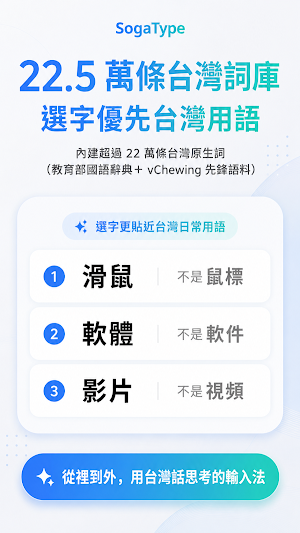


About SogaType – AI Voice Keyboard
Speaking is faster than typing.
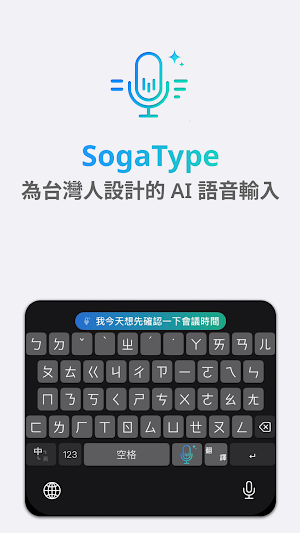
SogaType is a keyboard that listens. Tap the mic, speak naturally, and your words become text you can send right away — punctuation added, mis-heard words fixed, sentences tidied. A full keyboard is built in too, so you can type whenever you prefer.
■ Dictation you can send as-is
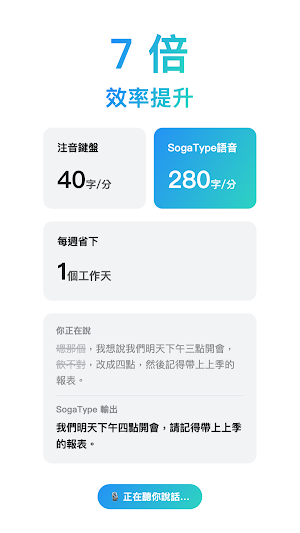
When you stop speaking, AI adds punctuation and fixes obvious mis-hearings. Your original words are never deleted.
■ Smart tidy-up
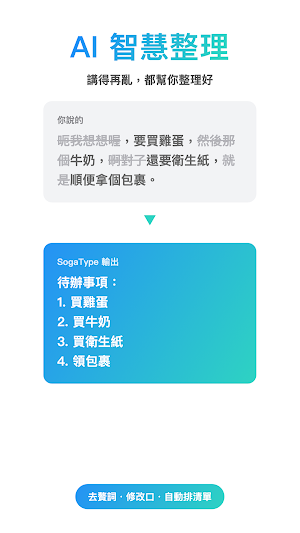
Filler words are removed, corrections you make mid-sentence are applied, lists you dictate are numbered automatically.
■ Four languages, one keyboard
Choose Chinese, English, Japanese or Korean. The interface, speech recognition and default translation direction follow your choice.
・Chinese: Zhuyin / Cangjie / Quick keyboards
・Japanese: 12-key flick (or romaji) with kana-to-kanji conversion
・Korean: 2-set (Dubeolsik) keyboard
・English: QWERTY with word suggestions
■ Translate what you say
One tap on the translate key and your speech comes out in English, Chinese, Japanese, Korean, Spanish, Vietnamese, Thai… 36 languages. Pick the ones you use in Settings.
■ Custom vocabulary
Add names and brand terms so they come out spelled right.
■ Works across devices
SogaType is also on iPhone, Mac and Windows. Sign in with the same account and your usage and vocabulary follow you.
■ Privacy
Audio and recognized text are sent to our server only to produce your text and are not retained. SogaType does not collect what you type.
■ Pricing
Free to install, no sign-up required. Unlimited AI correction for the first 7 days, then 10 per day. Members get unlimited AI correction and translation on every platform (monthly or yearly subscription via Google Play). Voice input keeps working even when the free quota is used up.
—
Questions or feedback: [email protected]
TVSOGA CO., LTD.
SogaType is a keyboard that listens. Tap the mic, speak naturally, and your words become text you can send right away — punctuation added, mis-heard words fixed, sentences tidied. A full keyboard is built in too, so you can type whenever you prefer.
■ Dictation you can send as-is
When you stop speaking, AI adds punctuation and fixes obvious mis-hearings. Your original words are never deleted.
■ Smart tidy-up
Filler words are removed, corrections you make mid-sentence are applied, lists you dictate are numbered automatically.
■ Four languages, one keyboard
Choose Chinese, English, Japanese or Korean. The interface, speech recognition and default translation direction follow your choice.
・Chinese: Zhuyin / Cangjie / Quick keyboards
・Japanese: 12-key flick (or romaji) with kana-to-kanji conversion
・Korean: 2-set (Dubeolsik) keyboard
・English: QWERTY with word suggestions
■ Translate what you say
One tap on the translate key and your speech comes out in English, Chinese, Japanese, Korean, Spanish, Vietnamese, Thai… 36 languages. Pick the ones you use in Settings.
■ Custom vocabulary
Add names and brand terms so they come out spelled right.
■ Works across devices
SogaType is also on iPhone, Mac and Windows. Sign in with the same account and your usage and vocabulary follow you.
■ Privacy
Audio and recognized text are sent to our server only to produce your text and are not retained. SogaType does not collect what you type.
■ Pricing
Free to install, no sign-up required. Unlimited AI correction for the first 7 days, then 10 per day. Members get unlimited AI correction and translation on every platform (monthly or yearly subscription via Google Play). Voice input keeps working even when the free quota is used up.
—
Questions or feedback: [email protected]
TVSOGA CO., LTD.
What’s new
Version 0.9.56 · Updated October 20, 2026
- Fixed some single characters being hard to find: after multi-character suggestions, a full row of single characters now follows (e.g. typing ㄌㄨˋ now shows 陸)
Alternatives to SogaType – AI Voice Keyboard
Looking for apps like SogaType – AI Voice Keyboard? Here are 6 similar Android apps on Google Play. All of them are free to download.




| App | Rating | Price | Installs | Last updated | Compare |
|---|---|---|---|---|---|
| SogaType – AI Voice Keyboard | – | Free | 500+ | Oct 20, 2026 | |
| Mindeze | – | Free | 5+ | Oct 13, 2026 | Compare |
| Easy Inventory | – | Free | 100+ | Jan 30, 2026 | Compare |
| Skycrown | – | Free | 1+ | Sep 11, 2026 | Compare |
| Loggios TV | – | Free | 10+ | Aug 12, 2026 | Compare |
| QualityControl by Cogrowers | – | Free | 50+ | Oct 29, 2026 | Compare |
| Intranet Usiminas | – | Free | 1,000+ | Sep 4, 2026 | Compare |
Similar apps on Google Play
- Mindeze
- Easy Inventory
- Skycrown
- Loggios TV
- QualityControl by Cogrowers
- Intranet Usiminas
- Focus Flow
- SRC BJ
- HR Prisma
- Dataplace Log
- Ribbonry DAZN bet
- Beria Erfe Keyboard
- Dunly by Rooche Digital
- ถอดเสียงเป็นข้อความ: ถอดเทป
- Deadlinr — Expiry Date Tracker
- MedVision: Emergency Alerts
- SnapScribe: Screenshot Manager
- King Sejong Keyboard
- Eureka Picking
- MinutesMaster: AI Notetaker
- Todo -Tasks, Notes & Routine
- EmpowerPoints
- FR Servizi
- TALON AI
- Bobby AI: Trade & Invest Agent