
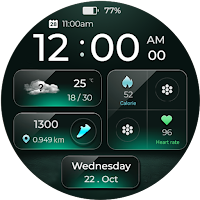
Multifunctional X Watch Face
Personalization
Try this cool watch face for all wear os devices.
- Downloads
- 107+
- on Google Play
- Price
- $0.99
- No in-app purchases
- Updated
- Oct 26
- 2025
Screenshots
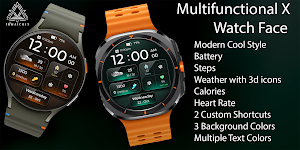
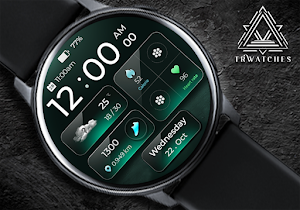
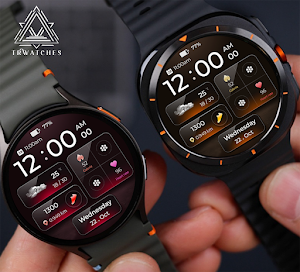
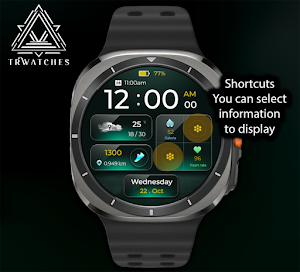


About Multifunctional X Watch Face
🕐 ✨ Modern Digital Watch Face – Stylish & Smart ⌚️
Stay connected in style! This premium digital watch face brings all your key stats to your wrist — beautifully organized and easy to read, day or night.
🔹 Main Features
🕒 Large digital time – 12h / 24h (AM / PM)
🔋 Real-time battery indicator
📅 Next event displayed right on the screen
🌤️ 3D animated weather icons with current, min & max temperature
👣 Step counter + distance tracker (km / mi)
🔥 Burned calories display
💓 Live heart rate sensor
📆 Full date view (day / month / weekday)
⚙️ Two customizable shortcuts — tap either icon and assign your favorite app (Music, Messages, Weather, etc.)
🌈 Elegant 3D depth effects and modern green glow
📱 Compatible with all Wear OS smartwatches (Galaxy Watch 4/5/6, Pixel Watch, OnePlus Watch 2, TicWatch Pro 5, and more)
💡 How to Customize Shortcuts
1️⃣ Touch and hold the watch face
2️⃣ Tap ⚙️ Customize
3️⃣ Select a shortcut slot → choose any app you like
➡️ Done — your favorite apps are now one tap away!
💚 Simple. Elegant. Informative.
Everything you need at a glance — designed for your everyday style.
📌 Compatible with:
Wear OS 3.0+
Devices such as Samsung Galaxy Watch series, Google Pixel Watch, and others
--------------------------------------------------------------------------------------------------------
Watch face installation notes on smart watch:
Phone app serves only as a placeholder to make it easier to install & find the watch face on your Wear OS watch. You have to select your watch device from the install dropdown menu.
If you download the helper directly with the phone , you need to open application and touch on the display or the download button. -> will start to install on the watch.
A wear os watch need to be connected.
If not working in that way , you can copy that link into your phone chrome browser and click on arrow down from right , and you choose the watch face to install.
..............................................
After installation you need to set that watch face to your screen , from wear OS app , go down at downloaded watch faces and you will find it.
If you have problems , please contact me on [email protected]
--------------------------------------------------------------------------------------------------
FOLLOW US AT TELEGRAM : https://t.me/TRWatchfaces
FOLLOW US WEBSITE TO GET FREE COUPONS :
https://trwatches.odoo.com/
--------------------------------------------------------------------------------------------------
Try to see others designs in my google profile.
Stay connected in style! This premium digital watch face brings all your key stats to your wrist — beautifully organized and easy to read, day or night.
🔹 Main Features
🕒 Large digital time – 12h / 24h (AM / PM)
🔋 Real-time battery indicator
📅 Next event displayed right on the screen
🌤️ 3D animated weather icons with current, min & max temperature
👣 Step counter + distance tracker (km / mi)
🔥 Burned calories display
💓 Live heart rate sensor
📆 Full date view (day / month / weekday)
⚙️ Two customizable shortcuts — tap either icon and assign your favorite app (Music, Messages, Weather, etc.)
🌈 Elegant 3D depth effects and modern green glow
📱 Compatible with all Wear OS smartwatches (Galaxy Watch 4/5/6, Pixel Watch, OnePlus Watch 2, TicWatch Pro 5, and more)
💡 How to Customize Shortcuts
1️⃣ Touch and hold the watch face
2️⃣ Tap ⚙️ Customize
3️⃣ Select a shortcut slot → choose any app you like
➡️ Done — your favorite apps are now one tap away!
💚 Simple. Elegant. Informative.
Everything you need at a glance — designed for your everyday style.
📌 Compatible with:
Wear OS 3.0+
Devices such as Samsung Galaxy Watch series, Google Pixel Watch, and others
--------------------------------------------------------------------------------------------------------
Watch face installation notes on smart watch:
Phone app serves only as a placeholder to make it easier to install & find the watch face on your Wear OS watch. You have to select your watch device from the install dropdown menu.
If you download the helper directly with the phone , you need to open application and touch on the display or the download button. -> will start to install on the watch.
A wear os watch need to be connected.
If not working in that way , you can copy that link into your phone chrome browser and click on arrow down from right , and you choose the watch face to install.
..............................................
After installation you need to set that watch face to your screen , from wear OS app , go down at downloaded watch faces and you will find it.
If you have problems , please contact me on [email protected]
--------------------------------------------------------------------------------------------------
FOLLOW US AT TELEGRAM : https://t.me/TRWatchfaces
FOLLOW US WEBSITE TO GET FREE COUPONS :
https://trwatches.odoo.com/
--------------------------------------------------------------------------------------------------
Try to see others designs in my google profile.
Alternatives to Multifunctional X Watch Face
Looking for apps like Multifunctional X Watch Face? Here are 6 similar Android apps on Google Play. The highest rated is RE64 - Weather Dashboard (4.4/5).
-
ML2U 175 Watch Face
-
WearOs Amoled Watch Face TMZ
-
RE64 - Weather Dashboard 4.4
-
TVV Workout 8 Watch Face
-
Strip Watch Face
-
Colorful Watch Face - OMG 22
| App | Rating | Price | Installs | Last updated | Compare |
|---|---|---|---|---|---|
| Multifunctional X Watch Face | – | $0.99 | 100+ | Oct 26, 2025 | |
| ML2U 175 Watch Face | – | 1.49 USD | 1,000+ | Aug 12, 2026 | Compare |
| WearOs Amoled Watch Face TMZ | – | 0.49 USD | 50+ | Aug 28, 2026 | Compare |
| RE64 - Weather Dashboard | 4.4 / 5 | 1.99 USD | 5,000+ | Oct 15, 2026 | Compare |
| TVV Workout 8 Watch Face | – | 1.49 USD | 1,000+ | – | Compare |
| Strip Watch Face | – | 1.99 USD | 1,000+ | Apr 2, 2026 | Compare |
| Colorful Watch Face - OMG 22 | – | 1.99 USD | 100+ | – | Compare |
Similar apps on Google Play
- ML2U 175 Watch Face
- WearOs Amoled Watch Face TMZ
- RE64 - Weather Dashboard
- TVV Workout 8 Watch Face
- Strip Watch Face
- Colorful Watch Face - OMG 22
- ML2U 235 Watch Face
- Crystal Facet Watch Face
- AD GeaR - Watch Face
- ZKin Watch Rust Green
- CFS108 Digital
- Plasma Flow Lite Watch Face
- RHS 71 WR Simple Slik
- Just Time Watch Face
- OMG 61 - Digital Watch Face
- CNRwatch051
- ML2U 381 Hybrid Watch Face
- Digital Black v2 watch face
- QuanTick 12 - Minimal Watch
- Space Lense
- ML2U 236 Watch Face
- ISAAC WATCH HJ900
- OZs60 Digital Watch Face